TheMrSkellytone
Members
-
Joined
-
Last visited
Files posted by TheMrSkellytone
-
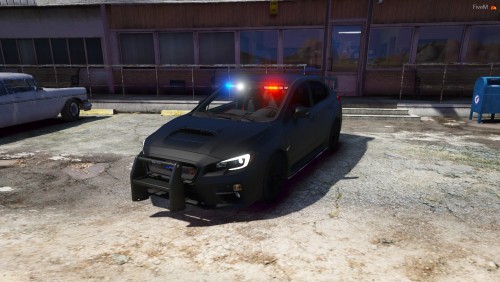
Simple slicktop unit, it is intended to be used as a sheriff supervisor car but if you replace the textures you can use it as whatever.
Vehicle uses primarily Code 3 equipment with the exception of the Whelen Avengers.
Known issues: rambar stuff are not going away with it
For more of me: discord.gg/yxtkAqD
- 1,469 Downloads
- 10 Comments
Updated -
As this is my first mod it is not perfect but i wanted to share it to the world.
It lacks an MDT, cage, radio and these details but its a WIP.
I suggest you apply 100% armor cause there are some issues (some things poking thru the bumper)
Known bugs:
-changing wheels sometimes makes them bug out
-crashing may destroy the look (use armor pls)
- windows not cracking
-needles not working (Shoot me a dm if you can make them work)
Credits:
Original model - Microsoft Studios
Mr Vano 42 - car model convert
Model from San andreas
Original auhor from San andreas : maksim_shuvalov777
generic led package: Bueno
Setina by Twurtleee
Setina textured by Twurtlee
Textures provided by Matt
If i missed you in the credits list make sure to let me know!
Any ideas to what i should do to the model post it in the comments!
- 5,005 Downloads
- 19 Comments
Updated