Skip to content
View in the app

A better way to browse. Learn more.

LCPDFR.com

A full-screen app on your home screen with push notifications, badges and more.

To install this app on iOS and iPadOS
  1. Tap the Share icon in Safari
  2. Scroll the menu and tap Add to Home Screen.
  3. Tap Add in the top-right corner.
To install this app on Android
  1. Tap the 3-dot menu (⋮) in the top-right corner of the browser.
  2. Tap Add to Home screen or Install app.
  3. Confirm by tapping Install.

JxstDev

Members
  • Joined

  • Last visited

Files posted by JxstDev

  1. This is my first post on LSPDFR.com and I am posting this because I personally love this artist so I want to share it with you. 
     
    ALWAYS MAKE A COPY OF THE ORIGINAL FILE YOU ARE WANTING TO MODIFY! I AM NOT RESPONSABLE FOR ANY ISSUES THAT OCCUR TO YOUR GAME. 
     
    Ensure you have the rar file extracted and somewhere on your computer.
    To change your loading screen music go to 
    [WhereEver you put GTA]\GTAV\mods\x64\audio\sfx then click on PROLOGUE.RPF then drag and drop the OAC file


    CREDIT - 
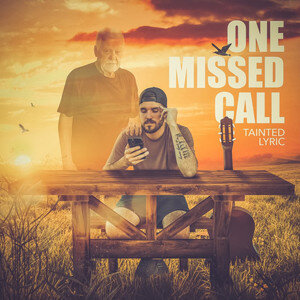
    The song is called 'ONE MISSED CALL' by Tainted Lyric. 
     
    ALL CREDIT GOES TO TAINTED LYRIC & ℗ 2022 Tainted Lyric Music 
     
    I TAKE NO CREDIT FOR HIS WORK, THIS IS STRICTLY FOR THE ENJOYMENT OF THE PEOPLE. 
     
    • 45 Downloads
    Updated

Account

Navigation

Search

Search

Configure browser push notifications

Chrome (Android)
  1. Tap the lock icon next to the address bar.
  2. Tap Permissions → Notifications.
  3. Adjust your preference.
Chrome (Desktop)
  1. Click the padlock icon in the address bar.
  2. Select Site settings.
  3. Find Notifications and adjust your preference.