Skip to content
View in the app

A better way to browse. Learn more.

LCPDFR.com

A full-screen app on your home screen with push notifications, badges and more.

To install this app on iOS and iPadOS
  1. Tap the Share icon in Safari
  2. Scroll the menu and tap Add to Home Screen.
  3. Tap Add in the top-right corner.
To install this app on Android
  1. Tap the 3-dot menu (⋮) in the top-right corner of the browser.
  2. Tap Add to Home screen or Install app.
  3. Confirm by tapping Install.

Kaz3678

Members
  • Joined

  • Last visited

Files posted by Kaz3678

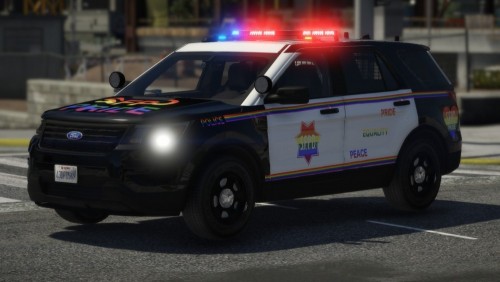
  1. I know Pride Month is over, but I've been working on this since then and just decided I would publish it. This texture is inspired by the real life car in San Francisco that the SFPD made for the Pride Month. I hope you all enjoy it
    • 66 Downloads
    • 1 Comments
    Updated
  2. I made a texture pack for six vehicles. This took me a lot of hard work and over 10 hours of my free time in school, so I hope you like it.
     
     
    There are six vehicles included. Each vehicle has three textures, just with a different unit number. These are the vehicles that go with the textures:
     
                    2010 Charger,
                    2011 CVPI,
                    2013 Tahoe,
                    2014 Charger,
                    2016 FPIU,
                    2018 Charger.
     
    You're free to use these as you like. And please try to credit me or at least let me know when you're using them for a video or whatever because I want to see them in action!
    • 226 Downloads
    • 6 Comments
    Updated

Account

Navigation

Search

Search

Configure browser push notifications

Chrome (Android)
  1. Tap the lock icon next to the address bar.
  2. Tap Permissions → Notifications.
  3. Adjust your preference.
Chrome (Desktop)
  1. Click the padlock icon in the address bar.
  2. Select Site settings.
  3. Find Notifications and adjust your preference.