Skip to content
View in the app

A better way to browse. Learn more.

LCPDFR.com

A full-screen app on your home screen with push notifications, badges and more.

To install this app on iOS and iPadOS
  1. Tap the Share icon in Safari
  2. Scroll the menu and tap Add to Home Screen.
  3. Tap Add in the top-right corner.
To install this app on Android
  1. Tap the 3-dot menu (⋮) in the top-right corner of the browser.
  2. Tap Add to Home screen or Install app.
  3. Confirm by tapping Install.

D1784

Members
  • Joined

  • Last visited

Everything posted by D1784

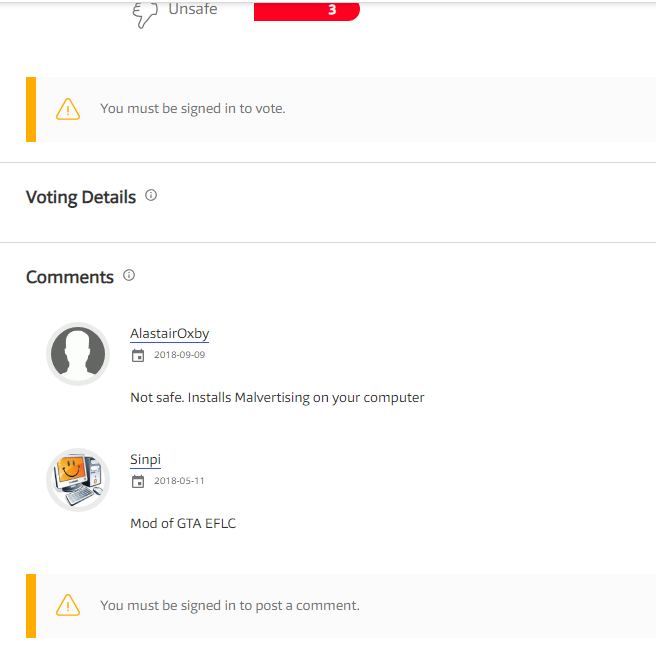
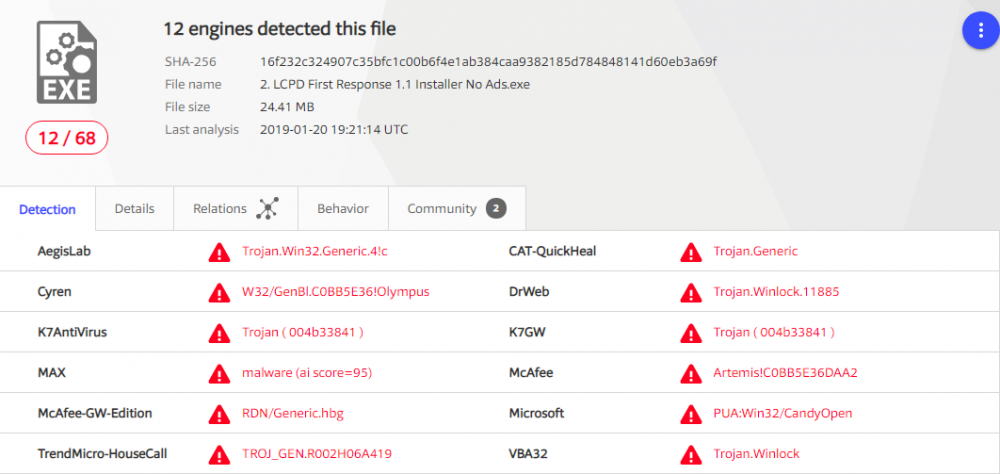
  1. Hey all, not sure if this is even the right forum/section for this but usually for most downloads I do, I check them out on VirusTotal.com as well. In case my own AV is wrong. Although my own Antivirus said the installer was safe VirusTotal has some negative feedback and detections on the file and I just wanted to check if these were just uninformed people and false positives or whatever? I know, I know, it sounds stupid. I've been wanting to try this mod for a while too so I may just ignore it all anyway. I don't think "malvertising" is a word anyway. lol
Account

Navigation

Search

Search

Configure browser push notifications

Chrome (Android)
  1. Tap the lock icon next to the address bar.
  2. Tap Permissions → Notifications.
  3. Adjust your preference.
Chrome (Desktop)
  1. Click the padlock icon in the address bar.
  2. Select Site settings.
  3. Find Notifications and adjust your preference.