5K32
Members
-
Joined
-
Last visited
Files posted by 5K32
-
Everything you need to know is in the readme. There is an Easter egg on this, lemme know if you find it
- 40 Downloads
Updated -
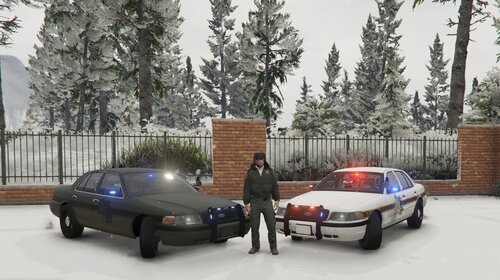
This is my first vehicle mod that I have posted.
Hope you like it.
IN THE README IT SAYS TO USE THE SLICKTOP K9 BUT YOU DONT HAVE TO, YOU CAN USE ANY OF THEM; HOWEVER THE BIKE ONE AND THE K9 W/ THE LIGHTBAR ONES ARE NOT OPTIMIZED WELL
This is a Kent County Michigan based CVPI Skin. The crown Vics are no longer used in Kent County but this is what they looked like when they did use them.
TEXTURE ONLY
Use Dan with da van's model "Slick Top Patrol" to install this skin onto.
Changelog 1.0.1
-Fixed the link to the model I used, sorry I linked the wrong one originally
Special Thanks to Dan with da van
- 45 Downloads
- 2 Comments
Updated
.thumb.png.bb1e61d909720709e8fd3838fe769b7e.png)