
Rebeltroop
Members
-
Joined
-
Last visited
Files posted by Rebeltroop
-
LSPD RETRO PACK
Thanks for Downloading, and I hope you enjoy this retro pack. I will be moving away from retro packs soon and will continue to create liverys for police vehicles.
Please contact through messages If you have any recommendations for what Car Pack I should make next.
Installation:
1. Make backups!
2. Drag all files included in the "models" folder into: gtav/mods/update/x64/dlcpacks/(LATEST PATCHDAY)/dlc.rpf/x64>levels/gtav/vehicles.rpf, using OpenIV in edit mode.
3. Drag the vehicles.meta included in the "vehicles.meta" folder into: gtav/mods/update/update.rpf/common/data/levels/gtav, using OpenIV in edit mode.
4. Drag all VCF files in the "ELS" folder into Grand Theft Auto V/ELS/pack_default.
SpawnCodes: ("police")("police2")
- 285 Downloads
- 4 Comments
Submitted -
LSSD RETRO PACK
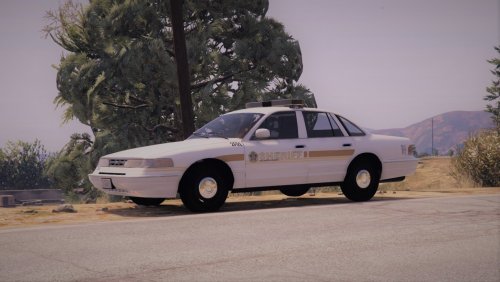
Hope you enjoy this little blast from the past Livery for the CVPI 95. Car model and author will be provided in the credits, and a knew full Sheriff Department Pack will come from me as soon as I can make it. Thanks for Downloading this Livery and I hope you enjoy using it.
DISCORD:
https://discord.gg/JFmgtDX
(Just a chill Discord for tips, recommendations, Ideas and just to chill)
INFO: By default the car is set as "police4", (So you can see in LS area). If you want to use it in Blaine County just change all of the file to "Sheriff#"
INSTALL:
Open IV and Press "Edit Mode" Locate folder directory: (C:\Program Files (x86)\Steam\steamapps\common\Grand Theft Auto V\mods\update\x64\dlcpacks\patchday3ng\dlc.rpf\x64\levels\gta5\vehicles.rpf\) Drag .ytd, .yft and .xml files into folder, then press "Edit Mode" to save Locate GTAV Directory ELS folder (Not in OpenIV), Drag the .xml in provided into "pack_default" Ready to Lauch Game!
CONTACTING: Make Sure to recommend what I should do next in the comments, and if you want me to make you a specific car pack or livery. Please feel free to go to this discord https://discord.gg/JFmgtDX and message me through there.
- 149 Downloads
- 2 Comments
Submitted -
MUST READ (REQUIRED TO DOWNLOAD):
PLEASE ENJOY THE SKIN I CREATED, ALL RESOURCES I USED (AND YOU COULD USE TOO!!!!) ARE IN THE CREDITS/README
_______________________________________________________________________________________________________________________________________________________
Hope You enjoy the skin pack. This pack is like a little bite of Kansas City style BBQ... But in the form of a Car Collection. All the Liverys are based off of Modern Day KCPD car liverys. If you want to get a hold of the Pre 2016 Skins that pack will be listed below.
_____________________________________________________________________________________________________________________________________________________
STUFF YOU MAY WANNA KNOW:
Installation:
1. Lauch OpenIV
2. Press "Edit Mode" and go to this file path: mods\update\x64\dlcpacks\
3. Create New Folder (Any Name)
3. Insert .rpf file given in Download into Folder
4. Press "Edit Mode" to save, and then you are ready to launch your game
Spawn Codes:
"Police2" - 2015 Dodge Charger
"Police3" - 2013 Ford Explorer (Supervisor Skin Included)
"Police4" - 2013 Ford Taurus
"police7" - 2011 Ford Crown Vic (Older KC Livery Included)
_______________________________________________________________________________________________________________________________________________________
OLDER STYLE PACK:
_______________________________________________________________________________________________________________________________________________________
- 73 Downloads
Submitted -
Based off of the Pre-2016 era of the Kansas City Police Department vehicle livery. I hope anyone who downloads this will enjoy this pack, and to please tell me if there are any problems or suggestions you want to tell me about.
- 64 Downloads
- 8 Comments
Submitted -
INCLUDED ITEMS:
CVPI 2011 Impala 2016 REQUIRED FILES:
-Instructions on How to Install and input the car skins are provided in the download. This is a skin that I had to take a lot of imagination to make. I think its cool and different from other car liveries being used today and I hope to anyone who downloads this that they will also enjoy this.
-Also feel free leave comments and recommendations for what I should do next. (Or if I should expand this skin pack Style)
- 12 Downloads
Submitted -
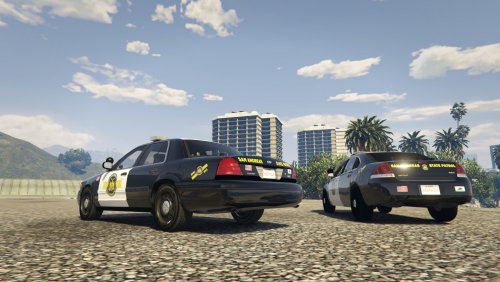
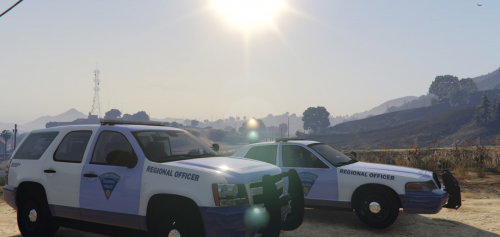
I hope that anyone who downloads this will enjoy this skin I made, It is partly based off of the Massachusetts State Police design and then partly driven by my own imagination.
CREDITS:
THIS SKIN PACK COULD NOT BE POSSIBLE WITHOUT:
- 6 Downloads
Submitted -
MUST HAVE THIS BEFORE DOWNLOADING:
https://www.lcpdfr.com/files/file/13331-lspd-pack-new-2013-fpis-20132016-explorer-2015-charger-2016-impala-2013-tahoe-2011-cvpi-els-style-lighting/?page=12&tab=comments#comment-120686
DOWNLOAD THIS CAR PACK BEFORE PUTTING IN THE YTD FILE!
Please Give a Review and tell if there are any bugs/problems
- 35 Downloads
- 1 Comments
Submitted