Skip to content
View in the app

A better way to browse. Learn more.

LCPDFR.com

A full-screen app on your home screen with push notifications, badges and more.

To install this app on iOS and iPadOS
  1. Tap the Share icon in Safari
  2. Scroll the menu and tap Add to Home Screen.
  3. Tap Add in the top-right corner.
To install this app on Android
  1. Tap the 3-dot menu (⋮) in the top-right corner of the browser.
  2. Tap Add to Home screen or Install app.
  3. Confirm by tapping Install.

F4tikki

Members
  • Joined

  • Last visited

Files posted by F4tikki

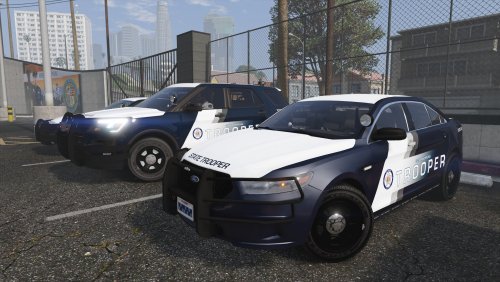
  1. Hello guys! This is my first release ever. I was too shy to publish it but @Frost88 supported me and I went ahead and now I'm here. I hope you guys enjoy it and I would be very glad if you make any suggestion for this skin. If you wish to have another model included I can try to do it just ask it in the comment session. Any review, bad or good, would be appreciated! Thank you for your attention and maybe I see you guys soon.
     
    I made those skins using 3 specific vehicles so I don't know if it will work on other models. If it doesn't, feel free to ask me to make one for the specific model!
     
     
    Textures included:
    - 2018 Charger
    - 2016 FPIU
    - 2016 FPIS
     
     
    Vehicles used (the author name has the link to the vehicle):
    2018 Charger - By Panoszaf
    2016 FPIU -  By Panoszaf
    2016 FPIS - By Frost88


    * Sorry for any English mistake *
    • 380 Downloads
    • 8 Comments
    Submitted

Account

Navigation

Search

Search

Configure browser push notifications

Chrome (Android)
  1. Tap the lock icon next to the address bar.
  2. Tap Permissions → Notifications.
  3. Adjust your preference.
Chrome (Desktop)
  1. Click the padlock icon in the address bar.
  2. Select Site settings.
  3. Find Notifications and adjust your preference.