Blue Line Designs
Members
-
Joined
-
Last visited
Everything posted by Blue Line Designs
-
-
 This work is licensed under a Creative Commons Attribution-NonCommercial-NoDerivatives 4.0 International License.
- 45 comments
- 3 reviews
-
-

- 2
-
-
-
-
 Amazing work once again tom!! It's unfortunate that mans released the private model in UGM. RIP
- 18 comments
- 3 reviews
-
-
- 1
-
-
-
 @Dwardo225 There is already one made it's should be on the fourms and possibly LSPDFR
- 6 comments
- 2 reviews
-
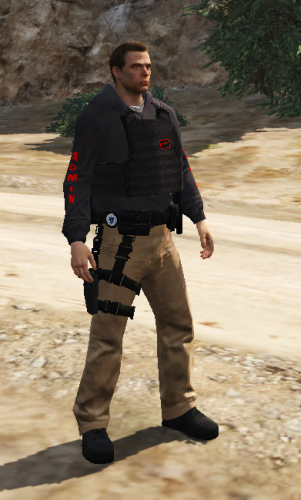
It is a replacement. Also the badge is customizable if you know what your doing.
- 6 comments
- 2 reviews
-
Hey, guys, I made this admin ped for a server I develop on and I hope you enjoy the player ped and put it to good use!! It is an improved admin ped. I made this because I was looking at all the released admin peds and I didn't quite enjoy them so if you feel the same way then this should be great for you. Also, the badge is customizable and if you use open iv to edit the texture it should work perfectly if you know what you doing. Join my discord: https://discord.me/chaosdesigns
- 6 comments
- 2 reviews