AP84
Members
-
Joined
-
Last visited
Files posted by AP84
-
For RGL version better don't install any textures mods or cars because this increase chance for update It has double check anyway if you see update in this way you need to change all files again sometimes it shows 0 bytes update it's fine
also update happens when you restart pc or rare when you close the game after just replace files again it works
I worked on this almost for a month
this realease bright but adaptation balanced so it looks more smooth than v.3
reworked shader
better ambient light effect
more natural colors
sharper image
changed settings for the sun
better clouds
changed bloom
timecyc tweaks
other small changes
cutscens not too bright
optional darker image
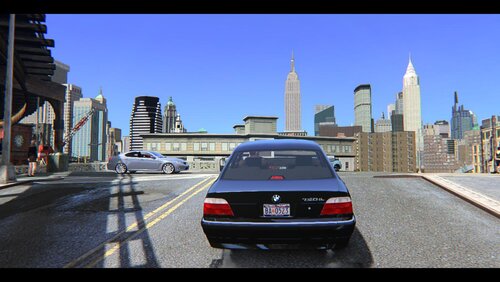
screens from laptop patch 1.0.8.0
Made for medium and low pc
Compatibility: 1.0.3.0 - 1.0.8.0 - 1.2.0.43 Tested all versions
to install you should choose patch then drag all files into GTAIV folder where the game installed
If your monitor too bright so better reduce it a bit while playing
Credits:
AP84 (Timcyc and all settings, editing and changes of ENB)
ENBseries by Boris Vorontsov
Dax1 (Shaderfix for last patches)
DKT70 (Blueshift code, Bloom, Roads)
IceLaGlace (Bloom, Lens code)
gp65cj04 (Bloom)
Marty McFly (Letterbox)
- 2,343 Downloads
- 7 Comments
Updated -
This is full rework of my grahic mod and the result of all my work for many months
Made for Medium and Low pc and comfortable playing
support multiplayer
Credits:
AP84 (Timcyc and all settings, changes of ENB)
Boris Vorontsov (ENBseries)
Dax1 [Shaderfix]
Dkt70
- 5,235 Downloads
- 29 Comments
Updated -
It's a Revision of my last enb and i tried to give it a fresh view it happend because in years i decided to install GTAIV again 🙂
for more sharpness you should open effect.txt see there
float SharpeningAmount=0.75; increase this value better not more than 2.0 after save it
screens patch 1.0.8.0 from laptop 1366x768
Compatibility: 1.0.4.0 - 1.0.8.0 & EFLC
to install you should choose patch then drag all files into GTAIV folder
less bright cutscens
less visual haze
fixed night street light for last patch
nights a bit darker
increased shadows
increased gamma
light and shadow now looks more contrasting how should it be
updated SSAO for last patches
mild godrays
as option added Soft Gamma version
trees look a bit better
other small changes
Credits:
Timcyc and all settings, editing and changes by AP84
ENBseries by Boris Vorontsov
Shaderfix for last patches by Dax1
BlueShift code and Roads by Dkt70
Godrays by Gp65cj04
Letterbox code by Marty McFly
Lens code by IceLaGlace
- 700 Downloads
- 4 Comments
Updated