




Demuth
Members
-
Joined
-
Last visited
Everything posted by Demuth
-
-
-
-
-
 @Alec545 Since I haven't used Arrest Manager in a long time, I haven't really tested it through. But it loads and seems to do what it is supposed to and doesn't crash. I just updated the .NET Framework to 4.7.2 And updated it for LSPDFR 0.4.6 So please give it a go, let me know if you experience any issues 🙂 INSTALLATION: Download the latest version from this site (7.11.0.0). Install it (Follow the instructions) Replace the "Arrest Manager.dll" with this one. Launch LSPDFR via RPH I take no credit for this plugin, all credits go to Albo1125 !! I'm simply trying to keep his mod alive and hope he'll update them soon. Arrest Manager.zip
- 1,915 comments
- 242 reviews
-
 Default is SHIFT + O and CTRL + O, so I belive you forgot to change the modifier keys.
- 3,646 comments
- 306 reviews
-
-
I updated Traffic Policer until Albo1125 post an official update: I hope this might help you 🙂
- 1,915 comments
- 242 reviews
-
-

- 1
-
-
-
@Meenos I had the same problem, here is the updated dll file, you still need the rest of the plugin Try replacing the dll with this one, I didn't change anything in the code, just changed the LSPDFR version and updated the .NET to 4.7.2 Seems to have done the trick for me, I haven't had any crashes since I updated it at least. All credits go to Albo1125 for his awesome mods, I'm just trying to keep it alive a little longer and hope Albo1125 will post an update soon 🙂 Installation: Download the latest version from this page (version 6.16.0.0) Install that as normal (follow the installation instructions..) Download the zip file from this comment, unzip it, and replace: "Traffic Policer.dll" with this one. Laucnh GTA V via RPH and you should now be crash free (At least from this plugin) Traffic Policer.zip
- 3,646 comments
- 306 reviews
-
-
- 2
-
-
 I use Visual Studio I've been looking into it, I would love to try to figure it out, but this far I haven't had much luck.
- 37 comments
- 10 reviews
-
StopThePed has been removed... I can't seem to find Search Warrant, I guess it's removed too.. And Police Search has also been removed.. WTF is going on with this community ?! And nobody wants to share their working files because "It's against the authors wishes- blah blah"
-
It's updated, just waited to delete the old file, because last time it took them 48+ hours to approve the mod 🙂
- 37 comments
- 10 reviews
-
-
What happens if you load it manually via RPH console ? LoadPlugin PoliceRepairShops.dll
- 37 comments
- 10 reviews
-
It works for me, and seems like it works for everyone else, did you enable it in RPH, you should get a notification once it's loaded in. Otherwise you can post your log file.
- 37 comments
- 10 reviews
-
 Having some random crashes, I cannot find a source for the crash. It happens at random, sometimes after 5 minutes, other times other a couple of hours in the game. RagePluginHook_01052019_192124.log RagePluginHook_01052019_193226.log RagePluginHook_04052019_192054.log
- 1,743 comments
- 172 reviews
-
@HazyTube you can put in letters in the ini file, works just as well as key IDs, as far as I have tested. I just left the Key ID in the file after I was done testing it 🙂
- 37 comments
- 10 reviews
-
-
- 1
-
-
-
-
I actually never had a trainer, felt like the RPH console was enough, just to make it more immersive, I prefer some extra plugins to make it as much a simulator as possible 🙂
- 37 comments
- 10 reviews
-
-
- 5
-
-
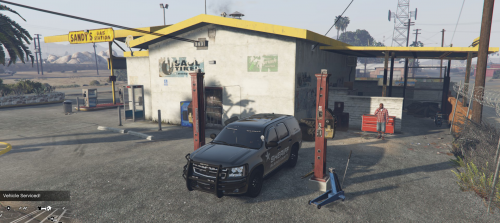
This is my first plugin, I am new to coding mods and wanted to learn. Usage: All repair shops are marked on your map. Simply drive to the marked location, park your vehicle near the repair shop. Default button to repair and wash your vehicle is U ToDo: Add more locations? Known bugs: None.
- 37 comments
- 10 reviews
-
-
- 8
-
-
I swear I tried that, but it works now, thank you so much
-
Hi guys, I made my first mod, yay. I press a button and my car gets fixed and washed, if it's a police vehicle and I am inside it, I know it's so simple. But now I am stuck, I spend the entire night on google, and trying out everything I could think of to make it work, including reading a ton of C# stuff, but I can't wrap my head around how to actually do it. So here goes: I have made a mod where I can press a key and something happens, but what if I only want something to happen near one or more coordinates ? I tried messing around with this: Game.LocalPlayer.Character.Position.Around() -- but I can't get it to accept my Vector3 without making a ton of errors. To be honest I am not really sure how to put it together, I am just trying to learn 🙂
-

