



NCM
Members
-
Joined
-
Last visited
Reputation Activity
-
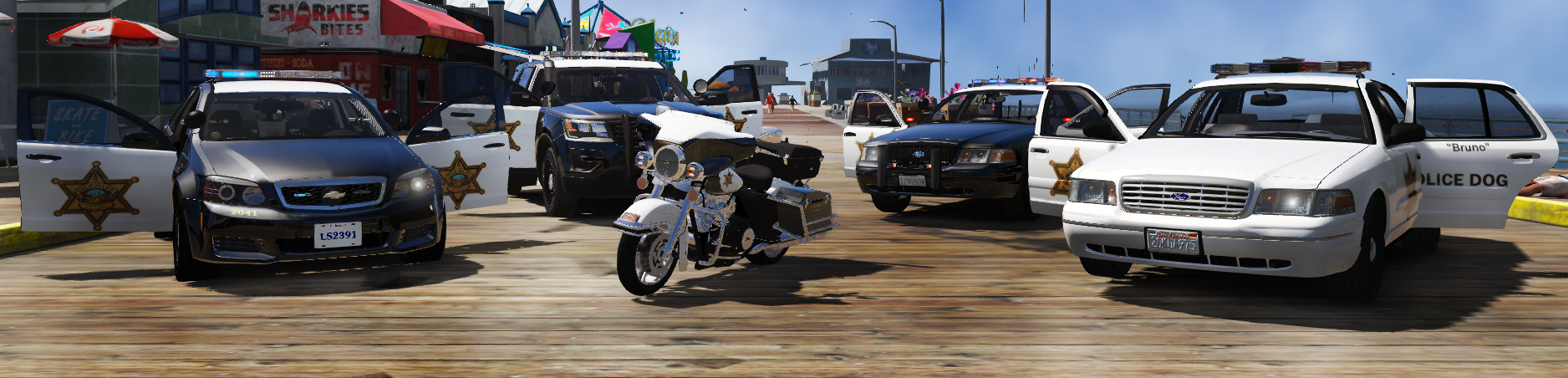
 NCM got a reaction from Frank Murphy for a file, Orange County Sheriff Department Texture PackWelcome to the Orange County Sheriff Department Texture Pack! I recreated the vehicles based
off of my county, Orange County,CA. This are semi-accurate due to some adjustment I had to do!
WHEN YOU DOWNLOAD THIS PLEASE READ THE INFO PROVIDED!
I created more than one skin for variety you will see the following:
2011 & 1998 CVPI skins:
Standard Skin K9
2016 FPIU Skins:
Standard Skin K9
2013 Chevry Caprice:
Standard
Harley Davidson Electraglide:
Standard
If you want any personal design like "Can I have some extra images or words" please PM me
for those request because OCSD has now added more messaging to it like "Proudly serving OC since ____"
and "Our trust in your legacy", flags and other logos that has cities and the OCTA, etc.
I know I forgot the supervisors so I will add that in a later update of the pack.
Again thank you for downloading and I hope you enjoy!
Future textures:
OCSD Tahoe:
Standard K9 Supervisor
2011 & 1998 CVPI:
Supervisor
BMW r1200rt:
Standard
Ford F-150:
Standard
Jeep Wrangler:
Standard
*Future textures may not be released for a while*
Credit for Vehicles:
@TheHurk
@RealUnlimited
@McCreary
Please make sure you give credit if you share this, do not reupload without consent of the original author
Please make sure you give credit if you share this, do not reupload without consent of the original author
