Skip to content
View in the app

A better way to browse. Learn more.

LCPDFR.com

A full-screen app on your home screen with push notifications, badges and more.

To install this app on iOS and iPadOS
  1. Tap the Share icon in Safari
  2. Scroll the menu and tap Add to Home Screen.
  3. Tap Add in the top-right corner.
To install this app on Android
  1. Tap the 3-dot menu (⋮) in the top-right corner of the browser.
  2. Tap Add to Home screen or Install app.
  3. Confirm by tapping Install.

McHaffer

Members
  • Joined

  • Last visited

Files posted by McHaffer

  1. Hello everybody,
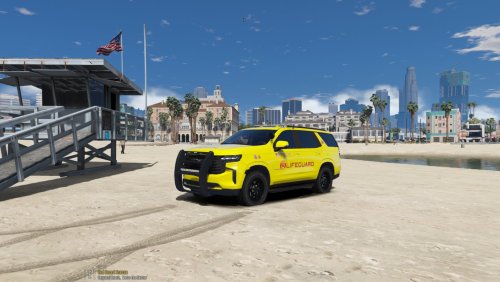
    Here is my lifeguard skin for the 2021 Tahoe by uniFORM12oh2. It works on both marked and slicktop version.
    I used the vanilla lifeguard badges and I think it looks pretty nice.
    Feel free to edit to fit your needs but do not reupload this file without permission
     
    Installation for the beginners: In Open IV (edit mode) find the .ytd file of the slot you chose for the 2021 Tahoe. Open it and just replace the 21tahoe_sign_1
     
    Link to this amazing car pack:
     
    If you encounter any problem just message me and I will try to help you (I am not an expert)
    • 416 Downloads
    • 1 Comments
    Updated

Account

Navigation

Search

Search

Configure browser push notifications

Chrome (Android)
  1. Tap the lock icon next to the address bar.
  2. Tap Permissions → Notifications.
  3. Adjust your preference.
Chrome (Desktop)
  1. Click the padlock icon in the address bar.
  2. Select Site settings.
  3. Find Notifications and adjust your preference.