
Andrewg1520
Members
-
Joined
-
Last visited
Files posted by Andrewg1520
-
This will make any non Els Vehicle Els. This Els xml will not mess around with the extras, meaning this file WILL NOT make the extras appear then disappear.
Please note that I have made this for myself because I am not a big fan of Luxart Siren Control and els both in my game.
This is for people who do not know how to edit an els xml.
How to install:
Rename the xml to the name which the non els vehicle is under.
Place in Els>Pack Default.
Things I have noticed:
There are no other lighting patterns? Why?
This is because the vehicles weren't meant to be els, meaning that you would have to talk to the creator of the vehicle about getting other lighting patterns.
The lights do not flash on buildings.
You have to edit visual settings.
- 33,350 Downloads
- 37 Comments
Updated -
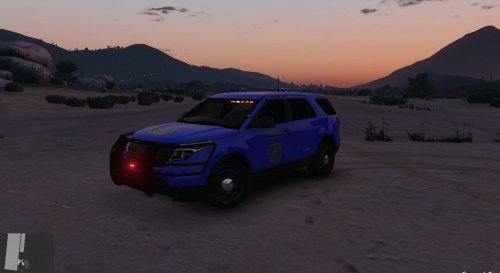
This is a Blaine County Sheriff Skin for ablaze's 2013 slicktop unit.
The original vehicle can be found Here.
DO NOT REUSE WITHOUT MY PERMISSION!
- 7 Downloads
Submitted