ntmsmb
Members
-
Joined
-
Last visited
Files posted by ntmsmb
-
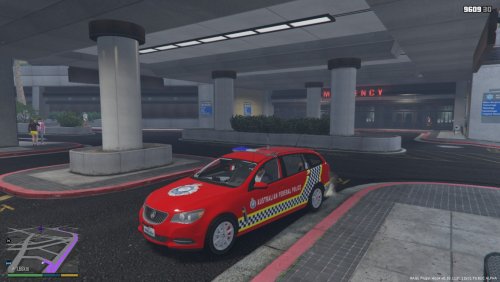
THIS PRODUCT WAS CREATED BY NTMSMB ALONGSIDE SNOWTIGERJR USING MACGREGOR'S HOLDEN EVOKE SPORTSWAGON. PLEASE READ THE README FILE INCLUDED IN THE DOWNLOAD FOR MORE INFORMATION, TERMS AND CONDITIONS AND INSTALLATION INSTRUCTIONS
-ABOUT-
This is a retexture of Macgregor's Holden Evoke Sportswagon in the AFP Protective Services Livery. For those of you who are unaware, the AFP Protective Services do a wide range of tasks. These include patrolling and protecting major government sites such as embassies, parliaments, defence establishments, escorts of high-profile people, at the Australian Nuclear Science Facility (Could be simulated using the Humane Labs Facility) and at special events. They also provide response to terrorism incidents.
This texture is still a work in progress, so expect to see some texture alignment issues. However all main features are on there. I will work to complete the texture once I find the time. Please feel free to leave your own feedback on how it could be improved in the comments section
-INSTALLATION-
Full installation instructions available in readme
Click here for Macgregor's Holden Evoke Sportswagon V1.0
Click here for Macgregor's Holden Evoke Sportswagon V2.0 (RECOMMENDED)
Enjoy!
- 150 Downloads
Updated -
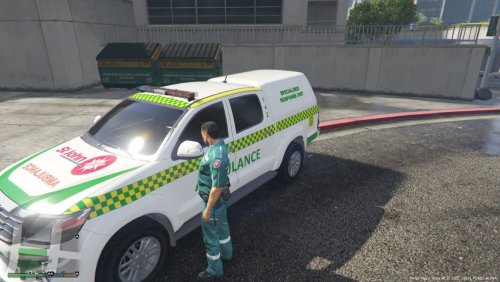
THIS PRODUCT WAS CREATED BY NTMSMB USING AUSSIESIM AND THERO'S TOYOTA HILUX. PLEASE READ THE README FILE INCLUDED IN THE DOWNLOAD FOR MORE INFORMATION, TERMS AND CONDITIONS AND INSTALLATION INSTRUCTIONS
-ABOUT-
This is a retexture of AussieSim and Thero's Toyota Hilux in the W.A. St John Ambulance livery. For those of you who are unaware, the Western Australian Government contracts St John Ambulance to operate all of our ambulance and paramedic operations. Please feel free to leave your own feedback on how it could be improved in the comments section
-INSTALLATION-
Full installation instructions available in readme
Click here for the original Toyota Hilux Model (Required)
Enjoy!
- 57 Downloads
- 3 Comments
Updated -
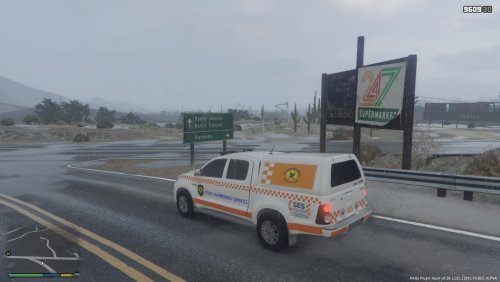
THIS PRODUCT WAS CREATED BY NTMSMB USING AUSSIESIM AND THERO'S TOYOTA HILUX. PLEASE READ THE README FILE INCLUDED IN THE DOWNLOAD FOR MORE INFORMATION, TERMS AND CONDITIONS AND INSTALLATION INSTRUCTIONS
-ABOUT-
This is a retexture of AussieSim and Thero's Toyota Hilux in the W.A. State Emergency Service livery. Please feel free to leave your own feedback on how it could be improved in the comments section
-INSTALLATION-
Full installation instructions available in readme
Click here for the original Toyota Hilux Model (Required)
Enjoy!
- 76 Downloads
Submitted