



StrawberryPi
Members
-
Joined
-
Last visited
Files posted by StrawberryPi
-
Replace this texture with the existing one in the original YTD.
This is a skin for:
- 41 Downloads
Updated -
Replace this texture with the existing one in the original YTD.
This is a skin for:
- 256 Downloads
Submitted -
Replace this texture with the existing one in the original YTD.
This is a skin for:
- 493 Downloads
Submitted -
Replace this texture with the existing one in the original YTD.
This is a skin for:
- 448 Downloads
Submitted -
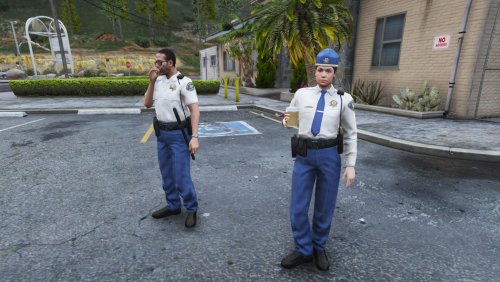
This is a work in progress pack containing new blue color schemed textures for LSSD. At this moment it includes vanilla clothing and hats, but I am working on an EUP compatible version.
This pack can be combined with my blue schemed LSSD vehicle textures
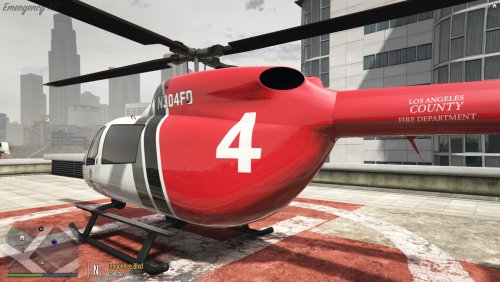
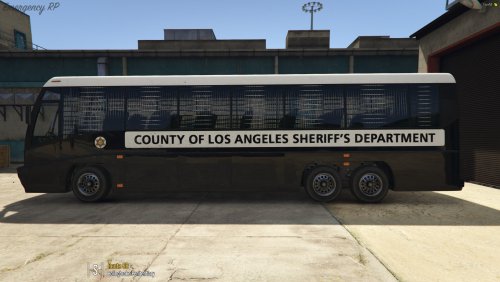
And with my 4k Vanilla Emergency Vehicles pack (including blue schemed predator, helicopter and transport van)
Installation
You can find the textures vanilla sheriff textures in x64e.rpf\models\cdimages\componentpeds_s_m_y.rpf\ and x64v.rpf\models\cdimages\componentpeds_s_f_y.rpf\. Look for the sheriff files in both folders and copy them to an empty folder. Place the files in mods\update\x64\dlcpacks\patchday14ng\dlc.rpf\x64\models\cdimages\patchday14ng.rpf\. Open the ytd files and change the textures (all textures have their original names).
You can find the the props folder at x64e.rpf\models\cdimages\pedprops.rpf\. Make a copy in the mods folder and change the textures in the ytd file.
Planned
EUP version Adding body armor
- 380 Downloads
- 15 Comments
Updated -
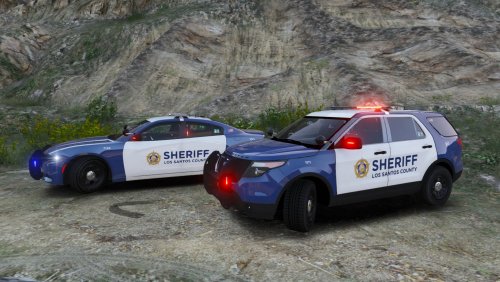
Blue LSSD textures for the 2015 Dodge Charger R/T by Turn 10 Studios and FPIU models from the LSPD Redmond Pack by BlackJesus.
- 98 Downloads
Submitted -
ALSO WORKS ON VANILLA ELS MODELS
Not all emergency models in the game get the same kind of attention, but we still see them during our patrols. Give your eyes some extra candy and add these nice 4k textures to your emergency vehicles around you.
Installation
You can find the vehicles in x64e.rpf\levels\gta5\vehicles.rpf\ Copy the vehicle files to your mod folder. The vehicles have the following names: Ambulance Predator (boat) Polmav (helicopter) Firetruk (nope, not a spelling error on my side) Policeb (SAHP motorcycle) Riot (NOOSE van) Policet (transport) Find the texture in the .ytd file and change it with the texture from this mod. If you use a vanilla els model or if you don't see a texture with the same name present, than import the texture from this mod. This will also override the vanilla texture.
Alternate colors / decals / whatever...
If you have any requests, than let me know in the comments. This is a 4k pack for vanilla vehicles, so I'll only create a new texture when it's for a vanilla model.
- 113 Downloads
Submitted -
You need the mods below for Citations+ to function. All credits for Computer+ and LSPDFR+ go to their respective creators and contributors.
Do you also find it annoying that different mods have different available citations and prices for them? Citations+ unifies the penalties across the mods included. There are also several new citations and charges available with existing callouts in mind. The citations and charges have been checked as much as possible with the Californian law. This includes the points and prices. Check out the video below to see how this will effect your work as a police officer.
If you want more citations or charges or if you find another mod that can be included, than please leave a comment below.
- 18,048 Downloads
- 17 Comments
Updated -
This package contains liveries for the vanilla police and sheriff ELS models. The goal is to provide several liveries for the vanilla ELS models. You need to download the models below.
Featured liveries
Redmond, WA Police inspired liveries
There are two main variants of this livery: the ones with the original blue-purple scheme and the ones with the black scheme. In the blue-purple livery folders, you'll find an additional white variant for each vehicle. You can mix and match the liveries any way you like.
Cowlitz County, WA Sheriff inspired liveries
There is one main variant and three alternate liveries in this design: the main one is based on the Cowlitz County Sheriff car color scheme. There are also white and black variants for each vehicle. In the main livery folder you will find a blue variant for each vehicle. You can mix and match the liveries any way you like.
The black and white variants are inspired by the "ghost" vehicles Houston PD has in service. They idea is that people will only see that you are in a police car when you get up close.
Planned
More livery designs More vehicles (police transport, police bike, ambulance, firetruck and lifeguard). This depends on other making ELS compatible vanilla vehicles.
Installation
Download the ELS compatible vanilla models above. Remove the POLICE4 and POLICE5 models. Rename the POLICE6 models to POLICE4. Copy the POLICE6 vehicles.meta lines to the POLICE4 section. Also use the interior line for POLICE6 for the POLICE4 interior. Copy the POLICE4 files and rename them to SHERIFF2. Use the liveries to your hearts content.
More liveries...
If you have ideas for new designs, let me know :)
- 205 Downloads
- 2 Comments
Updated -
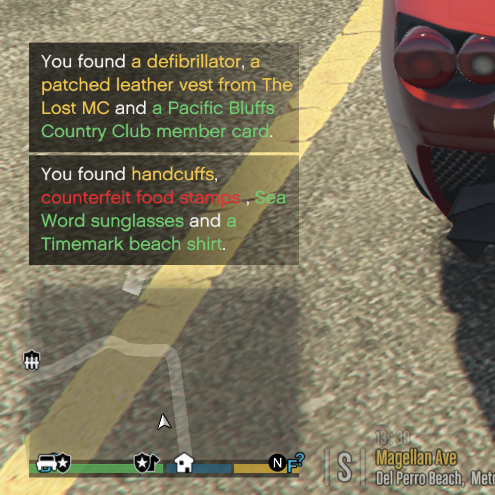
I made a complete lore friendly list of items for the Police Search mod. Most items are branded to enhance immersion and maybe give you a better inside on what the person is up to. All brands used can be found driving around San Andreas.
Featured items
Regular car emergency gear Car documentation Tourist items (Stolen) government documents Local business receipts Restaurant meals and doggy bags General household items (Industrial) utility items General electronic devices Stolen electronic devices Open cans/bottles of branded alcoholic beverages Cans/bottles/boxes of branded beverages Bus and plane tickets Membership and gift cards of local businesses Sportswear and gear Groceries from local supermarkets Local magazines and newspapers Forged certificates, passports, government documents, insurance papers, credit cards, event tickets etc. Shady things like a bloody cooler, blood stained objects, human remains and Gang paraphernalia Counterfeit and stolen emergency services items Political items (Un)paid bills and court documents Various amounts and types of drugs. Featured are cannabis, heroin, cocaine, MDMA, GHB, XTC, LSD, ketamine, PCP (Angel dust), methamphetamine and anabolic steroids.- 1,534 Downloads
- 1 Comments
Submitted -
Liveries for the BSCO and LSSD that can be used on the vehicle package below.
I DID ONLY CREATE THE LIVERIES, ALL CREDITS FOR THE TEXTURES AND MODELS OF THESE VEHICLES GO TO THEIR RESPECTIVE CREATORS.
About the liveries
The sheriff vehicles will spawn in either Los Santos County or Blaine County liveries. The design is based on the ones from Desoto County, Florida Sheriff's Office.
How to install
1. Download BlackJesus' pack and give him a big thank you on the file page above.
2. Install the vehicles with OpenIV.
3. Go to \mods\update\x64\dlcpacks\patchday14ng\dlc.rpf\x64\levels\gta5\vehicles.rpf\
4. Copy the POLICE2 files into an empty folder, rename them to SHERIFF and put them back.
5. Open sheriff.ytd and browse to chgr_sign_1. Click replace and find the livery in the Dodge Charger folder with number 1. Do this for all 8 liveries.
6. Copy the POLICE3 files into an empty folder, rename them to SHERIFF2 and put them back.
7. Open sheriff2.ytd and browse to explor_sign_1. Click replace and find the livery in the Ford Explorer folder with number 1. Do this for all 4 liveries.
8. Start the game and ENJOY!
- 104 Downloads
Submitted -
I DID ONLY CREATE THE LIVERIES, ALL CREDITS FOR THE TEXTURES AND MODELS OF THESE VEHICLES GO TO THEIR RESPECTIVE CREATORS.
I really liked BlackJesus' LSPD pack and wanted a clean extension of these vehicles in the rest of San Andreas. These liveries are the result of that. I did only make the liveries, so you need to download the BlackJesus' Pack for this to work.
About the liveries
The sheriff vehicles will spawn in either Los Santos County or Blaine County liveries. There is also an Highway Patrol variant based on the Nevada Highway Patrol look.
How to install
1. Download BlackJesus' pack and give him a big thank you on the file page above.
2. Install the vehicles with OpenIV.
3. Go to \mods\update\x64\dlcpacks\patchday14ng\dlc.rpf\x64\levels\gta5\vehicles.rpf\
4. Copy the POLICE2 files into an empty folder, rename them to SHERIFF and put them back.
5. Open sheriff.ytd and browse to chgr_sign_1. Click replace and find the livery in the Dodge Charger folder with number 1. Do this for all 8 liveries.
6. Copy the POLICE3 files into an empty folder, rename them to SHERIFF2 and put them back.
7. Open sheriff2.ytd and browse to explor_sign_1. Click replace and find the livery in the Ford Explorer folder with number 1. Do this for all 4 liveries.
8. Start the game and ENJOY!
- 170 Downloads
- 8 Comments
Updated


.thumb.jpg.e76afa87dea89f6c5f432e1c57142364.jpg)
.thumb.png.76a1191bfab63bc82cad8f72f8e4dcb4.png)

.thumb.png.dc5f2c6c6b1e6355dff53918035f892e.png)
.thumb.png.72ffd37d3094cf4d965be073797bcf31.png)