swapilot48
Members
-
Joined
-
Last visited
Files posted by swapilot48
-
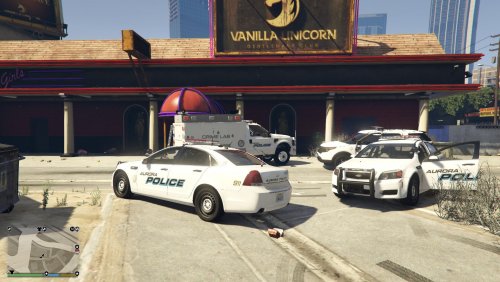
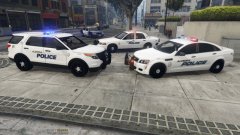
Aurora Police Department (CO) replica textures. Includes textures for patrol, K9 unit, Traffic divisions.
These are for the following models used in this pack :
The models are (you can use them on vehicles from other packs):
AtheDJ - Assets
TheHurk - CVPI
Thegreathah - FPIU (Venice Pack)
T0y - Ford F-Series Crime Lab (LSPD Pack)
RobertTM - Lenco Bearcat (LSVMPD Pack)
Kane104 (accuratestudio.com) - Chevy Caprice
Inspired by Aurora Police (CO). These are (almost) exact replicas. You may not re-upload these skins, edited or unedited, to this (LCPDFR.com) or any other site. Please leave comments with any issues or vehicle suggestions. Please leave a review with how you think I did. I like feedback and I need it to better my skills and reputation. Donations are welcomed but never required. I am very slow, but pay much attention to detail and refinement; I put about a week into creating this pack from scratch and some pre-made assets. Bugs:
CVPI white might be off a little but I think it gives it the aged look it needs.
Enjoy!
Models I used:
- 48 Downloads
Submitted -
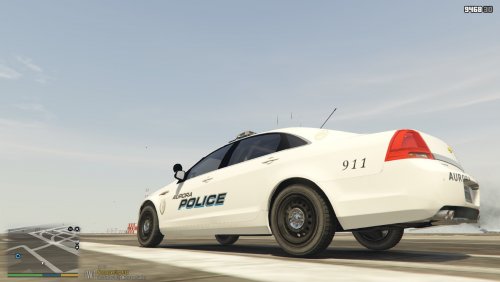
This is a much better version of my Aurora Chevy Caprice.
It will fit any car with the "Livery_sign_X" template but it is made for this amazing Caprice:
goo.gl/cxuK2d
Enjoy!
- 47 Downloads
- 1 Comments
Submitted -
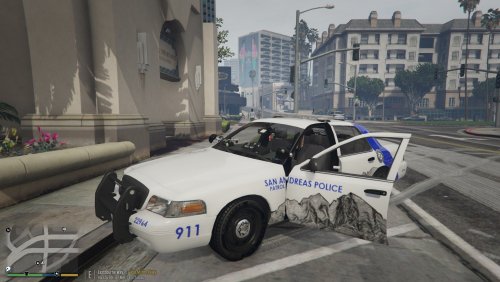
SAN ANDREAS CVPI "ASPEN"
Textures for Bxbugs123 CVPI based of Aspen CO's police department Ford Explorer
RECOMMENDED MODELS
BXBUGS 123 CVPI 1.9
Thank you for downloading my new texture! Enjoy!
-Cullen
- 18 Downloads
Submitted -
AURORA (CO) POLICE DEPARTMENT
Hello! This is my first EVER texture for LSPDFR and the first time I've painted cars in GTA V.
______________________________________________________________________________________________________________________________________________________________________
- Aurora Police Department (CO) textures for POLICESCO's awesome Chevy Caprice
Caprice found here: https://www.gta5-mods.com/vehicles/los-santos-police-chevrolet-caprice-ppv
To install:
With OPENIV in editing mode, place "cap_sign_6.DDS" into the texture folder for the Chevy Caprice (Typically Found In patchday4ng)
Please leave feedback! Thanks for downloading my first texture!
Sorry that the back and other text may be slightly warped, It is my first time painting after all...
-Cullen
PLEASE do not ask for help installing this livery, I took me 45 minutes to figure out how to do it myself. I'm sorry in advance... however there are plenty of wonderful people here and on YouTube, ask them!
_________________________________________________________________________________________________________________
IMPORTANT NOTE REGARDING THE LOADING OF MY SKIN
For some reason (hopefully one I can fix soon) if you load this skin directly from the LSPDFR vehicle select menu at the start of your shift, the textures will look unpleasant. Please use simple trainer to load the textures correctly:
Fig1. After selecting POLICESCO's Caprice in the LSPDFR menu at the start of your patrol, open Simple Trainer (or any other trainer that can spawn vehicles and liveries) and navigate to the "Vehicle Spawning" tab
Fig2. Select this tab then select "emergency"
Fig3. Find and select the slot you have the Caprice loaded in and select it
Fig4. Enjoy!
(Note: If for some reason you are presented with another livery than mine, navigate to the vehicle options menu and select it. Then go to the livery menu and use the Num Pad 4 and 6 keys to find my livery and you should be set!)
Simple Trainer: https://www.gta5-mods.com/scripts/simple-trainer-for-gtav
THANK YOU SO MUCH FOR INSTALLING MY SKIN, PLEASE LEAVE FEEDBACK AND RATE
WHAT SHOULD I PAINT NEXT?!
- 46 Downloads
- 5 Comments
Updated