
CHiPz
Members
-
Joined
-
Last visited
Files posted by CHiPz
-
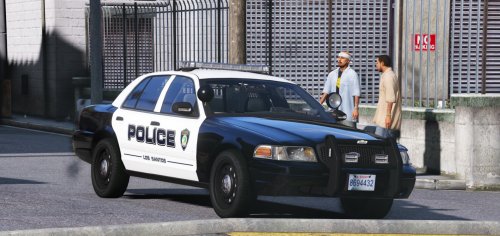
LOS SANTOS POLICE DEPARTMENT
(Citrus Heights based)
Hope you enjoy this pack
In the future I'm planning to release a 15' Tahoe, Ford Tarus, a 16 Charger and The Crime Investigation Unit.
Citrus Heights is in Sacramento county, CA I have seen these cars in real life and they mostly use explorers
and crown vics. Leave Feedback on what I should add next or edit. I'm curious on what you guys think about my content so leave your opinion and thoughts which is always appreciated!
*known bugs- for some vehicles the maximum amount of textures is supported only up to 6.
- Plates say Ca exempt instead of Sa exempt(in progress).
LPDFR Fans Discord- https://discordapp.com/invite/hxmvtHE
Installation:
1:open OPENIV
2: go to GTA V> update> x64> dlcpacks> Patchday14ng> dlc.rpf>x64> levels> gta5> vehicles.rpf
then find the model and replace the texures in .ytd
3: Enjoy!!
*Be sure for bradm's cars to replace texures in both .ytd files.
Models:
2006 Ford Crown Victoria: t0y/ BradM
2013 Ford Explorer: t0y/ BradM
2014 Dodge Charger:t0y/ BradM
2015 Doge Charger: Gump
2013 Chevrolet Tahoe: t0y/ BradM
Silverado: 72will
2016 Taurus: t0y/ BradM
Note: Will work with many other models.
- 1,547 Downloads
- 32 Comments
Updated -
Sacramento Police Department
Hope you enjoy this pack
In the future I'm planning to release a texure for a 16' Ford Explorer, a Chevy Express transport, and a Tahoe.
I live in Sacramento California and All the Sacramento police texures are for non els vehicles. I wanted something that made me feel right at home with the new els models that came out like TheHurk's forza Crown Victoria. The models I chose were not the most accurate with the light bar setups but they are the cars I would perfer to have in my game because of the quality.
The Badge used was from: https://nextdoor.com/agency-detail/ca/sacramento/sacramento-police-department/
The fonts used were the fonts I had available and tried to match it as close as possible to the real thing (leave feedback for fonts that more accurately represent the real thing).
Note: I know Sacramento police don't use the Ford Tarus But only use Ford Explorers and Crown Vics
LSPDFR Fans Discord- https://discordapp.com/invite/hxmvtHE
Installation:
1:open OPENIV
2: go to GTA V> update> x64> dlcpacks> Patchday14ng> dlc.rpf>x64> levels> gta5> vehicles.rpf
then find the model and replace the texures in .ytd
3: Enjoy!!
Models:
1998 Ford Crown Victoria: Pricefield
2011 Ford Crown Victoria: Thehurk / Pricefield / Toy
2013 Ford Explorer: BradM / Thegreathah / Gump
2016 Ford Tarus: BradM / Thegreathah
Note: Will work with many other models.
- 513 Downloads
- 3 Comments
Updated