



FrameBGrad.png.58e24256855b46c96be9aeac80800515.png)
Jacobmaate
Members
-
Joined
-
Last visited
Everything posted by Jacobmaate
-
 Beautiful vehicle right? You can download the original pack from here: https://www.gta5-mods.com/vehicles/2008-bravado-buffalo-s-c-police-pack-add-on-template I made a few small edits in my pack here, mostly the front bumper and grille but that aside it's as it is in the original pack.
- 44 comments
- 4 reviews
-
Sure ELS gives you more control over siren tones and what have you, but firstly making a mod dependant on external scripts isn't exactly my go-to, and secondly it seems kinda ironic you agree custom sirensettings are better than ELS, but your reasoning for not downloading the mod, is because it doesn't have ELS, though it has custom sirensettings... but heyho.
- 44 comments
- 4 reviews
-
-

- 2
-
-
Custom sirensettings > ELS But with that said... I can't please everyone ((:
- 44 comments
- 4 reviews
-
-
- 4
-
-
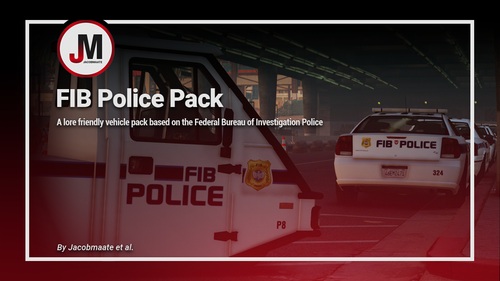
FIB Police Pack v3.0 by Jacobmaate et al. This mod aims to introduce a new federal law-enforcement agency to GTA V: The Federal Investigation Bureau Police. This pack is essentially a lore-friendly version of the real FBI Police, with a selection of vehicles and equipment based on their real life counterparts. I hope that this pack can be enjoyed and appreciated by everyone, even if you're not specifically a fan of the FIB Police concept, hopefully you can see from this pack that lore-friendly mods can still be highly detailed, and at times even closely follow their real life counterparts and yet still be unique. As of version 3.0, the spawn codes for the vehicles included are: • FIBP - Stanier • FIBP1A - Stanier (Supervisor) • FIBP2 - Buffalo A/C • FIBP3 - Torrence • FIBP4 - Alamo • FIBP42 - Alamo (K-9) • FIBP5 - Granger • FIBP6 - Scout • FIBP62 - Scout (K-9) • FIBP7 - Rumpo • FIBP8 - Pigeon Patrol ---- Features ---- • LODs • Dirt mapping • Breakable glass and glass shards • Liveries (templates included) • Custom sirensettings/flashpatterns • Custom soundbanks • Custom handling • Custom lore-style lightbars and equipment • Optional LSPDFR Integration files ---- Change Log ---- v3.0 (March 06, 2020): A complete overhaul of the modification: Pretty much as if this was a brand new mod - everything has been redone from scratch. This was done to give the mod a fresh feel, and to ensure that it wasn't bound by its previous version and also making sure that all content was up-to-date. FIBPv2, at its time of release, was regarded by many as the most detailed lore-friendly pack around. One year on, I wanted to make sure it remained that way, so hopefully this update is something that exceeds your expectations 🙂 • Reworked all FIB and FIB Police assets • Updated designs: New fonts, colours and logos etc (closer to FBI Police design) • Updated sirensettings/flashpatterns • Created new lore-style lightbar and lighting equipment for all vehicles • Updated base Vehicle models and interior equipment • Given Explosives K-9 Vehicles their own slots with K-9 package equipment • Added glass shards to all vehicles • Added Optional LSPDFR Integration files: Custom duty station, ambient spawning/patrols, backup options etc. • Updated custom handling • Added custom soundbanks: New engine noises/swapped 'police' sirens for 'federal' sirens (as per Discord poll) • Added lighting variations for some vehicles • Updated U.S. government federal license plates and more... v2.0 (February 06, 2019): • Added 6 more vehicles: Scout (Replacing Gresely), unmarked Torrence, Caddy, Sovereign, Sandking and Alamo • Fixed a variety of issues: liveries, LODs, lightbar sizes etc. • Updated sirensettings/flashpatterns and more... v1.0 (October 06, 2018): Initial release ---- Installation ---- Please see the included readme.txt file inside the archive for installation instructions Installation instructions for the optional LSPDFR Integration files are included inside the "Optional Files" subfolder inside the archive. ---- Requirements ---- OpenIV - Required to install these files to your game Custom Gameconfig - Required to support multiple addon vehicles, otherwise your game may crash If you wish to install the optional LSPDFR Integration files, then you'll also need to make sure you've installed the following requirements: LSPDFR v0.4 (or above) - LSPDFR v0.4 or above is required for the optional LSPDFR Integration files - older versions not supported. LSPDFR EUP Configurations - EUP LSPDFR Configs are needed otherwise FIBP uniforms will not work, and you'll have missing files you'll need to edit. ---- Credits ---- Full comprehensive credits list With thanks to all the contributors of this modification! ---- Known Bugs ---- No known bugs as of present ---- Permissions ---- • You're allowed to use this modification for your FiveM server, so long as appropriate credits are given. • You're allowed to use my assets from this modification for your own mods, so long as appropriate credits are given. • You're required to seek permission to use assets from other developers found in this mod from those respective developers - not myself. Please see the comprehensive credits listed above to see which assets are mine, and which are made by others. • If you make a reskinned version of this pack, please only upload the liveries, and provide a direct link to this mod page. • This modification is exclusive for download at GTA5-Mods.com, lcpdfr.com and gtapolicemods.com. Downloads from other sites will be regarded as stolen. ---- Social Media ---- MAATE Modding Discord Server My Youtube Channel My Twitter My Instagram My Patreon
- 44 comments
- 4 reviews
-
-
- 13
-
-
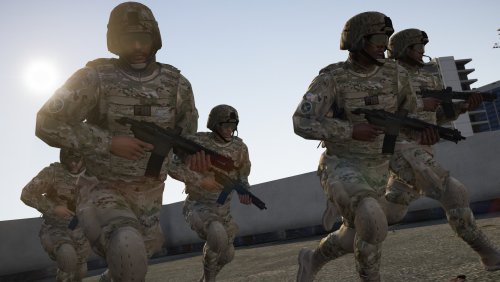 Updated uniform is here: https://www.gta5-mods.com/player/fib-hrt-uniform-eup-texture-mod Sorry I rarely come on this site now and occasionally they get a bit outdated here. Shall try and update it here in due course.
 -
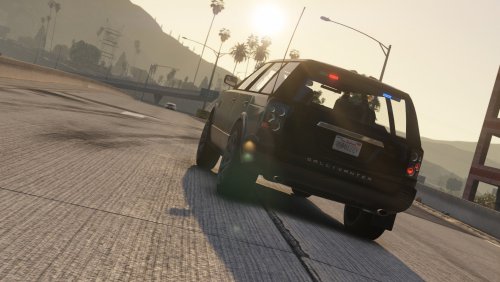 Glad you like it! And thanks for pointing out that issue, something I thought I had fixed but evidently not 😜 Updated the file now, all should be working fine. Hey, I'm always open to suggestions if you have any? Making several FIB/unmarked styled cars as I feel like the Vanilla game lacks them big time, and anyhow I'm learning new things as I go along in order to make more things in future 🙂
- 6 comments
- 1 review
-
-
- 1
-
-
Nothing too special, but hopefully something you can enjoy! I have also supplied pre-written vehicles.meta and carvariations.meta files within this mod. IMPORTANT: Before installing this mod, please ensure you have downloaded and installed OpenIV, if you haven't got it already, you can find the link here Inside your download will be a readme.txt file, to explain exactly how to install this mod. NOTE: If you know how to install addon cars, thats great! For those who aren't so familiar with it, I suggest installing Albo1125's Modding DLC pack first, and then following the installation instructions I've provided in the readme.txt file You can download Albo1125's Modding DLC pack from here. Credits: - Gallivanter Baller, by Rockstar Games. - Other vehicle components, by Rockstar Games - Edited, by Jacobmaate
- 6 comments
- 1 review
-
-
- 2
-
-
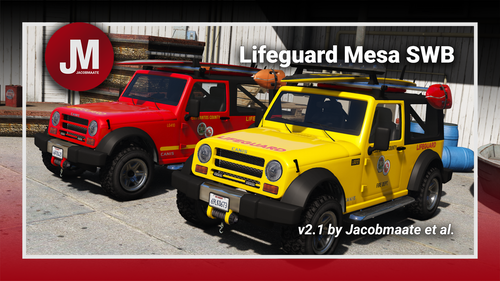 Lifeguard Mesa SWB v2.1.1 by Jacobmaate et al. A rather simple mod which I figured would be interesting and slightly different from my usual mods, a lifeguard version of Bob332's Canis Mesa SWB. Special thanks to him for letting me create this modification! Vehicle Spawn Code: • LGUARDMESA - Lifeguard Mesa SWB ---- Features ---- • LODs, Dirt Mapping, Breakable Glass (& Glass Shards) • Liveries (template included) • Custom sirensettings/flashpatterns & custom soundbanks • Custom assets/equipment • Paintable equipment (for added customisability) ---- Permissions ---- • You're allowed to use this modification for your FiveM server, so long as appropriate credits are given. • You're allowed to use my assets from this modification for your own mods, so long as appropriate credits are given. • If you make a reskinned version of this pack, please only upload the liveries, and provide a direct link to this mod page. • This modification is exclusive for download at GTA5-Mods.com and lcpdfr.com. Downloads from other sites will be regarded as stolen.
- 4 comments
- 4 reviews
-
-
- 5
-
-
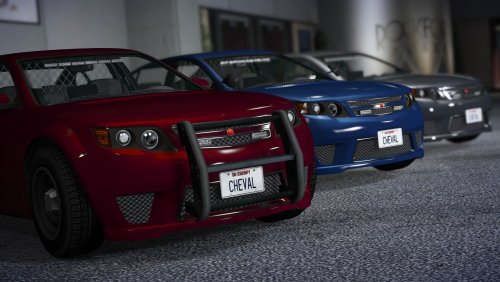 Nothing too special, but hopefully something you can enjoy! I have also supplied pre-written vehicles.meta and carvariations.meta files within this mod. IMPORTANT: Before installing this mod, please ensure you have downloaded and installed OpenIV, if you haven't got it already, you can find the link here: OPENIV Inside your download will be a readme.txt file, to explain exactly how to install this mod. NOTE: If you know how to install addon cars, thats great! For those who aren't so familiar with it, I suggest installing Albo1125's Modding DLC pack first, and then following the installation instructions I've provided in the readme.txt file You can download Albo1125's Modding DLC pack from here: Modding DLC pack Credits: - Cheval Fugitive, by Rockstar Games. - Other vehicle components, by Rockstar Games - Edited, by Jacobmaate
 -
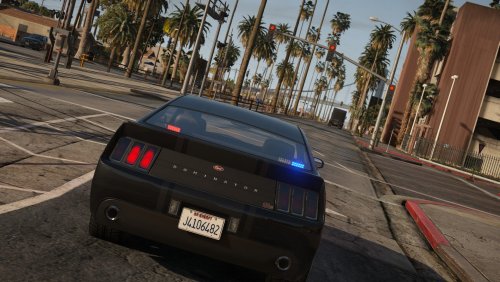 A simple edit of Rockstar's Vapid Dominator. For quite some time I wanted an unmarked Vapid Dominator ((honestly? I'm not sure why, I just wanted one), so now I'm on PC I just decided to go ahead and make one). Nothing too special, but hopefully something you can enjoy. I have also supplied pre-written vehicles.meta and carvariations.meta files within this mod. IMPORTANT: Before installing this mod, please ensure you have downloaded and installed OpenIV, if you haven't got it already, you can find the link here: OPENIV Inside your download will be a readme.txt file, to explain exactly how to install this mod. NOTE: If you know how to install addon cars, thats great! For those who aren't so familiar with it, I suggest installing Albo1125's Modding DLC pack first, and then following the installation instructions I've provided in the readme.txt file You can download Albo1125's Modding DLC pack from here: Modding DLC pack Credits: - Vapid Dominator, by Rockstar Games. - Edited, by Jacobmaate GTA5-MODS.COM VERSION
 -
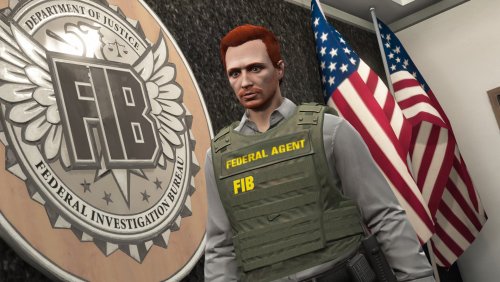 Okay fair enough. In that case I'll review the possibility of adding that in the next update. Thanks.
 -
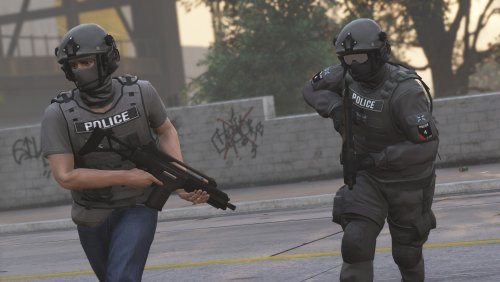 A texture modification for 'Emergency Uniforms Pack' IMPORTANT: Before installing this mod, please ensure you have downloaded and installed Emergency Uniforms Pack, if you haven't got it already, you can get it here: GTA5-MODS.COM, LCPDFR.COM Also ensure you have OpenIV installed: GTA5-MODS.COM, OPENIV.COM NOTE: I'd advise you to back up the EUP files, so you can revert back to original EUP files should you want to remove my mods. Alternatively you can use the uninstalled provided with EUP and then reinstall EUP with the OIV Package Installer. I will not take any responsibility for any damages to your game. GTA5-MODS.COM VERSION
- 4 comments
- 1 review
-
-
- 3
-
-
I could, but the reason I didn't is because I haven't a clue whether people will use all the slots, it's more down to whether or not someone wants to use one particular piece of armour, or have them all etc, meaning that the wardrobe.ini file thing would mostly be useless to most users. As it could be any of those texture slots, or all of them. I might consider adding it, since I do plan on updating this mod soon (won't be anything huge, maybe a couple more variants, possibly some other federal agencies as opposed to being solely FIB based stuff, maybe even some FBI versions too), anyhow we'll see.
-
Which 'vests' are you referring to exactly? There's one FIB vest in the set that this mod replaces, so if you only one of the vests in this mod, then you're golden, you can replace the original FIB one, with the one you like from this mod. If you want more than one of the vests from this mod, then I'm afraid it'll mean you'll have to start sacrificing certain vests you don't mind not having. If you're referring to the blue vests with "FIB" printed on it in yellow, then no, those are completely different vests.
-
The specific M4A1 model used in these screenshots is this one here, from gta5-mods: https://www.gta5-mods.com/weapons/m4a1-eotech-acog-carry-handle-animated I believe he was talking about the rifle used in the last 6 screenshots.
-
A texture modification for 'Emergency Uniforms Pack' IMPORTANT: Before installing this mod, please ensure you have downloaded and installed Emergency Uniforms Pack, if you haven't got it already, you can get it here: GTA5-MODS.COM, LCPDFR.COM Also ensure you have OpenIV installed: GTA5-MODS.COM, OPENIV.COM NOTE: Inside your download will be a readme.txt file, to explain exactly how to install this mod. Inside the 'readme' file, will also explain how to apply the armour to your player using a trainer (i.e. MENYOO), and how to apply the armour using the EUP plugin (ensure you have downloaded RagePluginHook) GTA5-MODS.COM VERSION
-
A texture modification for 'Emergency Uniforms Pack' IMPORTANT: Before installing this mod, please ensure you have downloaded and installed Emergency Uniforms Pack, if you haven't got it already, you can get it here: GTA5-MODS.COM, LCPDFR.COM Also ensure you have OpenIV installed: GTA5-MODS.COM, OPENIV.COM NOTE: Inside your download will be a readme.txt file, to explain exactly how to install this mod. This mod instructs you too replace certain files in order for you to be able to use the FIB SWAT (EUP original), and my FIB HRT uniforms at the same time, without replacing SWAT with HRT. However, you may replace the SWAT files with the HRT files if you wish. I'd advise you to back up the EUP files, so you can revert back to original EUP files should you want to remove my mods. Alternatively you can use the uninstalled provided with EUP and then reinstall EUP with the OIV Package Installer. I will not take any responsibility for any damages to your game. GTA5-MODS.COM VERSION
FrameBGrad.thumb.png.203c596c923420820bcf0c0c7717dcf4.png)
