
coleplays
Members
-
Joined
-
Last visited
Files posted by coleplays
-
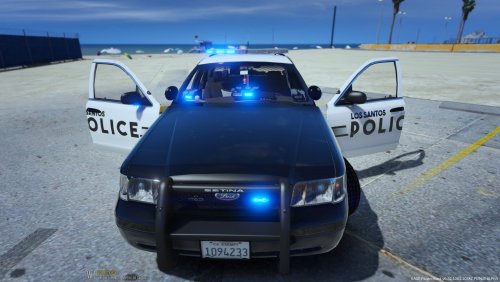
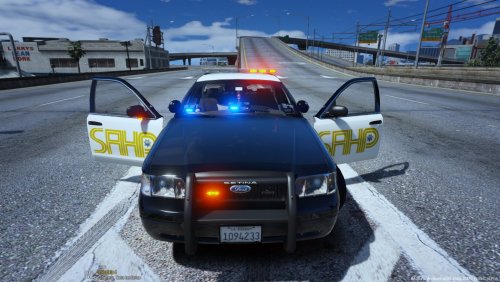
This is a texture for the 2011 Ford CVPI by Bxbugs123.
INSTALLATION:
1. Make sure you have the model installed already.
2. While in OpenIV, in the DLC pack that you installed the model in, double click on police.ytd (Make sure edit mode is enabled)
3. Scroll down until you find vicz_sign_1-8 and click 'replace' in the top right corner of the window.
4. Select the png file that you downloaded, and click save in the bottom right.
5. Load up GTA V and you should be good to go!
You can find the original model below.
- 51 Downloads
Submitted -
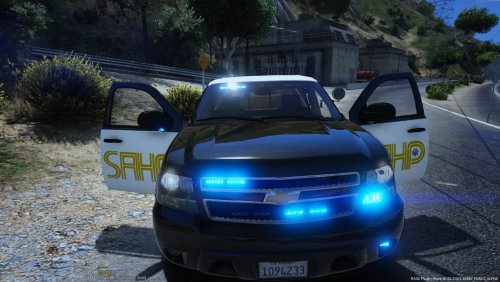
This is a texture for the 2013 ST Tahoe by Gump/OfficerUnderwood.
INSTALLATION:
1. Make sure you have the model installed already (You need to change the 'noose4' in the yft,ytd, and _hi.yft and the XML file to another model, I would recommend the fbi2 slot).
2. While in OpenIV, in the DLC pack that you installed the model in, double click on fbi2.ytd (Make sure edit mode is enabled)
3. Scroll down until you find tahoe_sign_1 or 2, and click 'replace' in the top right corner of the window.
4. Select the png file that you downloaded, and click save in the bottom right.
5. Load up GTA V and you should be good to go!
You can find the original model below.
- 300 Downloads
- 11 Comments
Updated -
THIS IS IT! IT'S FINALLY HERE!
What's up, guys! Recently, I have been working and putting out many SAHP textures for you to use, and I have taken the time to put them all in one simple pack so that you can easily download and install all of them! Installation instructions and model downloads are included in the pack so there is no need to worry about that!
If you have some extra time, please let me know what you think of this pack by leaving a review or comment! It really helps me to improve my texture creation in order to put out better skins for you guys! Thank you all so much for the support that you guys have given me thus far!
I really hope you enjoy this pack!
- 176 Downloads
- 3 Comments
Updated -
This is a texture for the 2016 Ford Explorer by Thehurk.
INSTALLATION:
1. Make sure you have the model installed already.
2. While in OpenIV, in the DLC pack that you installed the model in, double click on police3.ytd (Make sure edit mode is enabled)
3. Scroll down until you find exp_sign_1, 2, or 3, and click 'replace' in the top right corner of the window.
4. Select the png file that you downloaded, and click save in the bottom right.
5. Load up GTA V and you should be good to go!
You can find the original model below.
- 174 Downloads
Updated -
This is a texture for the 2011 Ford CVPI by Bxbugs123.
INSTALLATION:
1. Make sure you have the model installed already.
2. While in OpenIV, in the DLC pack that you installed the model in, double click on police.ytd (Make sure edit mode is enabled)
3. Scroll down until you find vicz_sign_1-8 and click 'replace' in the top right corner of the window.
4. Select the png file that you downloaded, and click save in the bottom right.
5. Load up GTA V and you should be good to go!
You can find the original model below.
- 35 Downloads
Updated -
This is a texture for the 2014 ST Charger by BXBugs123/JJDawkins. This is my first texture so I hope you enjoy!
INSTALLATION:
1. Make sure you have the model installed already.
2. While in OpenIV, in the DLC pack that you installed the model in, double click on police4.ytd (Make sure edit mode is enabled)
3. Scroll down until you find chr2_sign_1, and click 'replace' in the top right corner of the window.
4. Select the png file that you downloaded, and click save in the bottom right.
5. Load up GTA V and you should be good to go!
*Note* If you spawn this in and it appears grey-ish rather than black, use a trainer to change the color to a classic black.
You can find the original model below.
- 127 Downloads
- 1 Comments
Updated -
This is a texture for the 2013 ST Tahoe by Gump/OfficerUnderwood.
INSTALLATION:
1. Make sure you have the model installed already (You need to change the 'noose4' in the yft,ytd, and _hi.yft and the XML file to another model, I would recommend the fbi2 slot).
2. While in OpenIV, in the DLC pack that you installed the model in, double click on fbi2.ytd (Make sure edit mode is enabled)
3. Scroll down until you find tahoe_sign_1, and click 'replace' in the top right corner of the window.
4. Select the png file that you downloaded, and click save in the bottom right.
5. Load up GTA V and you should be good to go!
You can find the original model below.
SSPD Tahoe V2.rar
- 112 Downloads
Updated