tank5811
Members
-
Joined
-
Last visited
Everything posted by tank5811
-
I've had the issue where I will load a vehicle into the game with ELS installed and attempt to put components with the vehicle on to it. I have troubleshooted many solutions and have not found an answer to this issue. I have already tried many different vehicle packs to ensure that it is not just one vehicle or slot. I have replaced and re-installed my simple trainer to ensure that it was not a keybinding issue. I have checked the ELS folder to ensure that there are no extra XML files that are being used. Im not sure what else to do at this point and am very frustrated. I also have the issue where I cant upgrade the engine, brakes, transmission, or suspension in simple trainer as well. If anyone has any solution that would be fantastic. TIA
-
 This is one of the most authentic models ive seen yet head to toe thank you for sharing this and putting hard work into this I recorded an episode and would like to post it here or send it to you long with the screen shots ! heres the video for your pleasure! I kind of butchered your name there a little. sorry man
- 139 comments
- 38 reviews
-
-

- 2
-
-
 I have tried this and it does not work for me Im still having trouble and even followed the steps. Im wondering if there is a hidden file somewhere that I am missing.
- 246 comments
- 40 reviews
-
Ive been looking for a decent up to date tactical police ped for my game, Ive seen the US. Marshall ped but ive been un able to find it. Does anyone have any suggestions or links?
-
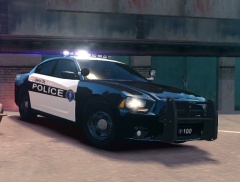 Is this downloadable?