Skip to content
View in the app

A better way to browse. Learn more.

LCPDFR.com

A full-screen app on your home screen with push notifications, badges and more.

To install this app on iOS and iPadOS
  1. Tap the Share icon in Safari
  2. Scroll the menu and tap Add to Home Screen.
  3. Tap Add in the top-right corner.
To install this app on Android
  1. Tap the 3-dot menu (⋮) in the top-right corner of the browser.
  2. Tap Add to Home screen or Install app.
  3. Confirm by tapping Install.

Stephen Adams

Members
  • Joined

Files posted by Stephen Adams

  1. Based loosely off of:

    With some personal changes and touches to my own liking.
     
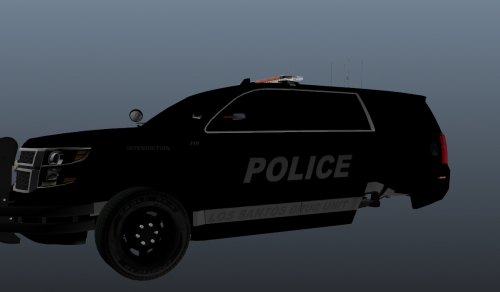
    I decided to make one for the LSPD. I don't tend to make skins often. 9 times out of ten I copy a skin from someone's I like onto a template that may not be present in a pack. This was primarily done to prove somewhat of a point. That with a little time and effort, skins can be make to a good quality.
     
    No in game screenshots are present because I was not going to jump in game for a skin that was primarily done to prove a point, nor try and cram any more vehicles into my game and risk crashing. Instead, I provided a picture in OpenIV on all sides in which I had skinned to show you what I have done.
     
    Skin has been made for this model by 'TheGreatHah'
    Created using Paint.NET.
    • 102 Downloads
    • 8 Comments
    Submitted

Account

Navigation

Search

Search

Configure browser push notifications

Chrome (Android)
  1. Tap the lock icon next to the address bar.
  2. Tap Permissions → Notifications.
  3. Adjust your preference.
Chrome (Desktop)
  1. Click the padlock icon in the address bar.
  2. Select Site settings.
  3. Find Notifications and adjust your preference.