dmorrill22
Members
-
Joined
-
Last visited
Files posted by dmorrill22
-
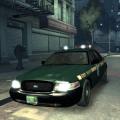
Texture for CVPI. One livery only. I will make one for a Charger later on, as well as more liveries (possibly, haven't decided yet).
- 88 Downloads
- 5 Comments
Submitted -
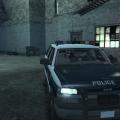
Includes 4 Liveries for CVPI's, Chargers, Tahoes (Z71, and cj24's Impala. These skins do not have unit numbers on them yet, so for now each livery is the same. I will add numbers later on. Please PM me if there are any bugs.
Please do not modify or reupload with out my permission. Same goes for uploading to other sites.
- 77 Downloads
- 1 Comments
Updated -
Contains 4 textures to replace in the vehicle texture file. Works great with Area Livery Mod. If using the ALM, use the following settings:
ADY=1
BKR=0
AQN=3
BHN=2
I have changed the skin slightly. Changed the lettering to white, removed the flags, and centered the POLICE on the front of the hood, as it was slightly off.
To install, open OpenIV and go to models > cdimages > vehicles.img
Click Edit.
Find the .wtd file of the police car you would like to change, such as police.wtd
Open the wtd, click on import images, and add the four "police_sign" images. Make sure you select DXT5 as the compresson level, or the texture will be very blurry and low-quality.
Save, and the skin should be changed.
Feel free to PM me for any questions.
- 214 Downloads
- 6 Comments
Updated