Specter793
Members
-
Joined
-
Last visited
Files posted by Specter793
-
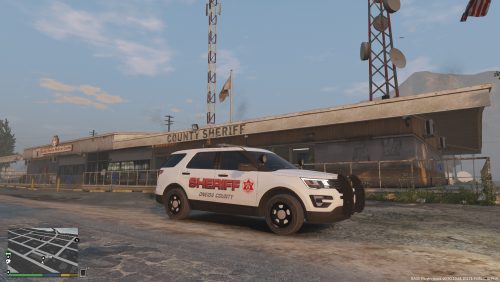
This texture is an extremely crude representation of Oneida County NY's Sheriff's Department FPIU. I'm very sorry for the lack of detail and the quality of the graphics. I just started using Photoshop and making textures yesterday and am still very unfamiliar with it. Also, it was impossible to find accurate high resolution graphics for the cars unless i ripped them from an actual real life photo. So the red stripes down the side in real life, wasn't able to replicate those due to my lack of knowledge on photoshop and not being able to find a decent high res graphic online of it. So again I apologize this is so bad lmao. In game, it doesn't look terrible though lol. If anyone is able to help with making this better and who has a better understanding of PS, please message me and I can send what files I have to you so you can try to make it better lol. Again this texture is modeled for TheHurk's 2016 FPIU which can be found here:
- 103 Downloads
- 5 Comments
Submitted -
Hey guys! I'm excited to announce my very first texture I've ever made on my own. This skin is a replica of the actual Onondaga County Sheriff's Department new FPIU vehicles from upstate NY. This texture is modeled for TheHurk's ELS 2016 FPIU. If you need the model:
Hope you guys enjoy! Thanks.
- 657 Downloads
- 15 Comments
Updated