Skip to content
View in the app

A better way to browse. Learn more.

LCPDFR.com

A full-screen app on your home screen with push notifications, badges and more.

To install this app on iOS and iPadOS
  1. Tap the Share icon in Safari
  2. Scroll the menu and tap Add to Home Screen.
  3. Tap Add in the top-right corner.
To install this app on Android
  1. Tap the 3-dot menu (⋮) in the top-right corner of the browser.
  2. Tap Add to Home screen or Install app.
  3. Confirm by tapping Install.

gRocc0

Members
  • Joined

  • Last visited

Files posted by gRocc0

  1. Wanted one Ford Fusion with also black rims, so couldn't find it made it police version of it from original vehicle.

    Wheel color can be changed as it's secondary color. Also vehicle color can be change to whatever you want.
     
    Hope you enjoy and have fun!
     

    Here's a little preview of the lighting
    • 3,636 Downloads
    • 6 Comments
    Updated
  2. My first published ELS Model, with great helps from @JdmImport

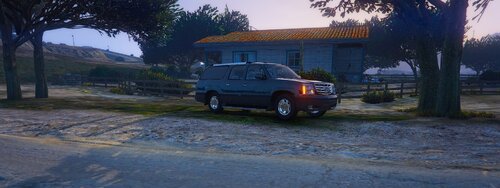
    2002 Cadillac Escalade ESV With Linear lighting making it useful for convoys, secret service and FBI Models.

    P.S.
    Nothing in the vehicle yet such as a cage nor a laptop, I'll be working on those.
     
    Here's a little preview of the lighting.
    • 1,314 Downloads
    • 5 Comments
    Updated

Account

Navigation

Search

Search

Configure browser push notifications

Chrome (Android)
  1. Tap the lock icon next to the address bar.
  2. Tap Permissions → Notifications.
  3. Adjust your preference.
Chrome (Desktop)
  1. Click the padlock icon in the address bar.
  2. Select Site settings.
  3. Find Notifications and adjust your preference.