Reddington
Members
-
Joined
Files posted by Reddington
-
Quick note for those who don't usually read the descriptions:
You can use "CTRL F" to quickly search for the pack/vehicle/author you're looking for.
This is my all blue light texture mega pack for ELS vehicles. You can also find these files on my Discord, which is a central HUB for all my stuff. IMPORTANT NOTE: If you want a faster way to search through what packs/cars are added, join my Discord! I'm making a channel dedicated to listing all of the vehicles this pack supports. It will link directly to that channel so you have an easier time searching for what you want. - https://discord.gg/TuPW4gD
If you'd like to keep up to date with what has been suggested, what I want to do, what is coming or known pack issues, please read over my public Trello! https://trello.com/b/HkMsR6ai/the-museum-of-blue-lights
I have added a list of all supported vehicles at the end of this description for those who are curious about which packs specifically. I want to give a special thanks to the authors who included a link to my pack in their file!
If you have a model or pack you want all blue or a different color (I will do all red/fire/EMS requests, but those will be uploaded separately), you may request it in the file comments. However, my only stipulation is that I am allowed to post it on LCPDFR.com for others to use. I will not do requests for models that will be private. The only exception to this is fivem communities/packs, see notes below.
A couple things to note:
Some vehicles have a +hi.ytd that also contain light textures. If I provide a +hi.ytd folder, that means the blue/blue textures need to be placed in the +hi.ytd.
This pack was uploaded in 2018, which sadly means that some older cars/packs may no longer be available.
• I can do non-ELS, please go to my other file of the same name (except it says non els). However, iff you want a mega pack done for a fivem server, you'll need to PM me on here or join the discord and make a ticket.
Install instructions
Important note: In case you get tired of blue/blue, back up the .ytd and ELS VCF before installing the textures.
Helpful tip for the list below: If you're looking to see if there's textures specific car/pack, you can use CTRL + F to search.
List of supported cars/packs:
- 23,191 Downloads
- 269 Comments
Updated -
Quick note for those who don't usually read the descriptions:
You can use "CTRL F" to quickly search for the pack/vehicle/author you're looking for.
This is my all blue light texture and carcol mega pack for Non-ELS vehicles. You can also find these files on my Discord - https://discord.gg/TuPW4gD
I have added a list of all supported vehicles at the end of this description for those who are curious about which packs specifically. I want to give a special thanks to the authors who included a link to my pack in their file!
If you have a model or pack you want all blue or a different color (I will do all red/fire/EMS requests, but those will be uploaded separately). However, my only stipulation is that I am allowed to post it on LCPDFR.com for others to use. I will not do requests for models that will be private. The only exception to this is fivem server/packs, see the notes below.
A couple things to note:
Some vehicles have a +hi.ytd that also contain light textures. If I provide a +hi.ytd folder, that means the blue/blue textures need to be placed in the +hi.ytd.
Non-ELS takes a little longer to do, so you'll need to be patient.
• If you want a mega pack done for a fivem server, you'll need to PM me on here or join the discord and make a ticket.
• Due to carcols being a bitch, I am not able to test all cars to see if things are working as intended.
• You must provide a carcol for the vehicle/pack! Even if it's your default carcols.
• Since I'm unable to test all of them, I'd really appreciate it if you can post pictures in the comments or DM me pictures of the car I made all blue so I can add it here as a file image. 🙂
Install instructions
Important note: In case you get tired of blue/blue, back up the .ytd, VCF and/or carcols before installing the textures.
Helpful tip for the list below: If you're looking to see if there's textures specific car/pack, you can use CTRL + F to search.
List of supported cars/packs:
- 275 Downloads
Updated -
This XML will allow you to utilize basic functionality of ELS with non-ELS cars. This means you can use keybinds for lights and sirens, but cannot change patterns or light stages. While you technically can have light stages, it's pointless since individual lights won't turn on.
==== Install Instructions =====
Place the sample VCF into GTA\ELS\pack_default.
Rename the XML to match that of your vehicle name, such as police 2, sheriff, etc. This will work for addon vehicles!
Special note to ELS users: You can use this with your ELS cars, but most of the functionality is disabled in the XML. You need to go in and re-enable them.
- 2,975 Downloads
- 14 Comments
Updated -
I love unique undercover vehicles, and undercover Taxi certainly fits the bill. We don't have very many of them in GTA, so thought I'd help with that. This was my first time successfully making skins, I'm well aware they are not perfect. I'm not happy with the "need a ride" on the trunk of the CVPI. Still trying to figure out how to make that work. As of right now it is only the CVPI and Transit from BlueGhost's unmarked mega pack - https://www.lcpdfr.com/downloads/gta5mods/vehiclemodels/26123-els-blueghosts-unmarked-pack/
These skins will work on other models that use the same template. Bare in mind, there are at least three variants of the CVPI out there. This skin will not fit on all of them! Only the ones that use the same template. If you have a vehicle that you'd like to see added to this pack, feel free to suggest in the comments.
You may not redistribute or modify these skins. You may use them in a Fivem server, but please provide credit.
Please note: ELS or non-ELS does not matter when it comes to skins. My skins will work on ANY vehicle that uses the same template.
--- Install Instructions ---
Navigate to the .ytd of the model in OpenIV.
Click "edit mode".
Double click the .ytd.
Drag and drop the livery into OpenIV
Click "edit mode" again.
Done.
HELPFUL TIP: If you still want to have an unmarked skin on the CVPI and Transit, rename my skins to name_sign_2, Then you have unmarked and undercover.
- 342 Downloads
- 4 Comments
Submitted -
This is a simple edit of the defaultregions.xml and customregions.xml that allows the following departments to respond in conjunction with the parent agency (EG LSPD, BCSO, etc) when calling for localpatrol backup.
- Sheriff responding in the city
- Metro police responding in the city
- Sandy Shores Police responding in Sandy Shores
- Paleto Bay Police responding in Paleto Bay
- Grapeseed Police responding in Grapeseed
Once the download archive opens, you will be greeted by three folders that contain defaultregions.xml. Pick the one you'd like and install. Then drag and drop the CustomRegions.xml and your chosen defaultregions.xml into the location described below.
**Important:** You will need to edit! Specifically, vehicle names and the peds. You can add more vehicle lines as needed, just make a new line and change the name. I have added comments in the XMLs that help you know where to begin editing and when to stop. If you need further help, please post in the comments.
You must have Ultimate Backup!! - https://bejoijo256.wixsite.com/bejoijo/post/ultimate-backup
To install the XML - Open your GTA directory / Plugins / LSPDFR / Ultimate Backup. Drag and drop.
A few things to note:
- I recommend you backup your original XMLs just in case.
- I may include a SpecialUnits if the need arises.
- The result ends up looking a lot better if you use add-on cars to fill in for Metro, Sandy Shores PD, etc. Here's my guide for installing add-ons -
- As of right now, I am not including State Trooper/Highway Patrol due to the fact that they are basically the same thing as far as Ultimate Backup is concerned. However, I can include a version separating them into two departments (this way you can use different peds) if requested.
- I recommend messing around with the customization just to learn. 🙂
Huge thanks to @TreadRed for pointing out a huge flaw in my plan for this file and helping to correct it.
In case you need suggestions for certain vehicles to fill the slots, here's some that I use:
Metro, County and State Patrol -
Highway patrol -
Sandy Shores police -
Paleto Bay Police -
- 3,955 Downloads
Updated -
Given that all my LEO vehicles are blue/blue, I thought I'd go ahead and make fire and EMS all red. It's not 100% red, as I have left in the rear ambers. That said, I can replace ambers with all reds and/or make a red/white version if requested.
Install instructions
Important note: Remember to back up the .ytd and the XML just in case.
Ambo can be found here -
https://www.gta5-mods.com/vehicles/2018-ford-xlt-f350-superduty-quad-cad-custom-ambulance-els
- 78 Downloads
Updated -
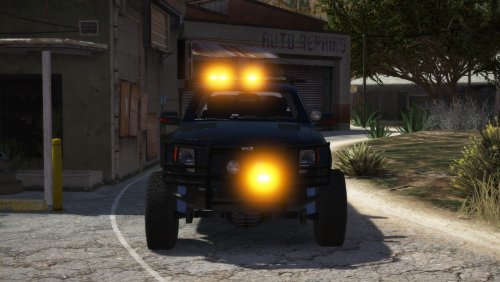
The towing industry has always been one of my unexplored fascinations until I got old enough to really understand and appreciate it. I've got my own little tow empire in game, all with amber lighting, and wanted to make this bad boy match the rest of them in terms of light colors and livery - or lack thereof. I've made this model all amber, and have added an unmarked, transparent livery which will allow you to use whatever color you want.
Despite the vehicle being non-ELS, I've included a generic XML in order to make life a little easier on those of us using ELS. Do note that you will only receive the bare basics of ELS functionality, which includes turning on lights and siren individually and changing siren tone. You will not be able to change light patterns.
Yes yes, I'm aware, my lights are bright as fuck in the screenshots. Currently tweaking graphics settings and this is an unfortunate result.
Link to truck: https://www.gta5-mods.com/vehicles/police-raptor-towtruck
Possible bug: You may still see blue reflections in the environment when the lights are on. I don't believe this is fixable.
Install instructions for the light textures:
Install instructions for the unmarked livery:
Installing the VCF (Optional and only for people using ELS)
- 158 Downloads
Updated -
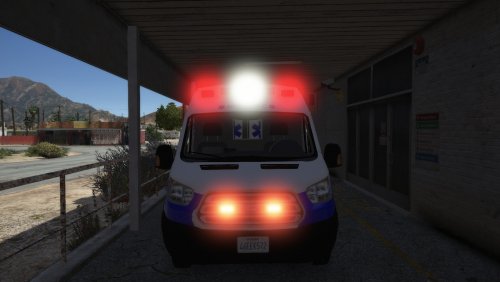
Lets be honest, ambulances should have either all red or red/white lighting. 😂 All credit goes to Trooper Goetz, I'm just a guy who changes colors.
There are two different variants in the download.
1) All red and no amber light.
2) All red with rear amber light.
I tried doing a 100% red version, but Trooper Goetz added takedowns/scene lights to the ambo. If I changed out the white light texture, it also made the light housing red, which looked weird when you had the scene lights activated. If you don't plan on using the scene lights and want 100% reds, let me know in the comments and I'll add it.
Install instructions
Important note: Remember to back up the .ytd, +hi.ytd and the XML just in case.
Ambo can be found here -
- 119 Downloads
Submitted