Gonzy
Members
-
Joined
-
Last visited
Everything posted by Gonzy
-
Ok that would be cool! hope Terrence (BlackerCracker) and Brandon (LethalWeapon) will get on because its better in more ppl. I'll be on TS!
-
whyy so late again? :/ we were playing everyday like at 4:00PM (your time) ...cant play at 6:00PM... is it posible to make another game sooner so i can join in again?
-
What kind of mod is on your mind?
-
I wont play this weekend. :D i have 3 Days Airsoft war so... :D
-
Have nice game guys... I cant play today its already 0:05 here and i need to get up early next morning... so see ya in another game =)
-
Application Windows Live Name: Gonzy252 Age: 15 Teamspeak: Yes Microphone: Yes Country: Czech Rep. Time Zone: +1GMT Unit Desired: Patrol/Traffic Unit
-
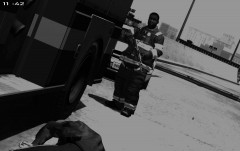 Ok my theory is, that the fireman dropped the mag, it felt under the fire truck and the cop is trying to find it xD
 -
Wow ur right... it looks like AK... but how can it be ak? there is no magazine... When ur reloading in GTA IV magazine is still there...
-
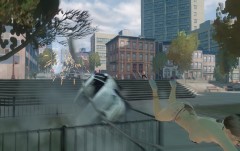
From the album: Pictures from shift.
...this happens when ur not using your seatbelt... -
From the album: Pictures from shift.
yes... just a fireman with a shotgun killing a cop... -
-
Yeee it was reaaally fun... As always.... If you guys want to play some LCPD:FR multiplayer game we are on teamspeak almost every day at the evening (20-23:00 +1GMT) So if you want to play go to teamspeak at that time. See ya in game.
-
Yes. open your ELS.ini file and you can see there "ToggleSirens = Number" every key on the keyboard have his own number... If you want to togle your siren by R just change it to ToggleSirens = 82 then use your horn by pressing G. // 008 Backspace // 009 Tab // 012 Clear // 013 Enter // 016 Shift // 017 Ctrl // 018 Alt // 019 Pause // 020 Caps Lock // 027 Esc // 032 Spacebar // 033 Pg Up // 034 Pg Dn // 035 End // 036 Home // 037 Left // 038 Up // 039 Right // 040 Down // 042 Print // 044 Print Screen // 045 Ins // 046 Del // 047 Help // 048 0 // 049 1 // 050 2 // 051 3 // 052 4 // 053 5 // 054 6 // 055 7 // 056 8 // 057 9 // 065 A // 066 B // 067 C // 068 D // 069 E // 070 F // 071 G // 072 H // 073 I // 074 J // 075 K // 076 L // 077 M // 078 N // 079 O // 080 P // 081 Q // 082 R // 083 S // 084 T // 085 U // 086 V // 087 W // 088 X // 089 Y // 090 Z // 096 Numpad 0 // 097 Numpad 1 // 098 Numpad 2 // 099 Numpad 3 // 100 Numpad 4 // 101 Numpad 5 // 102 Numpad 6 // 103 Numpad 7 // 104 Numpad 8 // 105 Numpad 9 // 106 Multiply // 107 Add // 108 Separator // 109 Subtract // 110 Decimal // 111 Divide // 112 F1 // 113 F2 // 114 F3 // 115 F4 // 116 F5 // 117 F6 // 118 F7 // 119 F8 // 120 F9 // 121 F10 // 122 F11 // 123 F12 // 144 Num Lock // 145 Scroll Lock // 160 Left Shift // 161 Right Shift // 162 Left Ctrl // 163 Right Ctrl
-
yea and dont forget to backup your file before you do it... just for sure...
-
that graphics is really bad... LCPD:FR is way better than this "Police Force" game.
-
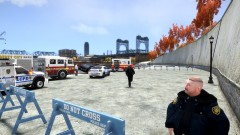 wow that fat cop at the right corner looks more fat than in my game... lol... very nice pic!
 -
Right now, yesterday,tommorow... always... TUPAC... Rest in peace to god of rap. In our hearts forever. http://www.youtube.com/watch?v=_1vU5NeOgHw&feature=relatedStopped working? Its normal that its not responding when u click on browse. U need to wait few seconds.Dont change anything in the ini file if you dont know what ur changing... Just Download Simple native trainer Version 6.4 (remove the old one) put the files in your gta iv folder, then ingame Disable Keys and thats it. If it still doesnt work after this, reinstall your LCPD:FR. Thats all i can say.. If it doesnt work after all i dont know what else should be the problem.Then change your key binds in trainer.ini file. Next time make your own topic...And the trainer works or not?Your trainer works fine? And the shoot out "thing" happens every time when u got this call? I'm using Simple Native trainer Version 6.4 and it works fine. Try to reinstall LCPD:FR and the trainer...Nothing can go wrong. (read the readme file if you put the files in right folder)