
AlexBoosted
Members
-
Joined
-
Last visited
Files posted by AlexBoosted
-
- 1,275 Downloads
- 4 Comments
Updated -
- 766 Downloads
- 5 Comments
Updated -
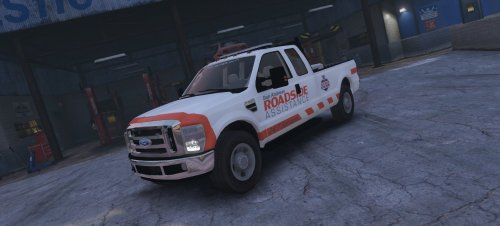
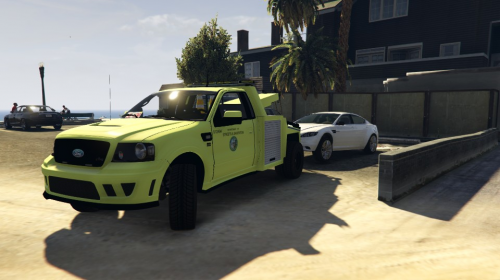
Hi there everybody! After uploading various textures to the LCPDFR.com community, I've decided to step it up a notch and start working on models. This is my first model that I will be uploading to the site. This vehicle was created to be used with RSA - V (Roadside Assistance V) which is a modification that myself and Abel Software are currently working on. https://www.gta5-mods.com/scripts/roadside-assistance-v
If you have any questions, concerns or issues, feel free to private message me on here, and I will respond in a timely manner.
If you would like to throw out a suggestion or if you would like to request a texture/model, just PM me.
DO NOT REUPLOAD OR TAKE CREDIT FOR THIS MODEL!
Thanks for checking out my first model! I hope you enjoy it, there's plenty more models to come!
- 1,759 Downloads
- 8 Comments
Submitted -
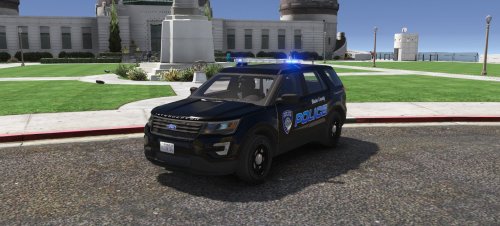
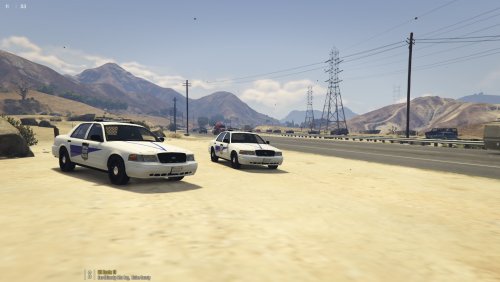
Hi there everybody! This skin pack is an ongoing project and will feature more vehicles in the upcoming days, featuring 3 skins, 2 for the Vic, and 1 for the FPIU. This pack is completely fictional and not based on any departments.
These models are NOT made by me! The model credits are in the .ZIP!
Models:
If you have any questions, concerns or issues, feel free to private message me on here.
If you would like for me to make textures just PM me!
DO NOT REUPLOAD OR TAKE CREDIT FOR THIS SKIN
Thanks for checking out my skin pack! I hope you enjoy it, there's plenty more textures to come!
- 31 Downloads
Submitted -
Hi there everybody! This skin pack is a joint department pack, featuring 5 vehicles in 2 states that border each other: Maryland & Delaware!
These models are NOT made by me! The model credits are in the .ZIP!
Models:
If you have any questions, concerns or issues, feel free to private message me on here.
If you would like for me to make textures just PM me!
DO NOT REUPLOAD OR TAKE CREDIT FOR THIS SKIN WITHOUT MY PERMISSION
Thanks for checking out my Maryland & Delaware skin pack! I hope you enjoy it, there's plenty more textures to come!
- 379 Downloads
- 6 Comments
Submitted -
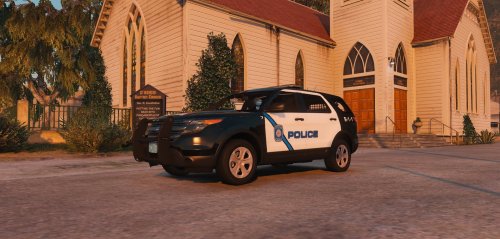
Hi there everybody! This skin is aimed at the FPIU used by the Littleton PD in Massachussettes.
This model is NOT made by me! The model credits are in the .ZIP!
Model:
If you have any questions, concerns or issues, feel free to private message me on here or on Skype.
If you would like for me to make textures just PM me or send me a message on Skype (nativexperience.alex)!
DO NOT REUPLOAD OR TAKE CREDIT FOR THIS SKIN WITHOUT MY PERMISSION
Thanks for checking out my Littleton PD skin! I hope you enjoy it, there's plenty more textures to come!
- 33 Downloads
Submitted -
DO NOT REUPLOAD OR TAKE CREDIT FOR THIS SKIN WITHOUT MY PERMISSION
Hi there everybody! This model is NOT made by me! The model credits are in the .ZIP!
If you would like for me to make textures just PM me or send me a message on Skype (nativexperience.alex)!
This is still a 'Work In Progress' simply because I can still add more stuff to it and also there are some issues with the placement of the logos and other stuff so, just let me know down in the comments or in the review how you would like me to update the skin, (adding more stuff to it, changing stuff, removing stuff, etc.) and I will try my best to do just that.
I didn't include an installation guide in the description, but there is a README that contains all the info you need!
Thanks for checking out my Oklahoma City Mini-Pack! I hope you enjoy it, there's plenty more to come!
- 255 Downloads
Updated -
DO NOT REUPLOAD OR TAKE CREDIT FOR THIS SKIN WITHOUT MY PERMISSION
Hi there everybody! This model is NOT made by me! The model credits go to mohaalsmeer model:
If you would like for me to make textures just PM me or send me a message on Skype (nativexperience.alex)!
I didn't include an installation guide in the description, but there is a README that contains all the info you need!
Thanks for checking out my Chicago Department of Streets & Sanitation Skin! I hope you enjoy it, there's plenty more to come!
- 69 Downloads
Updated -
DO NOT REUPLOAD OR TAKE CREDIT FOR THIS SKIN WITHOUT MY PERMISSION
Hi there everybody! This model is NOT made by me! The model credits go to Windows446 model:
This CVPI texture was made for antonioac08401. If you would like for me to make textures just PM me or send me a message on Skype (nativexperience.alex)!
I didn't include an installation guide in the description, but there is a README that contains all the info you need!
Thanks for checking out my Atlantic City PD Skin! I hope you enjoy it, there's plenty more to come!
- 42 Downloads
- 4 Comments
Updated -
DO NOT REUPLOAD OR TAKE CREDIT FOR THIS SKIN WITHOUT MY PERMISSION
Hi there everybody! This model is NOT made by me! The model credits go to OfficerWalters model:
Me and my friend Abel have created a modding community that is looking for new members to join! That's why I've decided to make this texture, if you would like to join visit: www.nativexperience.honor.es we are looking for model creators, texture developers, scripters and other modders! We hope that you are able to join our community.
I didn't include an installation guide in the description, but there is a README that contains all the info you need!
Thanks for checking out my NativeXperience Texture Pack! I hope you enjoy it, there's plenty more to come!
- 15 Downloads
Updated -
DO NOT REUPLOAD OR TAKE CREDIT FOR THIS SKIN WITHOUT MY PERMISSION
Hi there everybody! These models are NOT made by me! The model credits are in the .ZIP!
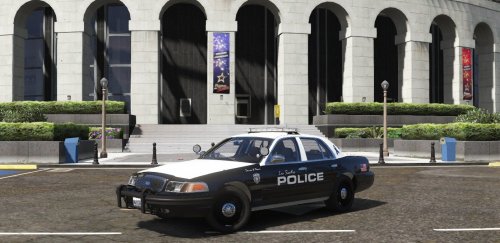
It's been so long since I have posted a skin, so I'm back! I wanted to release something big for my return so here is my NLSPD Texture Pack. I also didn't include an installation guide in the description, but there is a README that contains all the info you need!
This is still a 'Work In Progress' simply because I can still add more stuff to it and also there are some issues with the placement of the logos and other stuff so, just let me know down in the comments or in the review how you would like me to update the skin, (adding more stuff to it, changing stuff, removing stuff, etc.) and I will try my best to do just that. This is also my first texture/skin pack that I've released!
Thanks for checking out my North Los Santos PD Texture Pack! I hope you enjoy it, there's plenty more to come!
- 252 Downloads
- 2 Comments
Updated -
DO NOT REUPLOAD OR TAKE CREDIT FOR THIS SKIN WITHOUT MY PERMISSION
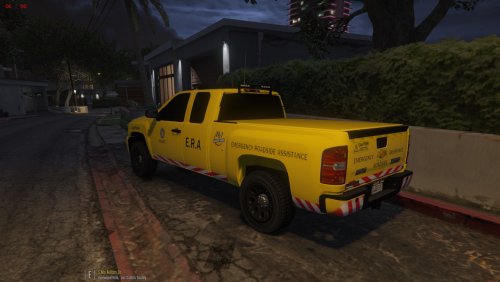
Hi there everybody! This model is NOT made by me! The model credits go to CanadapoliceOfficial model:
I recommend that you use this vehicle for M.V.A. (Motor Vehicle Accidents), Hit and Run, Broken Down Vehicle (Ambient Event) and anything else that you can think of to use this vehicle for!
INSTALLATION:
- Drag and drop the 'sheriff2' files to your desktop or any folder that you would like
- Open up OpenIV.
- Grand Theft Auto V: Windows.
- Click on Edit mode [Top right].
- Go to: update/x64/dlcpacks/patchday3ng/dlc.rpf/x64/levels/gta5/vehicles.rpf.
- Find (Filter): 'sheriff2' (Or the vehicle that you changed it too, police3 will be in patchday4ng).
- Go to the 'sheriff2' files that you installed.
- Drag and drop them into the vehicles.rpf in OpenIV (Where all the vehicles are).
- (OPTIONAL, BUT HIGHLY RECOMMENED): Go to: update/update.rpf/common/data
- Drag and drop the VisualSettings.dat in there, it removes Coronas and it makes the lights look better
This is still a 'Work In Progress' simply because I can still add more stuff to it and also there are some issues with the placement of the logos and other stuff so, just let me know down in the comments or in the review how you would like me to update the skin, (adding more stuff to it, changing stuff, removing stuff, etc.) and I will try my best to do just that.
Thanks for checking out my E.R.A. Skin! I hope you enjoy it, there's plenty more to come!
- 342 Downloads
- 18 Comments
Updated -
About This File
Hi there everybody! This is my fourth skin, so take that into consideration.. This model is NOT made by me! The model credits go to PimDSLR model:
The only reason the lightbar looks strange is because I had it in the police.4 file which is ment for unmarked cars, so take note of that.
INSTALLATION:
- (I made this one EASIER than the CVPI skin)
- Drag and drop the four 'police4' files to your desktop or any folder that you would like
- TRUST ME AND DO THIS!!: Change the name to police.2 for every file, but keep the '+hi' and the '_hi' in those two specific files.
- ^ ^ If you don't the lightbar will not look too good, change it too police.2 ^ ^
- Open up OpenIV.
- Grand Theft Auto V: Windows.
- Click on Edit mode [Top right].
- Go to: update/x64/dlcpacks/patchday3ng/dlc.rpf/x64/levels/gta5/vehicles.rpf.
- Find (Filter): police2 (Or the vehicle that you changed it too, police3 will be in patchday4ng).
- Go to the 'police2' files that you installed.
- Drag and drop them into the vehicles.rpf in OpenIV (Where all the vehicles are).
This is still a 'Work In Progress' simply because I can still add more stuff to it and also there are some issues with the placement of the logos and other stuff so, just let me know down in the comments or in the review how you would like me to update the skin, (adding more stuff to it, changing stuff, removing stuff, etc.) and I will try my best to do just that.
Thanks for checking out my Indiana State Police skin! I hope you enjoy it, there's plenty more to come!
- 97 Downloads
- 10 Comments
Updated -
Hi there everybody! This is my third skin, so take that into consideration.. This model is NOT made by me! The model credits go to Virzza model:
If you would like to change the hubcaps to steel rims, follow these couple of steps:
1. Open your trainer in game
2. Spawn the vehicle
3. Go to Vehicle Mod Menu
4. Go to wheels and go to #36
INSTALLATION:
- Start off by opening your Model file
- Drag and drop the four 'police4' files to your desktop or any folder that you would like
- OPTIONAL: You can change the name but keep the '+hi' and the '_hi' in those two specific files.
- Open up OpenIV.
- Grand Theft Auto V: Windows.
- Click on Edit mode [Top right].
- Go to: update/x64/dlcpacks/patchday3ng/dlc.rpf/x64/levels/gta5/vehicles.rpf.
- Find (Filter): police4 (Or the vehicle that you changed it too, police3 will be in patchday4ng).
- Go to the 'police4' files that you installed.
- Drag and drop them into the vehicles.rpf in OpenIV (Where all the vehicles are).
- The two 'wheel2' files go in: update/x64/dlcpacks/mpheist/dlc.rpf/x64/levels/mpheist/vehiclemods/wheels2_mods.rpf
- ^ Drag and drop those into that location ^
- Open up your Skin file and there should be a 'cvpi_sign_1'.
- Drag and drop your cvpi_sign_1 onto your desktop.
- Go back to OpenIV and find your police4.ytd
- Looking to your left, find cvpi_sign_1
- Click it and then click Replace on the top right. It should be next to Delete.
- Find the cvpi_sign_1 that you dropped off on your desktop.
THIS IS STILL A BETA & this is still a 'Work In Progress' simply because I can still add more stuff to it and also there are some issues with the placement of the logos and other stuff so, just let me know down in the comments or in the review how you would like me to update the skin, (adding more stuff to it, changing stuff, removing stuff, etc.) and I will try my best to do just that.
Thanks for checking out my Indiana State Police skin! I hope you enjoy it, there's plenty more to come!
- 41 Downloads
Updated -
Hi there everybody! This is my second skin, so take that into consideration.. This model is NOT made by me! The model credits go to BxBugs123 model:
INSTALLATION:
- Start off by opening your skin file that you just downloaded
- Drag and drop the .png file to your desktop or any folder that you would like
- Open up OpenIV
- Grand Theft Auto V: Windows
- Click on Edit mode [Top right]
- Go to: update/x64/dlcpacks/patchday3ng/dlc.rpf/x64/levels/gta5/vehicles.rpf
- Find (Filter) police2
- Double click the police2.ytd
- Looking to your left, find impa14_sign_1
- What I did was I actually got rid of impa14_sign_2, by clicking on it and in the top right click delete
- DON'T DELETE impa14_sign_1
- When you are on police_sign_1, click Replace [should be next to delete]
- Find wherever you placed your Thin Blue Line Tribute Police skin and click that to replace the original skin
This is still a Work In Progress simply because I can still add more stuff to it, just let me know down in the comments or in the review how you would like me to update the skin, (adding more stuff to it, changing stuff, removing stuff, etc.) and I will try my best to do just that.
Thanks for checking out my Thin Blue Line Tribute Police skin! I hope you enjoy it, there's plenty more to come!
- 21 Downloads
Updated -
Hi there everybody! This is my first ever skin, so take that into consideration.. This model is NOT made by me! The model credits go to PimDSLR model:
INSTALLATION:
- Start off by opening your skin file that you just downloaded
- Drag and drop the .png file to your desktop or any folder that you would like
- Open up OpenIV
- Grand Theft Auto V: Windows
- Click on Edit mode [Top right]
- Go to: update/x64/dlcpacks/patchday4ng/dlc.rpf/x64/levels/gta5/vehicles.rpf
- Find (Filter: police3)
- Double click the police3.ytd
- Looking to your left, find police_sign_1
- What I did was I actually got rid of police_sign_2, by clicking on it and in the top right click delete
- DON'T DELETE police_sign_1
- When you are on police_sign_1, click Replace [should be next to delete]
- Find wherever you placed your ULSA Campus Police skin and click that to replace the original skin
(The reason why I chose patchday4ng instead of 3ng is actually because if you notice, the police3 files are in patchday4ng. Make sure you choose patchday4ng.)
This is still a Work In Progress simply because I can still add more stuff to it, just let me know down in the comments or in the review how you would like me to update the skin, (adding more stuff to it, changing stuff, removing stuff, etc.) and I will try my best to do just that.
Thanks for checking out my ULSA Campus Police skin! I hope you enjoy it, there's plenty more to come!
- 104 Downloads
- 1 Comments
Submitted