Hvlios
Members
-
Joined
-
Last visited
Files posted by Hvlios
-
OmniScan by Helios
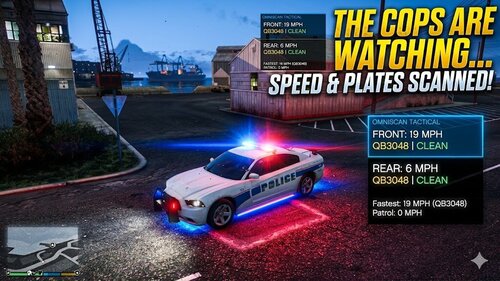
OmniScan is a high-performance, integrated radar and ALPR (Automatic License Plate Recognition) system for LSPDFR. Designed for modern patrol units, it provides real-time speed tracking, plate scanning, and tactical deployables through a sleek, pulsing HUD interface.
Key Features
Dual-Antenna Radar: Simultaneous tracking of front and rear targets with "Fastest Speed" memory.
Intelligent ALPR: Automatic scanning of license plates with integrated BOLO, Wanted, and Expired registration alerts.
Dynamic HUD: A high-visibility interface featuring pulsing visual alerts for speed violations or vehicle flags.
Manual BOLO Entry: Input specific plates to track targets through traffic.
Tactical Tools: Instant deployment of Spike Strips directly from the vehicle.
Controller Friendly: Full support for both Keyboard and Gamepad inputs.
System Controls
Menu Navigation
Keyboard: Press [X]
Controller: Press [RB + A]
Use the menu to toggle power, adjust speed limits, view scan history, or deploy equipment.
Radar & ALPR Logic
Lock/Unlock Data: Press [Space] (Keyboard) or [RB + X] (Controller).
This "freezes" the current speed and plate on the HUD for processing citations or initiating stops.
Manual BOLO: Accessible via the LICENSE PLATE QUERY sub-menu.
Tactical Deployables
Deploy Spike Strips: Accessible via the DEPLOYABLES sub-menu.
Automatically targets any vehicle (except your own) that passes over the strips.
Installation
Ensure you have RagePluginHook and LemonUI installed.
Place OmniScan.dll into your Plugins folder.
Load the game and the system will initialize automatically upon entering a police vehicle.
Developed by Helios- 965 Downloads
- 29 Comments
Updated -
🛰️ SpeedRadar
Advanced AI-Assisted Traffic Enforcement for LSPDFR
Elevate your highway patrol with SpeedRadar, a lightweight and highly accurate speed detection tool designed for seamless integration with LSPDFR. Developed with the assistance of advanced AI, this plugin provides officers with the essential data needed to identify, track, and intercept speeding motorists with professional-grade precision.
🔹 Core Features
Real-Time Raycast Tracking: Instantly detect the speed of any vehicle in your direct line of sight using high-precision tracking logic.
Target Locking System: Use the Spacebar to "freeze" a target's current speed and license plate. This allows you to maintain a visual record of the offense while you initiate a pursuit or traffic stop.
Visual & Audible Alerts: The radar display automatically changes color (White to Red) and triggers a distinct audio tone when a vehicle exceeds your defined speed threshold.
Minimalist HUD: Designed to be non-intrusive, the radar information appears in the standard "Help Text" area to keep your screen clear of clutter during high-speed patrols.
Full Customization: A dedicated .ini file allows you to set your own Toggle Keys, Lock Keys, Speed Limits, and choose between MPH or KPH.
🎮 Controls (Default)
Toggle Radar: I (Enable/Disable the system)
Lock/Unlock Target: Spacebar (Capture speed and plate data)
⚙️ Installation
Ensure you have RAGE Plugin Hook and LSPD First Response installed.
Drag the Plugins folder into your main Grand Theft Auto V directory.
Navigate to Plugins/LSPDFR/SpeedRadar.ini to customize your settings.
Launch GTA V via RagePluginHook and go On Duty.
📋 Requirements & Credits
LSPD First Response (0.4.9 or higher)
RAGE Plugin Hook (1.85 or higher)
Microsoft .NET Framework 4.7.2
- 1,466 Downloads
- 7 Comments
Updated