Iggy Fresh
Members
-
Joined
-
Last visited
Files posted by Iggy Fresh
-
Hey guys,
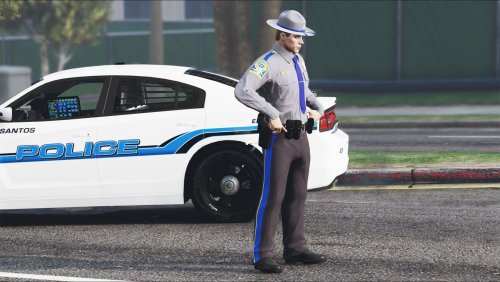
There weren't any CT State Trooper uniforms available, so I created my own and decided to share with everyone per many requests.
Due to some limitations, the hat is not exact (doesn't say 'State Police') and the badge is a little off.
You will need EUP 7.4 to use this skin.
Ped Skin Installation:
1. Install EUP 7.4
2. Replace both .ytd files (starting with jbib and lowr) in this directory via OpenIV:
GTA5/mods/update/x64/dlcpacks/eup/dlc.rpf/x64/models/cdimages/eup_componentpeds.rpf/mp_m_freemode_01_male_freemode_business
Trooper Hat Installation
1. Install EUP 7.4
2. Replace p_head_diff_013_e.ytd file in this directory via OpenIV:
GTA5/mods/update/x64/dlcpacks/eup/dlc.rpf/x64/models/cdimages/eup_componentpeds_p.rpf/mp_m_freemode_01_p
Use EUP or Skin Control to put the outfit together.
-Iggy Fresh
CT State Police Taurus in the screenshot:
Vehicle Used:
Wheels Used:
Video Showcase:
- 569 Downloads
- 1 Comments
Submitted -
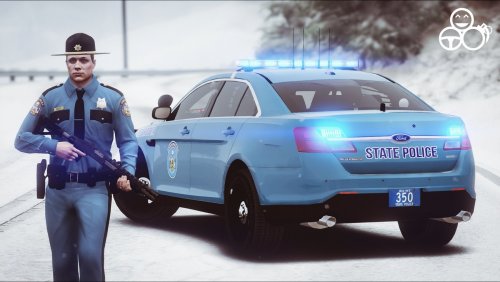
I present to you Maine State Police FPIS and MSP Uniform. I couldn't find any Maine State Police textures on this site, so I decided to create one and share with everyone who is interested.
Credit for creating the Taurus goes to Gump.
I only created the textures, please do not reupload this file anywhere without my permission.
Taurus Skin Installation:
1. Download the Taurus Model by Gump (http://www.lcpdfr.com/files/file/14554-els2016-fpis-wwhelen-liberty/)
2. Use OpenIV and go to: GTA5/Mods/update/x64/dlcpacks/patchday12ng/dlc.rpf/x64/levels/gta5/vehicles.rpf/police3.ytd (or wherever you installed it - I used the police3 slot)
3. Set OpenIV to Edit Mode
4. Open police3.ytd
5. Replace tau_sign_4 texture and delete the rest (deletion is optional and ensures other textures do not spawn)
6. Save and enjoy!
Ped Skin Installation:
1. Install EUP 7.4
2. Replace both .ytd files (starting with jbib and lowr) in this directory via OpenIV:
GTA5/mods/update/x64/dlcpacks/eup/dlc.rpf/x64/models/cdimages/eup_componentpeds.rpf/mp_m_freemode_01_male_freemode_business
Trooper Hat Installation:
1. Install EUP 7.4
2. Replace p_head .ytd file in this directory via OpenIV:
GTA5/mods/update/x64/dlcpacks/eup/dlc.rpf/x64/models/cdimages/eup_componentpeds_p.rpf/mp_m_freemode_01_p
Save and enjoy!
Known bugs:
- Badge doesn't seem to work on uniform
-Iggy Fresh
Vehicle Used:
Video Showcase:
- 437 Downloads
- 6 Comments
Submitted -
Hey guys,
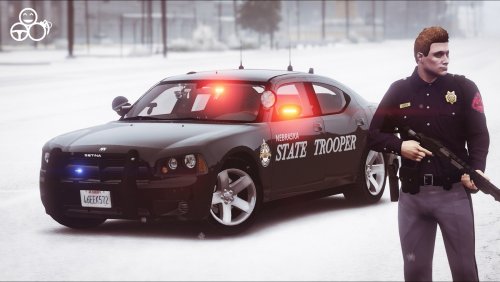
I looked everywhere on this site and could not find a Nebraska State Patrol livery of any kind (except for LCPDFR). So I created a skin for '09 Dodge Charger made by PSource and also created a uniform (you will need EUP installed to use it).
I only created the textures, please do not re-upload this file anywhere without my permission.
Charger Skin Installation:
1. Download the Charger Model by PSource (http://www.lcpdfr.com/files/file/10686-2009-dodge-charger-unmarked/)
2. Use OpenIV and go to: GTA5/Mods/update/x64/dlcpacks/patchday12ng/dlc.rpf/x64/levels/gta5/vehicles.rpf/sheriff.ytd (or wherever you installed it - I used the sheriff slot)
3. Set OpenIV to Edit Mode
4. Open sheriff.ytd
5. Replace chgr_sign_1 texture and delete chgr_sign_2 texture
6. Save and enjoy!
Ped Skin Installation:
1. Install EUP 7.4
2. Replace both .ytd files in this directory via OpenIV:
GTA5/mods/update/x64/dlcpacks/eup/dlc.rpf/x64/models/cdimages/eup_componentpeds.rpf/mp_m_freemode_01_male_freemode_business
Video Showcase:
Save and enjoy!
Known bugs:
- Badge doesn't seem to work on uniform
-Iggy Fresh
- 189 Downloads
- 7 Comments
Submitted -
Credit for creating the model goes to ALLENjr12, big thanks for creating such a sick car.
This is my first texture, so please be nice. If you notice any issues, let me know in the comments and I will correct it. If you like the texture, I'd appreciate a quick review! :)
Showcase of the car with CHP texture in spoiler:
I only created the texture, please do not re-upload this file anywhere without my permission.
Installation:
1. Download GTR Model by ALLENjr12 (http://wwww.lcpdfr.com/files/file/11721-unmarked-nissan-gtr)
2. Use OpenIV and go to: (Mods)/update/x64/dlcpacks/patchday3ng/dlc.rpf/x64/levels/vehicle.rpf/police2.ytd (or wherever you installed it)
3. Set OpenIV to Edit Mode
4. Open police2.ytd
5. Replace tr_boya texture
6. Save and enjoy!
-Iggy Fresh
Get the model here (works with either GTR):
- 1,342 Downloads
- 1 Comments
Updated -
I couldn't find a correct CT State Police Skin, so I made my own. This features the correct (to me) shade of grey and the black pieces on the trunk between the taillights. Pretty basic skin, but the only correct one on this site to-date!
Please note that this texture works on multiple CVPIs (by POLICESCO, Bxbugs123, Black Jesus, etc).
I only created the texture, please do not reupload this file anywhere without my permission
Installation:
1. Download CVPI Model by POLICESCO (http://www.lcpdfr.com/files/file/9268-lspd-cvpi-4k/)
2. Use OpenIV and go to: (Mods)/x64e/levels/gta5/vehicle.rpf/police.ytd (or wherever you installed it)
3. Set OpenIV to Edit Mode
4. Open police.ytd
5. Replace cvpi_sign_1 texture (delete others if wanted ex: cvpi_sign_2, cvpi_sign_3, etc)
6. Save and enjoy!
Vehicle used:
-Iggy Fresh
Video of CVPI with said texture:
- 245 Downloads
- 21 Comments
Updated -
Credit for creating the car model goes to BritishGamer88, I only created the texture.
If you like the texture, I'd appreciate a quick review! :)
I realize that CHP does not use EVOs, but this is a game and I thought it would be a cool addition to it.
Showcase of the car with said texture:
Installation:
1. Download EVO IX Model by BritishGamer (https://www.gta5-mods.com/vehicles/police-mitsubishi-evolution-9-pack-marked-unmarked)
2. Use OpenIV and go to: (Mods)/update/x64/dlcpacks/patchday3ng/dlc.rpf/x64/levels/vehicle.rpf/sheriff.ytd (or whereever you installed it)
3. Set OpenIV to Edit Mode
4. Open sheriff.ytd
5. Replace paintjob texture
6. Save and enjoy!
Get the car model here:
https://www.gta5-mods.com/vehicles/police-mitsubishi-evolution-9-pack-marked-unmarked
-Iggy Fresh
- 827 Downloads
- 5 Comments
Updated