


hexdex321
Members
-
Joined
-
Last visited
Everything posted by hexdex321
-
 @skyred50 The update is live with controller support! 🎉 @sgtmorris Do you mean having your lightbar on and headlights off? I believe this is already possible in vanilla LSPDFR, please DM me more specifics so I can look into it, thanks for the suggestion though! @IdeallyStoddy Engine toggle has been added in update 1.7, I will definitely look into lock/auto car lock for sure. The brake lights being on when stopped is a lot more tricky since Rage Plugin 1 doesn't implement it in a manner easy to develop. I will definitely look into it, however it appears a new version of Rage Plugin is being released in the future which may make development on this a lot easier, so we'll have to see. Thank you for all the suggestions and the support! -holexion
- 262 comments
- 21 reviews
-
Hello everyone, I am working on adding controller support, however it is taking a lot longer than expected, and I am also studying for finals. Thanks for the patience and the support, I promise that an update will be on its way eventually, thanks!
- 262 comments
- 21 reviews
-
-

- 1
-
-
@Cyanotic Yes, that is what is intended. If you have any suggestions, please tell me though!
- 262 comments
- 21 reviews
-
@Cyanotic Thanks for the report, if I'm not able to fix it in the next update please DM me! Thanks for the support!
- 262 comments
- 21 reviews
-
-
- 1
-
-
@thisridiculous Thanks for the support! I'm definitely going to take a look into it to see if I'm able to improve the door issue.
- 262 comments
- 21 reviews
-
Currently you can use the smart door feature to open the driver or passenger door, however I have taken your comment into note, and I'll definitely put this feature in my to-do list. Thanks for trying out my mod! @MikMak86 For the vehicle inventory, it is intended but you're right in that I want to expand the inventory system to actually make it store weapons and such, however that may take a bit of time to be implemented. For the door controls, that's definitely not intended, so I'll see if its something I can fix next update. Thanks for the bug report and the support, I do appreciate the comments so I can further improve this mod.
- 262 comments
- 21 reviews
-
-
- 1
-
-
Yeah, I was working on it but for some reason Rage Plugin makes it overly complicated, so it will probably be in the next update, however the preliminary code is actually built in, just not turned on yet as I need to get it working fully first. But don't worry, I'm on it! Thanks everyone for the support, I will continue updating this mod, and be on the lookout for more enhancements in the future! -holexion
- 262 comments
- 21 reviews
-
No problem, I've looked into it and it looks very possible, so please check in later as it may be in the next update if I can implement it!
- 262 comments
- 21 reviews
-
@GreyFox I am working on it, but it is very difficult to implement in RAGE Plugin Hook, so it may take some time, thanks for the suggestion though!
- 262 comments
- 21 reviews
-
@XGN ShaynePlayz Sounds cool, thanks for the suggestion! I'll see if I can implement it, and thanks for trying out my mod!
- 262 comments
- 21 reviews
-
@ToKen. Thanks for the suggestion, I'm working on it but it is very difficult as I don't have a controller to test with, but thanks for the suggestion anyways!
- 262 comments
- 21 reviews
-
@GreyFox I've been attempting to work on that, brake lights are a lot more difficult to implement due to it not being classified as a vehicle indicator, so it might be a while until that is implemented. But thanks for the suggestion!
- 262 comments
- 21 reviews
-
Hello everyone, sorry for not pushing out an update, there has been an update with Rage Plugin Hook this week due to the new Rockstar launcher, so be assured that I'm still working on this mod so thanks for the patience everyone!
- 262 comments
- 21 reviews
-
-
@thisridiculous that sounds like a cool idea! I'll definitely put that on my suggestion list, it might be in the next update if I'm able to implement it. Thanks for trying out my mod and for the suggestion! If you enjoyed it please leave a review, that would be very appreciated!
- 262 comments
- 21 reviews
-
-
- 1
-
-
Thanks! If you have any suggestions or issues please feel free to DM me! Also Version 1.4 with improved features hasn't been approved by mods yet, so please wait a day or so and check it out again!
- 262 comments
- 21 reviews
-
-
- 1
-
-
Thanks @alexgrobert, both functionalities that you mentioned is coming in version 1.4, so please keep an eye out on that, and follow to get the latest updates when they come out! To @Officer LarseN, currently the autoblinkers work by turning off automatically once you finished turning, but thanks for the question: I will make sure to make it clearer on the description page! Thanks for trying out my mod again, if you have any suggestions for new features, I will be sure to take it into consideration! To @HerbertCrain & @deeznuttz420: Unfortunately, I don't have a controller so it would be very difficult to test, if you are willing to test for controller settings, please DM me, but you must be willing to test out a couple of versions and be able to respond within a day, so I can make necessary adjustments. Now, in update 1.4, some parts like the retaining wheels will work with controller support, but for shortcut keys, as I said before, have not been implemented for controller support yet, hopefully I might get someone willing to test and will be able to implement the feature in the future (however there is no set date of implementation depending on how difficult it is to implement, especially since I don't have a controller to work with). For everyone who commented, thank you, and I do take suggestions seriously, it just takes time to implement them. And thanks for all who downloaded and supported my mod again, if you enjoyed it please leave a good review, and I'll make sure to keep updating the mod with improved and new features! Holexion
- 262 comments
- 21 reviews
-
Thanks for your comments! Currently they only turn on when you exit the vehicle while holding the vehicle tires in place (i.e. hold left while pressing 'f' to leave vehicle) however that will be updated next update to work whenever the vehicle stops, so thanks for you patience, and be sure to check up once I get it updated, it should be much better then! About the turn signals, that just means they turn off automatically once you activate them so you don't have to turn them off. Please leave any suggestions, and once updated 1.4 is out in the future and you still have problems, feel free to leave another comment or direct message me! Thanks for spending the time to look at my mod though, and please check it out in the future as I have taken your comments into account.
- 262 comments
- 21 reviews
-
-
- 3
-
-
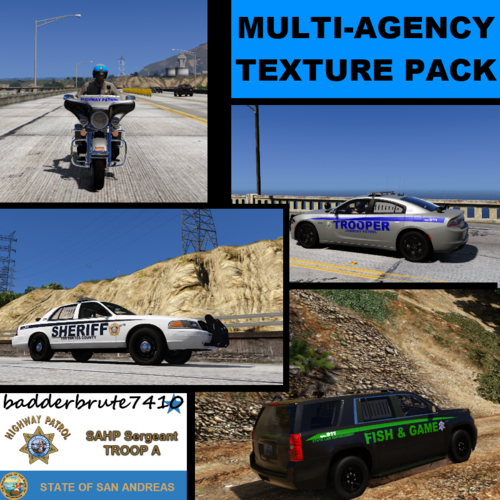 Wow, these cars are great, there are quite a few in this pack! Thanks for suggesting my plugin also!
- 1 review
-
-
- 1
-
-
Thanks for the support! Please leave a review if you enjoyed the mod, that would be appreciated! Please direct message me if you still have troubles!
- 262 comments
- 21 reviews
-
Thanks for the suggestion! About the brake lights, it is a lot more complicated to do for some reason, so it may be a while before its implemented, but I will definitely look into it. It appears to work for me. Make sure that when you exit the car when the vehicle is stopped, hold the left button so that your wheels turn in the left direction, then press f to leave your car while holding left. This will make your tires retain its position. Hope I helped, please message me directly if you have any other problems!
- 262 comments
- 21 reviews
-
-
- 2
-
-
@Kallenboston Interesting idea, I'll try my best to implement it in the next version! Thanks for the suggestion! EDIT: I will be implementing this in the next version 1.4, be on the lookout for that!
- 262 comments
- 21 reviews
-
-
- 2
-
-
I'm planning to add some more features in the future too, so any suggestions would be appreciated.
- 262 comments
- 21 reviews
-
The autoblinkers mean that when you activate your blinkers by pressing the control key, they automatically turn off once you make a turn, just like a vehicle in real life they automatically disable so you don't have to press a key to deactivate your blinker. You can disable this in the .ini file so you can see that origianlly you would have to press to activate a indicator light and then press a key again to deactivate the blinker light.
- 262 comments
- 21 reviews
-
-
- 2
-
-
I will have a look at adding an optional modifying key in, if that's possible in the near future. Everything works on my end, a temporary fix would be changing the controls with the .ini file to keys that are binded to any other mods you are using. Thanks for the suggestion though!
- 262 comments
- 21 reviews

