



AdirB
Members
-
Joined
-
Last visited
Everything posted by AdirB
-
I wrote a lines of code which creates objects but I want these objects to be called all by one name so if I need to delete them in end() I will need only to type the variable of all of the objects instead of typing each one of them separately, there's pretty much of these. I'd apperciate it if someone explains me how to do that. Thanks in advance :)
-
Thanks, I solved it myself before :)
-
Hello, I started to learn LSPDFR API yesterday, I'm trying to check if the suspect is dead and if he is, the dispatcher will say "Suspect is neutralized" and then she will say "10-4, copy that". I understand that to do it I need to play 2 defferent files in two seperate function lines but I kinda mess it around. if (PursuitCreated && !Functions.IsPursuitStillRunning(Pursuit)) { Game.DisplayNotification("Distpach, suspect is under custody. Resuming Patrol."); Functions.PlayScannerAudio("SUSPECT_IN_CUSTODY"); GameFiber.Sleep(4000); Functions.PlayScannerAudio("10-4"); End(); } if (PursuitCreated && Suspect.IsDead(Pursuit)) { Game.DisplayNotification("Distpach, suspect is neutralized. Resuming Patrol."); Functions.PlayScannerAudio("SUSPECT_NEUTRALIZED"); GameFiber.Sleep(4000); Functions.PlayScannerAudio("10-4"); End(); } The problem is when the suspect's dead it plays the first dispatch and then the second, but the second's kinda repeating himself all over endless. Also, I receive the custody notification. I don't know why, I'd aperciate if someone helps me. Thanks in advance! :)
-
Also, with the Realistic Radiance's file it seems to be that the flickering lights are faster. I ran a compare between the Bxbugs123's 2011 CROWN VICTORIA LASD/LSSD V1.4A visualsettings.dat file which is most likely the one causing me problems and between Realistic Radiance dat file, these are the differnces: First is Bxbugs123's dat file line and 2nd is Realistic Radiance's file line. heli.whitetaillight.color.green 1.00 heli.whitetaillight.color.green 0.00 car.defaultlight.day.emissive.on 350.00 car.defaultlight.day.emissive.on 100.00 car.defaultlight.night.emissive.on 120.00 car.defaultlight.night.emissive.on 30.00
-
I tried the Realistic Radiance visualsettings.dat file and it helped alot, the taxi ad bar is alot less brighter and the ford explorer's light bar is too. But the lights still glitches on the sky and kinda makes a blur background and the CVPI lights bar has rounded lights less bright but still not enough. I tried the original visualsettings.dat file of the game and the it fixed the CVPI light but it reduced the Ford Explorer's light to almost zero so it's somewhere between the original file and Realistic Radiance's file. But I don't know which line to edit.
-
-
Hello, I'm having a problems with my in-game lights. They are too birght. Also, when I target any light to sky, it seems to be that the light kinda making a background. You can see it in here - http://imgur.com/a/D8HFm It started after I installed a vehicle pack and I would like to keep the pack and just to fix the problem. I don't know how to do it I'm just guessing it's either in the vehicle.meta or carvations.meta files. Thank you in advance.
-
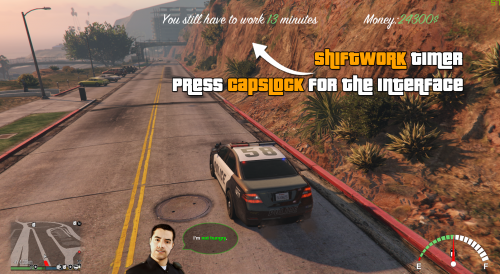 I'd be great if you add more time for the shift, because real-life time is 15 minutes for a shift for me, or there's away to make it longer in the INI file.
- 120 comments
- 13 reviews
-
-
I meant the Police Radio section in your webpage, the database thingy :) Also whenever I run the game with the plugin, and go on duty my game crases, could it be because the database's off or something?
- 120 comments
- 13 reviews
-
Hello! I'm trying it right now! I don't know if it's existing right now in this plugin, but if not could you add the Police Radio, to the game so we can see it in-game? Like maybe pop it up with a key press and have notification which we could also disable, it could be annoying for some of us. Thanks for your plugin! :D
- 120 comments
- 13 reviews
-
 I don't know if it's my installation as I see other players here who using it and probably have no problems with this mod. I installed the mod as it says in the text file you included with the ZIP file, but when I hit someone in-game it's like the punch doesn't effect him. It broke the hit system.
- 31 comments
- 5 reviews
-
 It's a very nice callout mod, pretty amazing! The new version you just released with the new version of RAGENativeUI, is not working. Probably because other mods I have are still not compatibility with the new RAGENativeUI. Good job on these callouts, Thank you :)
- 302 comments
- 66 reviews
-
-

- 1
-

