PrinceChristian
Members
-
Joined
-
Last visited
Files posted by PrinceChristian
-
- 78 Downloads
- 1 Comments
Updated -
Description:
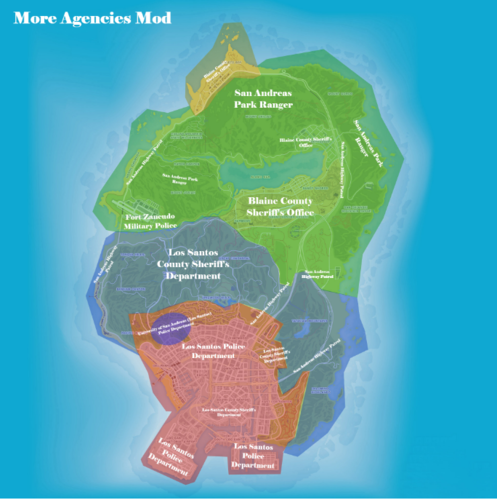
This modification/scripts adds more law enforcement agencies to LSPDFR. Users are now able to patrol with the following agencies:
- Los Santos Police Department (LSPD) - Patrols areas of Los Santos, San Andreas - Los Santos County Sheriff's Department (LSSD) - Patrols areas of Los Santos County, San Andreas (including specific areas within the City of Los Santos) - University of San Andreas Los Santos Police Department (ULSA) - Patrols areas surrounding the University of San Andreas of Los Santos - Blaine County Sheriff's Office (BCSO) - Patrols areas of Blaine County, San Andreas - San Andreas Highway Patrol (SAHP) - Patrols the highways/streets of San Andreas statewide - San Andreas Park Rangers (SAPR) - Patrols national/state parks - Fort Zancudo Military Police (FZMP) - Patrols areas of and around Fort Zancudo (including Lago Zancudo, Zancudo River, Route 68)
You will notice LSSD, BCSO, and FZMP will patrol parts of Route 68 as Los Santos County, Blaine County, and Fort Zancudo share a border on Route 68.
**IMPORTANT**: You will need to modify your vehicle slots within the .XML files using OpenIV for 'agency' (located in GTA\lspdfr\data) and 'CustomRegions' (located in GTAV\plugins\lspdfr\UltimateBackup) to correspond with the departments above only after completing the steps below.
(Example: 'sheriff2' is a default slot for the Los Santos County Sheriffs Department in LSPDFR. In this script, the 'sheriff2' slot is default for the Blaine County Sheriff's Office.
You will need to 1): change the 'sheriff2' in the 'agency' /XML file to a car slot reserved for Blaine County Sheriff's Office or 2): install a vehicle reserved for Blaine County Sheriff's Office in the 'sheriff2' slot.
You may also have to modify your EUP to display in game, any additional EUP add-ons you may have previously downloaded.
Requirements:
- LSPDFR
- Rage Plugin Hook
- OpenIV
Optional Requirements:
- Ultimate Backup * by bejoijo (Recommended) - EUP * (Emergency uniforms pack - Law & Order 8.2 by Alex_Ashfold and EUP Menu 2.2.1.0 PieRGud and others) (Recommended)
* If you use Ultimate Backup and/or EUP you will need to also follow the EUP Configuration Files Installation steps below.
Installation:
- (Required) Drag and Drop the 'data' folder into 'Grand Theft Auto V\lspdfr\
EUP Configuration Files Install (Required only if you use EUP):
- Drag and Drop 'CustomRegions','DefaultRegions', and 'Special Units' XML files into GTAV\plugins\UltimateBackUp
- Drag and Drop the 'Custom' folder into Grand Theft Auto V\lspdfr\data
Vehicle Slots:
- LSPD: police,police2,police3
- LSSD: sheriff
- ULSA: police4
- BCSO: sheriff2
- SAHP: fbi,fbi2
- SAPR: pranger
- FZMP: policeold2
Future updates will add Paleto Bay Police Department and more.
- 4,463 Downloads
- 21 Comments
Updated