TheBritishMighty
Members
-
Joined
-
Last visited
Files posted by TheBritishMighty
-
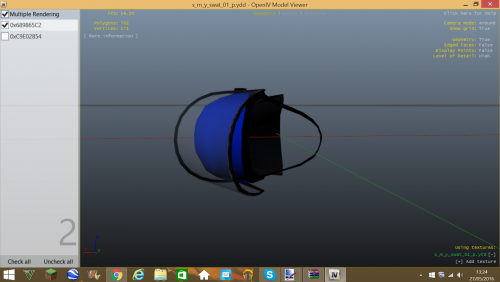
Includes: Cummunity Support hat, Normal hat, Traffic hat, Riot hat, Highways england hat.
How to install: Installation tutorials will be in each file.
To Use This Mod Follow These Terms:
Don't redistribute without my permission.
Don't edit any file and redistribute it without my permission.
I do not claim responsibility for any damage this mod may cause to your PC or Game. (DOWNLOAD AT YOUR OWN RISK)
DO NOT RE-UPLOAD MY PLAYER MOD AT ALL.
I do not take credit for the model, for credits check the "CREDITS" folder.
- 136 Downloads
Submitted -
Tips are appreciated, but please keep in mind that this is a wip and is in 0.1
also please check my to-do list in the desc
To Do:
- Put police text higher up
- Possibly a high vis/reflective version
- Possibly a white and blue pattern on the black version.
For credits check the download file.
_________________________________________________
HOW TO INSTALL
-------------------------------------------------
-Open up OPEN IV
-Go to mods/x64e/models/cdimages/componentpeds_s_m_y.rpf
-Search for "cop"
-Enter Edit Mode (IF YOU DONT DO THIS IT WILL NOT WORK)
-Then replace all of the s_m_y_cop_01 files with the ones you just installed.
-Exit OpenIV
-Enjoy
To Use This Mod Follow These Terms:
- Don't redistribute without my permission.
- Don't edit any file and redistribute it without my permission.
- I do not claim responsibility for any damage this mod may cause to your PC or Game. (DOWNLOAD AT YOUR OWN RISK)
- DO NOT RE-UPLOAD MY PLAYER MOD AT ALL.
- I do not take credit for the model, for credits check the "CREDITS" folder.
- 995 Downloads
Updated -
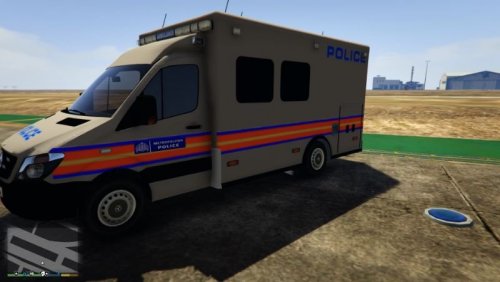
This is a skin for british gamers ambulance sprinter.
HOW TO INSTALL
-------------------------------------------------
-Open up OPEN IV
-Download British Gamers Ambulance and follow his installation guide first.
Link to the model: https://www.gta5-mods.com/vehicles/2014-british-mercedes-sprinter-ambulance
-Once complete go to mods/x64e/levels/gta5/vehicles.rpf (this is the same if you replace either policet or ambulance)
-Go into edit mode. (MAKE SURE TO DO THIS OR IT WONT WORK)
-Replace the files provided (choose what vehicle you want to replace)
-Click the X button and leave open IV
-Enjoy!
To Use This Mod Follow These Terms:
Don't redistribute without my permission.
Don't edit any file and redistribute it without my permission.
I do not claim responsibility for any damage this mod may cause to your PC or Game. (DOWNLOAD AT YOUR OWN RISK)
DO NOT RE-UPLOAD MY SKIN AT ALL.
I do not take credit for the model, for credits check the "CREDITS" folder.
CREDITS:
Met Police Sprinter SKin: TheBritishMighty
Model : ChrisR
GTAIV Author : BritishGamer88n
Edited Futher For IV : BritishGamer88
Converted over to GTAV : BritishGamer88
Texture's/Material's : BritishGamer88
Template : BritishGamer88
Police Lightbar : LtCaine
Grill Lights : Vertex
Rear Cab Equipment - 3Dwarehouse
Oleg : for continuious help to get the model working ingame!!
Ambulance Skin : Marco Clever
Wheel's - Jayone HOW TO INSTALL
-------------------------------------------------
-Open up OPEN IV
-Download British Gamers Ambulance and follow his installation guide first.
Link to the model: https://www.gta5-mods.com/vehicles/2014-british-mercedes-sprinter-ambulance
-Once complete go to mods/x64e/levels/gta5/vehicles.rpf (this is the same if you replace either policet or ambulance)
-Go into edit mode. (MAKE SURE TO DO THIS OR IT WONT WORK)
-Replace the files provided (choose what vehicle you want to replace)
-Click the X button and leave open IV
-Enjoy!
To Use This Mod Follow These Terms:
Don't redistribute without my permission.
Don't edit any file and redistribute it without my permission.
I do not claim responsibility for any damage this mod may cause to your PC or Game. (DOWNLOAD AT YOUR OWN RISK)
DO NOT RE-UPLOAD MY SKIN AT ALL.
I do not take credit for the model, for credits check the "CREDITS" folder.
CREDITS:
Met Police Sprinter SKin: TheBritishMighty
Model : ChrisR
GTAIV Author : BritishGamer88n
Edited Futher For IV : BritishGamer88
Converted over to GTAV : BritishGamer88
Texture's/Material's : BritishGamer88
Template : BritishGamer88
Police Lightbar : LtCaine
Grill Lights : Vertex
Rear Cab Equipment - 3Dwarehouse
Oleg : for continuious help to get the model working ingame!!
Ambulance Skin : Marco Clever
Wheel's - Jayone
- 103 Downloads
Submitted -
This took me about one and a half days to make, so I hope you enjoy it!
Whats To Come:
-Add "Making A Difference" Motto
-Add Unit Numbers
_________________________________________________
HOW TO INSTALL
-------------------------------------------------
-Open up OPEN IV
-Download the IMPALA and follow that installation guide first.
Link to the model: http:http://www.lcpdfr.com/files/file/8952-2014-chevrolet-impala-lspdlssd/
-Once complete go to the location of the files you just replaced.
-Go into edit mode. (MAKE SURE TO DO THIS OR IT WONT WORK)
-Click on police2.ytd TWICE then click the black plus at the top left.
-Then replace the .png file with the one you just downloaded
-Click the X button and leave open IV
-Enjoy!
To Use This Mod Follow These Terms:
Don't redistribute without my permission.
Don't edit any file and redistribute it without my permission.
I do not claim responsibility for any damage this mod may cause to your PC or Game. (DOWNLOAD AT YOUR OWN RISK)
DO NOT RE-UPLOAD MY SKIN AT ALL.
I do not take credit for the model, for credits check the "CREDITS" folder.
CREDITS:
- Florida Orange County Sheriff: TheBritishMighty
- Model is original 2010 Chevrolet Impala LS From Driver SF.
- Modified and Converted into 2014 PPV Impala by Bxbugs123, later Converted to GTA V by Bxbugs123
- Seats By Bxbugs123, Antennas by Bxbugs123.
- Wheels Modeled, Textured & Converted for GTA IV by Bxbugs123.
- All Police Equipment Modeled, Textured & Converted for GTA V by Bxbugs123 (see model overview for full list of equipment.)
- All Police Lighting Equipment Modeled, Textured & Converted for GTA V by Bxbugs123 (see model overview for full list of Lighting.)
- Go-Rhino Pushbar Modeled, Textured & Converted for GTA V by Bxbugs123.
- Setina Partition Modeled, Textured & Converted for GTA V by Bxbugs123.
- M780 Shotgun by GRIM, AR by Rockstar Games, Pro-Gard Gun Rack by Bxbugs123.
- LSPD & LSSD SKINS by Bxbugs123 "DO NOT EDIT THEM WITH OUT PERMISSION"
- 94 Downloads
Updated -
This is in 0.1 so please report errors/bugs to me.
CREDITS:
Model is original Driver San Francisco , modified for GTAV by F5544, marked to police version by Cj24 and KevinDV
Liveries are made by BogdanM.
Lightbar, LAPD Rambar made by F5544.
Console made by 0taku.
Interior parts made by Bxbugs123/Schaeft with permission to use.
Interior textured by F5544/BogdanM.
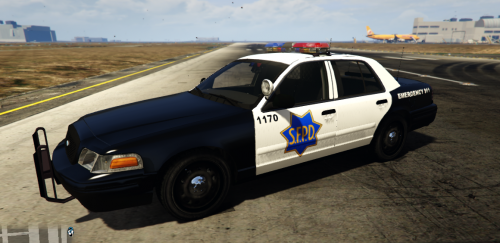
San Fransisco Textue By: TheBritishMighty
To Use This Mod Follow These Terms:
- Don't redistribute without my permission.
- Don't edit any file and redistribute it without my permission.
- I do not claim responsibility for any damage this mod may cause to your PC or Game. (DOWNLOAD AT YOUR OWN RISK)
- DO NOT RE-UPLOAD MY SKIN AT ALL.
- I do not take credit for the model, for credits check the "CREDITS" folder.
_________________________________________________
HOW TO INSTALL
-------------------------------------------------
-Open up OPEN IV
-Download F5544 CPVI Car and follow his installation guide first.
Link to the model: http://www.lcpdfr.com/files/file/8870-ford-cvpi-lspd-mx7000/?page=4&tab=comments#comment-70320
-Once complete go to the location of the files you just replace.
-Go into edit mode. (MAKE SURE TO DO THIS OR IT WONT WORK)
-Click on police.ytd TWICE then click the black plus at the top left.
-Then replace the .png file with the one you just downloaded
-Click the X button and leave open IV
-Enjoy!
- 31 Downloads
- 2 Comments
Submitted -
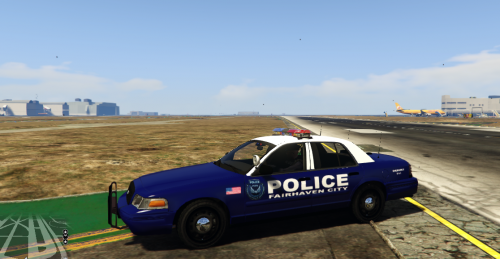
This cvpi is not based of the real Fairhaven police cars but it is based on the Need For Speed Mostwanted Fairhaven police cars.
For Licenses and credits please look in the downloaded file.
_________________________________________________
HOW TO INSTALL
------------------------------------------------- -Open up OPEN IV
-Download F5544 CPVI Car and follow his installation guide first.
Link to the model: http://www.lcpdfr.com/files/file/8870-ford-cvpi-lspd-mx7000/?page=4&tab=comments#comment-70320
-Once complete go to the location of the files you just replace.
-Go into edit mode. (MAKE SURE TO DO THIS OR IT WONT WORK)
-Click on police.ytd ONCE then click the green plus at the top.
-Then replace the .ytd file with the one you just downloaded
-Click the X button and leave open IV
-Enjoy! If you have any problems please report them to me.- 62 Downloads
Submitted -
Give me suggestions but remember this is a WIP and is in 0.1 !!!
OTHER INFORMATION...
For credits and licences check the file.
INSTALLATION:
-Open up OPEN IV
-Download F5544 CPVI Car and follow his installation guide first.
Link to the model: http://www.lcpdfr.com/files/file/8870-ford-cvpi-lspd-mx7000/?page=4&tab=comments#comment-70320
-Once complete go to the location of the files you just replace.
-Go into edit mode. (MAKE SURE TO DO THIS OR IT WONT WORK)
-Double click police.ytd. (or the .ytd file of whatever vehicle(s) you replaced, Example: ambulance.ytd or police3.ytd)
-Go to the top left and click Import.
-Import the cvpi_sign_2.jpg file in the download. (find the location of the file)
-Click the X button and leave open IV
-Enjoy!
- 136 Downloads
Submitted -
Give me suggestions but remember this is a WIP and is in 0.1 !!!
OTHER INFORMATION...
For credits and licences check the file.
INSTALLATION:
-Open up OPEN IV
-Download F5544 CPVI Car and follow his installation guide first.
Link to the model: http://www.lcpdfr.com/files/file/8870-ford-cvpi-lspd-mx7000/?page=4&tab=comments#comment-70320
-Once complete go to the location of the files you just replace.
-Go into edit mode. (MAKE SURE TO DO THIS OR IT WONT WORK)
-Double click police.ytd. (or the .ytd file of whatever vehicle(s) you replaced, Example: ambulance.ytd or police3.ytd)
-Go to the top left and click Import.
-Import the cvpi_sign_2.jpg file in the download. (find the location of the file)
-Click the X button and leave open IV
-Enjoy!
- 56 Downloads
Updated -
KNOW BUGS...
Vehicle will spawn with green paint as normal. (There is nothing I can do about this. We can not edit vehicle spawn colour/color meaning you will have to use your trainer to edit it. I suggest using white paint). OTHER INFORMATION...
For credits and licences check the file.
INSTALLATION:
-Open up OpenIV
-Enter edit mode
-Then go to mods/x64e/levels/gtav/vehicles.rpf
-Search for Stockade+hi.ytd
-double click on it
-Click import in the top left
-import the installed stockade_livery.png
-Then Exit the texture importer menu
-Then go to stockade.ytd and do the same as before
-once you have done this exit edit mode and OpenIV
-Then ENJOY!
- 39 Downloads
Submitted -
For Credits and Licences check the file.
Please note that this is still a (WIP) so there are a few bugs that need to be fixed. Its currently in 0.1
_______________________
KNOWN BUGS/ERRORS!
-Some blue near green.
-ANPR and DAV on the windows (just a texture issue with the police & paramedic skin. It will be fixed).
-Blue near gas cap.
-Wrong roof symbols (again just another police skin & paramedic skin glitch, again will be fixed).
_____________________
INSTALLATION (also included in download file)
-Open up OPEN IV
-Download Double Dopplers Met Police Car and follow his installation guide first. (make sure you install the BMW TRAFFIC POLICE unit not the ARV unit) Link: http://www.lcpdfr.com/files/file/8770-gta-5-met-police-bmw-525d-f11-arv-traffic-units/
-Once complete go to the location of the files you just replace.
-Go into edit mode. (MAKE SURE TO DO THIS OR IT WONT WORK)
-Double click police.ytd. (or the .ytd file of whatever vehicle(s) you replaced, Example: ambulance.ytd or police3.ytd)
-Go to the top left and click Import.
-Import the policenew_sign_1.jpg file in the download. (find the location of the file)
-Click the X button and leave open IV
-Enjoy!
___________________
SIDE NOTES
-Please feel free to inform me of any other bugs or errors with the skin
-I am not claiming responsibility for any damage/corruption this skin may cause to your PC or GTAV. This is not to scare you. (DOWNLOAD AT YOUR OWN RISK)
- 84 Downloads
Updated