Creators: Due to background reprocessing of files, approvals and file security checks may be delayed. Thanks for your patience.

Shadowed83
Members
-
Joined
-
Last visited
Files posted by Shadowed83
-
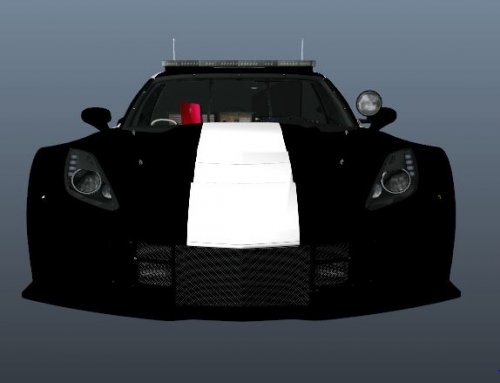
After downloading the Pursuit Chevrolet Corvette by BlizzardZX10R, I was saddened to find that there was no LSPD skin, therefore I decided to go ahead and make one for the Community. I ended up making the Corvette a standard black-and-white police car albeit with a white racing stripe. The Corvette itself is labeled ( as seen in the photo of the rear) as part of the LSPD's Pursuit Division for high speed chases. This skin took me roughly 6 hours to do, as this is my first skin I've ever made.
To install:
1.OpenIV
2. Go to: Grand Theft Auto V\mods\x64e.rpf\levels\gta5\vehicles.rpf\ Once there find the Police.ytd file and overwrite one of the liveries with the one provided in the folder. (I used livery one to overwrite)
3. Hit save
4. Click Rage plugin hook launcher
5. Load LSPDFR
6. Get in a High-speed Pursuit in downtown Los Santos.
Credits:
Original Corvette model by Rasputin
Police model by Bizzle ZX10R
Skin model by Shadowed83
Notice: Do not upload anywhere else without my express permission.
- 84 Downloads
- 11 Comments
Updated