Skip to content
View in the app

A better way to browse. Learn more.

LCPDFR.com

A full-screen app on your home screen with push notifications, badges and more.

To install this app on iOS and iPadOS
  1. Tap the Share icon in Safari
  2. Scroll the menu and tap Add to Home Screen.
  3. Tap Add in the top-right corner.
To install this app on Android
  1. Tap the 3-dot menu (⋮) in the top-right corner of the browser.
  2. Tap Add to Home screen or Install app.
  3. Confirm by tapping Install.

Garretw3

Members
  • Joined

  • Last visited

Files posted by Garretw3

  1. hello, this is my fulton county police texture pack.  This pack requires the LSPD PACK from t0y. this pack will use all vehicles in the LSPD PACK and no more no less.


    • 119 Downloads
    • 1 Comments
    Updated
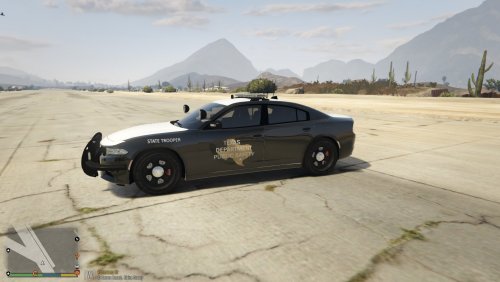
  2. Texas State Troopers retextures.


    Have fun with this retexture and let me know if you have any problems.
    • 404 Downloads
    • 2 Comments
    Submitted
  3. This is a reskin of LVMPDFAN's NHP patrol charger enjoy.


    • 170 Downloads
    • 1 Comments
    Updated
  4. This script adds guns, sights, and apparel to the vehicle Search script.
    1. AK-47
    2. Carbine Rifle
    3.Pistol
    4. Combat pistol
    5. AP pistol
    6. Shotgun
    7. combat Shotgun
    8. Sniper rifle
    9. Heavy Sniper
    10. marksmen Rifle
    11. Bullpup Shotgun
    12. Grenade
    13. Baseball bat
    14. Pocket Knife
    15. Switchblade
    16. LSPD Vest
    17. Grenade launcher
    18. RPG
    19. C4
    20. Military Vest
    21. military Helmet
    22. Sword
    23. Boot Knife
    24. Tommy gun
    25. ACOG
    26. Kobra Sight
    27. Scope
     
    Hope you enjoy let me know if you want to see anything added to this mod.
     
    • 276 Downloads
    Updated

Account

Navigation

Search

Search

Configure browser push notifications

Chrome (Android)
  1. Tap the lock icon next to the address bar.
  2. Tap Permissions → Notifications.
  3. Adjust your preference.
Chrome (Desktop)
  1. Click the padlock icon in the address bar.
  2. Select Site settings.
  3. Find Notifications and adjust your preference.