


TheDanishGuy
Members
-
Joined
-
Last visited
Everything posted by TheDanishGuy
-
It's for this car made by TIM98 Thanks to Michael V. for how to install a texture http://www.lcpdfr.co...o-a-vehicle-r28 SORRY FOR THE BIG FILE THE INGAME PICS IS THERE REMEMBER TO DO BACKUP I KNOW THE BACK NEEDS TO BE FIXED IT WILL SOON
- 3 comments
- 4 reviews
-
-
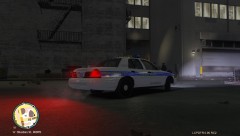 where can i get that car
 -
-
-
-
-
-
sure will
-
thumps up for the driveing
-
try Spark IV instead its the best
-
It's for this car made by TIM98 Thanks to Michael V. for how to install a texture http://www.lcpdfr.com/page/tutorials/index.action/_/vehicle-modification-tutorial/how-to-import-skins-onto-a-vehicle-r28 SORRY FOR THE BIG FILE THE INGAME PICS IS THERE REMEMBER TO DO BACKUP
- 4 comments
- 1 review
-
i'll do it tommorow
-
i suggest you do as Carrythx says might the car or change the visualsettings
-
Thanks but i already got one
-
Im making skins
-
Nice
-
hi i'd like to skin agian you got a specific car and some pictures and i'll try make it for yea :D There is included a test
-
nice respond i like it thumps up
-
you are so much worth a sub
-
i got to say that the videi edit is freeking crazy
-
here is mynethanks i'll try it out

