Skip to content
View in the app

A better way to browse. Learn more.

LCPDFR.com

A full-screen app on your home screen with push notifications, badges and more.

To install this app on iOS and iPadOS
  1. Tap the Share icon in Safari
  2. Scroll the menu and tap Add to Home Screen.
  3. Tap Add in the top-right corner.
To install this app on Android
  1. Tap the 3-dot menu (⋮) in the top-right corner of the browser.
  2. Tap Add to Home screen or Install app.
  3. Confirm by tapping Install.

mr_helm

Members
  • Joined

  • Last visited

Files posted by mr_helm

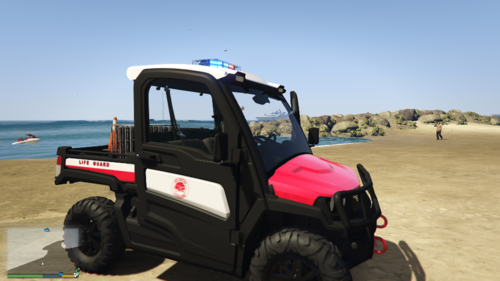
  1. Just a simple texture I made for Syther's Gator mod found below. Do not redistribute the texture without prior consent.
     
     
    • 113 Downloads
    Submitted
  2. A simple texture, haven't done one in a while. I am open to suggestions on what style to make next. Leave a comment and let me know, I can make a whole fleet as the original file contains 8 separate liveries.
     
     
    • 63 Downloads
    Submitted
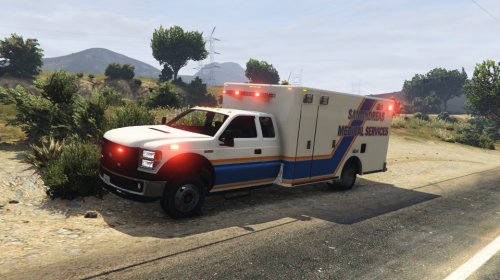
  3. This is loosely based off of Toronto EMS, there is a bonus file which has a green (instead of orange) color along with the one shown in the previews.
     
    Finally got a computer that is able to handle GTA V again.. been away from doing liveries for quite a while. Hopefully I will be contributing more. 
     
    Open to any feedback, I thoroughly enjoy making textures so I can take requests. 
     
    You will need PimDSLR's Ford E450, as this texture was used on this model.
     
    • 40 Downloads
    • 2 Comments
    Submitted

Account

Navigation

Search

Search

Configure browser push notifications

Chrome (Android)
  1. Tap the lock icon next to the address bar.
  2. Tap Permissions → Notifications.
  3. Adjust your preference.
Chrome (Desktop)
  1. Click the padlock icon in the address bar.
  2. Select Site settings.
  3. Find Notifications and adjust your preference.