Schroeder
Members
-
Joined
-
Last visited
Files posted by Schroeder
-
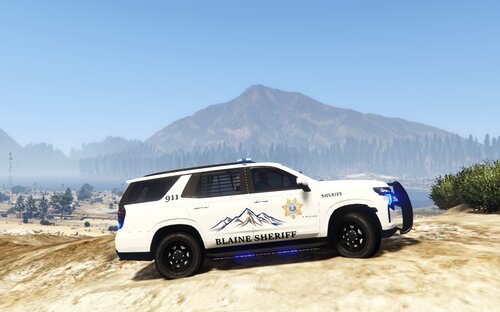
A small, simplistic livery pack that I've thrown together.
Not based off of any particular department, but is similar to most Sheriff Office fleets around me who put the entirety of the budget into the vehicles and not the markings.
I may add to this pack more if there is voiced interest.
So far (12/01/2020) the pack includes the following;
2021 Tahoe - "New" Markings;
2018 Charger - "New" Markings;
Infidel's Discord Release Exclusive in the screenshots, but will fit the one in the following pack.
https://modification-universe.com/forums/resources/blaine-county-law-enforcement-pack.31/
2006 to 2011 CVPI - "Old" Markings;
Depending on work schedule, I may also be taking requests/commissions for other skin packs (LEO or Fire). PM/DM me if interested.
DO NOT REPOST WITHOUT PERMISSION
DO NOT CONVERT TO OTHER GAMES WITHOUT PERMISSION
DO NOT USE IN FIVEM SERVERS!!
Installation; via OpenIV, replace the appropriate liveries/"signs", renaming may be necessary.
- 122 Downloads
Updated