


18smith
Members
-
Joined
-
Last visited
Files posted by 18smith
-
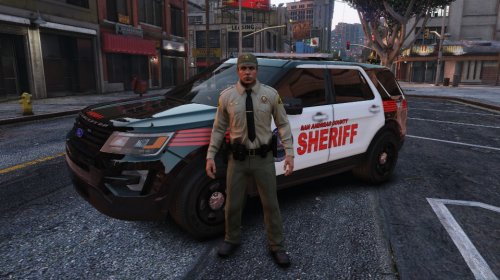
Hello everyone. everyone is installing and using TheHurk's Explorer, with ELS so I thought to make a texture for it!
All I did was make the texture. All model credits go to the original author(s). I DO PLAN TO MAKE A PACK WITH THESE TEXTURES! LET ME KNOW IF YOU WANT TO CHANGE SOMETHING ABOUT THE DESIGN!
INSTALL THE MODEL HERE:
WATCH THE VIDEO HERE:
- 100 Downloads
- 3 Comments
Updated -
Included in the Download:
- Text file with the vehicle download URL with texture on the car
- Texture Download
VEHICLE FILE:
- 49 Downloads
Updated -
CREATED BY: GTA SMITH
TEXTURES ARE NOT TO BE EDITED OR RE-UPLOADED!!
CAR DOWNLOAD: http://www.lcpdfr.com/files/file/9371-lspd-cvpi/
THIS IS THE FIRST VERSION OF THIS TEXTURE!
HOW TO INSTALL:
1.) Download Skin
2.) download Car
3.) Open Spark / Open IV
4.) GO TO: x64e\levels\gta5\vehicles.rpf
5.) Click "Edit Mode"
7.) Replace the Car
8.) Open the Texture File
7.) Find "cvpi_sign_1" and replace it with the texture you have downloaded
8.) ENJOY!!!
- 61 Downloads
Submitted -
CREATED BY: GTA SMITH
TEXTURES ARE NOT TO BE EDITED OR RE-UPLOADED!!
CAR DOWNLOAD: http://www.gta4-mods.com/vehicles/chp-cvpi-pack-dsf-version-f30838
THIS IS THE FIRST VERSION OF THIS TEXTURE!
HOW TO INSTALL:
1.) Download Skin
2.) download Car
3.) Open Spark / Open IV
4.) GO TO: pc < models < cdimages < vehicles.img (IN SPARK / OPEN IV)
5.) Find "police.wtd"
6.) Click "Edit Mode"
7.) Find "cvpi_sign_1" and replace it with the texture you have downloaded
8.) ENJOY!!!
- 152 Downloads
- 4 Comments
Updated

.thumb.jpg.6489e84418b4c3824f57a51e874522d8.jpg)
.thumb.jpg.f37e233ed7902bdd0969cfd556cdd045.jpg)