
Comstar
Members
-
Joined
-
Last visited
Files posted by Comstar
-
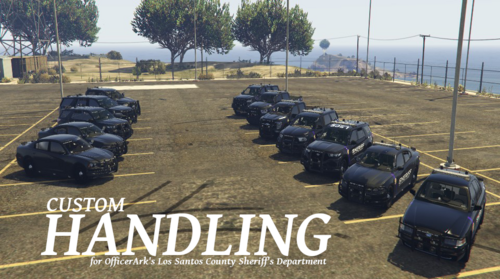
OfficerArk kindly granted me permission to upload a custom handling.meta
and vehicles.meta file for his addon "Los Santos County Sheriff's Department".
I mainly changed the vehicles center of gravity, true wheel center points,
suspension compression- and rebound values and traction curves.
I used a tool called "Real Time Handling Editor" by "ikt" for creating these handling datas.
https://www.gta5-mods.com/tools/real-time-handling-editor
I also changed the vehicles engine sounds.
The 2020 Ford Police Interceptor Utility- engine now sounds like a proper V6
engine by using the sound of the Chavos V6.
All other remaining vehicles use the V8 sound of the Rebla.
Furthermore I fixed a typo in the SheriffPackBlue's vehicles.meta file that prevented
the unmarked Ford F250 from spawning.
Installation instructions can be found in the files.
NOTE:
If you want to use any of the handling datas for the replace versions
you need to copy the handling data out of the handling.meta I provided
and replace the respective handling data in the handling.meta file from the car
you want the handling to use for.
- 231 Downloads
- 2 Comments
Updated -
OfficerArk kindly granted me permission to upload a custom handling.meta
and vehicles.meta file for his addon "Los Santos Police Department".
I mainly changed the vehicles center of gravity, true wheel center points,
suspension compression- and rebound values and traction curves.
I used a tool called "Real Time Handling Editor" by "ikt" for creating these handling datas.
https://www.gta5-mods.com/tools/real-time-handling-editor
I also changed the vehicles engine sounds.
The 2016 Ford Police Interceptor Sedan-, 2016 Ford Police Interceptor Utility-
and 2020 Ford Police Interceptor Utility- engines now sound like proper V6
engines by using the sound of the Chavos V6.
All other remaining vehicles use the V8 sound of the Rebla.
Installation instructions:
- To be sure always backup your current files.
- Open OpenIV and select GTAV.
- Navigate to "\mods\update\x64\dlcpacks\LSPDPack\dlc.rpf\data".
- Enable "Edit mode".
- Drag and drop the handling.meta and vehicles.meta files into the "data"- directory.
For this addon I also created:
- 277 Downloads
- 15 Comments
Updated -
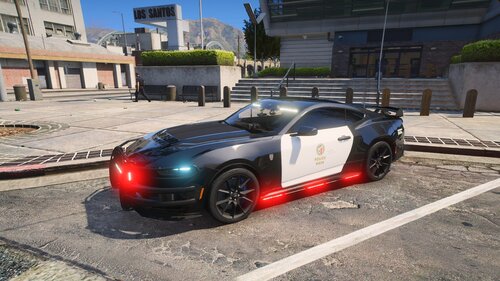
LAPD texture for ЯΛBBIƬ® Development's 2024 Ford Mustang Dark Horse addon.
I used the vehicle templates that ЯΛBBIƬ® Development included in their addon.
Furthermore I used the LAPD template (fonts, logos, stickers) by vladimir 850.
The texture comes as 2K and 4K.
Installation instructions are included in the download.
Feel free to use/change/correct and reupload the texture.
I'm not going to update the texture.
- 252 Downloads
- 1 Comments
Updated -
LAPD texturepack for OfficerArk's Los Santos Police Department Addon.
It's my first ever texture pack so don't expect it to be perfect.
I used the vehicle templates that OfficerArk included in his Addon.
Furthermore I used the LAPD template (fonts, logos, stickers) by vladimir 850.
Most textures come as 2K and 4K. The 2016 Ford Police Interceptor Utility only has a 2K texture.
Every texture has its own readme file for the installation instructions.
Feel free to use/change/correct and reupload the textures.
I'm not going to update the textures.
For this addon I also created:
- 594 Downloads
Updated