Skip to content
View in the app

A better way to browse. Learn more.

LCPDFR.com

A full-screen app on your home screen with push notifications, badges and more.

To install this app on iOS and iPadOS
  1. Tap the Share icon in Safari
  2. Scroll the menu and tap Add to Home Screen.
  3. Tap Add in the top-right corner.
To install this app on Android
  1. Tap the 3-dot menu (⋮) in the top-right corner of the browser.
  2. Tap Add to Home screen or Install app.
  3. Confirm by tapping Install.

Alarke91

Members
  • Joined

  • Last visited

Everything posted by Alarke91

  1. Thank you, it worked, but this is really terrible that I now have to use NVE 🥲
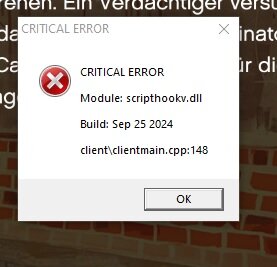
  2. Hello everyone, I recently downloaded the latest version of ScriptHookV, but now I’m encountering an error when I try to run the game. I’ve double-checked that the installation is correct, but the error persists, and I’m not sure what’s causing it. Has anyone else experienced this issue or knows how to fix it? Any help would be greatly appreciated! Thanks in advance!
  3. Seas, ich hab folgendes Problem, und zwar das nach einer gewissen Zeit keine Einsatzmeldungen mehr erscheinen. Hat jemand vllt eine Ahnung woran das liegen könnte? Weil gecrasht ist auch nichts.
Account

Navigation

Search

Search

Configure browser push notifications

Chrome (Android)
  1. Tap the lock icon next to the address bar.
  2. Tap Permissions → Notifications.
  3. Adjust your preference.
Chrome (Desktop)
  1. Click the padlock icon in the address bar.
  2. Select Site settings.
  3. Find Notifications and adjust your preference.