Skip to content
View in the app

A better way to browse. Learn more.

LCPDFR.com

A full-screen app on your home screen with push notifications, badges and more.

To install this app on iOS and iPadOS
  1. Tap the Share icon in Safari
  2. Scroll the menu and tap Add to Home Screen.
  3. Tap Add in the top-right corner.
To install this app on Android
  1. Tap the 3-dot menu (⋮) in the top-right corner of the browser.
  2. Tap Add to Home screen or Install app.
  3. Confirm by tapping Install.

officermiracle6073

Members
  • Joined

  • Last visited

Files posted by officermiracle6073

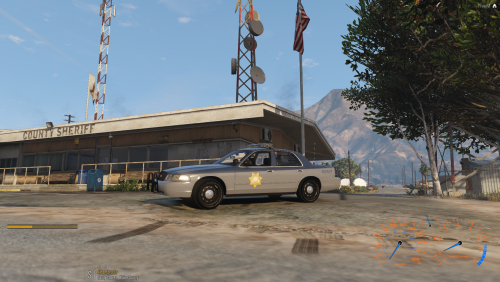
  1. Hello and welcome to my first upload. This pack of temps took me about a week or 2. I am OCD about most things and I have redone these about 3 times so I hope you like it. 
     
    ----------------
    These are the vehicles 
    ----------------
    2011 CVPI 
    2013 Chevy Tahoe 
    2013 Slick Top Tahoe | Unmarked 
    2015 Chevy Tahoe 
    2015 Ford Taurus
    2015 Unmarked Taurus 
    2016 Dodge Charger 
    2016 Caprice
    ---------------
    The White Truck is apart of our pack but there is no temp for it I fingered that I would show off the whole pack 
    ---------------
     
    THESE SKINS ARE MINE I HAVE MADE THEM CUSTOM TO OUR COMMUNITY YOU MAY DOWNLOAD AND USE 
    DO NOT POST ON ANY OTHER SITE 
    DO NOT CLAIM THEY ARE YOURS 


    • 651 Downloads
    • 5 Comments
    Submitted

Account

Navigation

Search

Search

Configure browser push notifications

Chrome (Android)
  1. Tap the lock icon next to the address bar.
  2. Tap Permissions → Notifications.
  3. Adjust your preference.
Chrome (Desktop)
  1. Click the padlock icon in the address bar.
  2. Select Site settings.
  3. Find Notifications and adjust your preference.