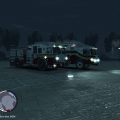
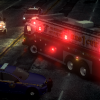
MOD NAME-rescue 1 fdny
VERSION-fdresc1.4fjs
SPECIAL MODEL-pstockade
LIGHT BAR-federal signal jetstream mini
EXTRA PARTS-n/a
MULTIPLE LIVERIES:yes
OPTIMIZED FOR-pstockade
CREDITS-GtaPoliceTruckers(SEE ADDDITONAL NOTES)
MOD STATUS-closed
ADDITIONAL NOTES
the vehicle is els enabled, suggested lighting pattern, els-h
the model contains multiple liveries
vehicle has a enterable interior with interior lights that act as taxi light that can be turned off/on with snt
model is composed of defualt gta iv firetruk model extensivily modifed into current form by gtapolicetrucker
all vehicle edits done to truck by gtapolicetrucker
spotlight made by matthias/MrScheckske
headlights,quadflares, made by Ssanchez10 edited by gtapolicetrucker
wheels made by freakinmusket
federal signal jetstream mini by EVI/Yakadafi/TheThinBlueLine
everything else on the model is made by gtapolicetrucker including, new bumper,3d grill,heavy rescue body,new rear interior, and overal everything that isnt creditted to someone else
Donations are much appreciated and help me bring new models out quicker, so please donate