DCGKWM
Members
-
Joined
-
Last visited
Files posted by DCGKWM
-
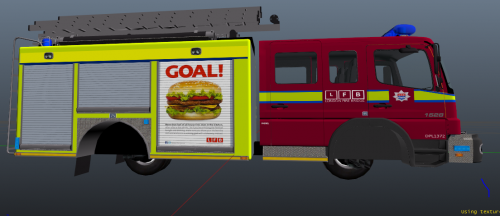
Mercedes Atego / LondonFireBridge atego firetruck ELS-H
____________________________________________________________________________________
Credits:
-Mercedes Atego cab by Matthias and converted to GTA IV by KevinDV
-Fire Raiders rear and all equipment modeled by KevinDV
-GHSCENE lighting modeled by KevinDV
-Federal Signal Aerodynic, Sentry Beacons, and Emeduvac flushmount LED modules by KevinDV
-Rims modeled by KevinDV
-Bumper edits by KevinDV
-Templates and textures by KevinDV
-liveries by dcgkwm
____________________________________________________________________________________
Files included:
-firetruk.wft
-firetruck.wtd
____________________________________________________________________________________
Additional notes:
-This vehicle is ELS-H enabled.
-All content in this file has been used with the permission of their respective authors.
-Please use a unmodified version of GTA IV's handling line for the best experience.
-Although this vehicle is multi-livery enabled, it has a bug where the liveries
appear falsely mapped when the +livery extension is present in the vehicles.ide file. Please
ensure that you remove the "+livery" to avoid the mapping bug.
____________________________________________________________________________________
Editing and redistributing of the content of this archive are not allowed unless permission is obtained from the author.
Any commercial or by laws prohibited use of the content of this archive is forbidden.
____________________________________________________________________________________
hope your enjoy!(ps:i was post some pic to some facebook group)
- 68 Downloads
Updated