
HANAKO
Members
-
Joined
-
Last visited
Reputation Activity
-
 HANAKO got a reaction from NUV3X for a file, EUP Clothes PackDescriptions:
This mod is a pack of a variety of clothes extracted from another games More variety of clothes will be added in the future
Awesome video by Crunhycat
Features:
All clothes are made to fit my latest vests Patches are easy to edit Different color variations
Included Contents:
mp_m_freemode_01_mp_m_gunrunning_01
Jbib_014=Tactical Hoodie Jacket (Rolled up sleeves version) Jbib_015=Tactical Hoodie Jackte (Rolled up Sleeves , Tucked in Version) Jbib_016=Tactical Hoodie Jacket(For vest) Jbib_017=Tactical Hoodie Jacket(For vest, Tucked in Version) Jbib_018=Tactical Hoodie Jacket(Normal)
mp_m_freemode_01_mp_m_vinewood
Jbib_012=Condor Combat Shirt Jbib_013=Condor Short Sleeve Combat Shirt lowr_000_u=Joggers1 mp_m_freemode_01_mp_m_smuggler_01 jbib_008_u=Hoodie1
mp_m_freemode_01_p_mp_m_heist3
p_head_002=Fast Helmet with NVGs (flip down) p_head_003=Fast Helmet with NVGs (flip up)
mp_m_freemode_01_p_mp_m_heist4
p_head_001=The North Face Beanie p_head_002=Under Armour Beanie
mp_m_freemode_01_p_mp_m_vinewood
p_head_000=Fast Helmet p_head_001=Fast Helmet with headset
INSTLLATION:
Please make a backup of eup_componentpeds.rpf before installing this MOD
[Clothes]
1.install the EUP 2.Drag and drop all folders in "Main" to eup_componentpeds.rpf (mods\update\x64\dlcpacks\eup\dlc.rpf\x64) 3.Change Jbib, Torso2, Shirt Overlay, or Lower(in case of pants) using Trainer Mod in game (you can find at the end of the menu)
[Accessories]
1.install the EUP 2.Drag and drop all folders in "Accessories" to eup_componentpeds_p.rpf(mods\update\x64\dlcpacks\eup\dlc.rpf\x64) 3.Change Hat,Helmet or glasses(in the case of sunglasses) using Trainer Mod in game (you can find at the end of the menu)
If your character's appearance is changed, you've succeeded
VERSION HISTORY:
Do not ask me!!
Texture request Request to unlock a model Asset Release Request How to install these to FiveM
FREQUENTLY ASKED QUESTIONS
Credits:
Activision/Infinity Ward
-COD:MW2019 Assets
DICE/Electronic Arts
-Battlefield 4 Assets
Beta-testers:
crunchycat, Syther Screenshots:
crunchycat Alex_Ashfold, EUP team(patch textures)
ATTENTION
Do not unlock, edit, leak or sell the file Editing textures at non-profit is allowed Please do not upload any texture mods to sites other than this site and GTA5 MODS
My other mods
https://www.gta5-mods.com/misc/ai-cover-animations-mod-hanako
Highly Recommended
-
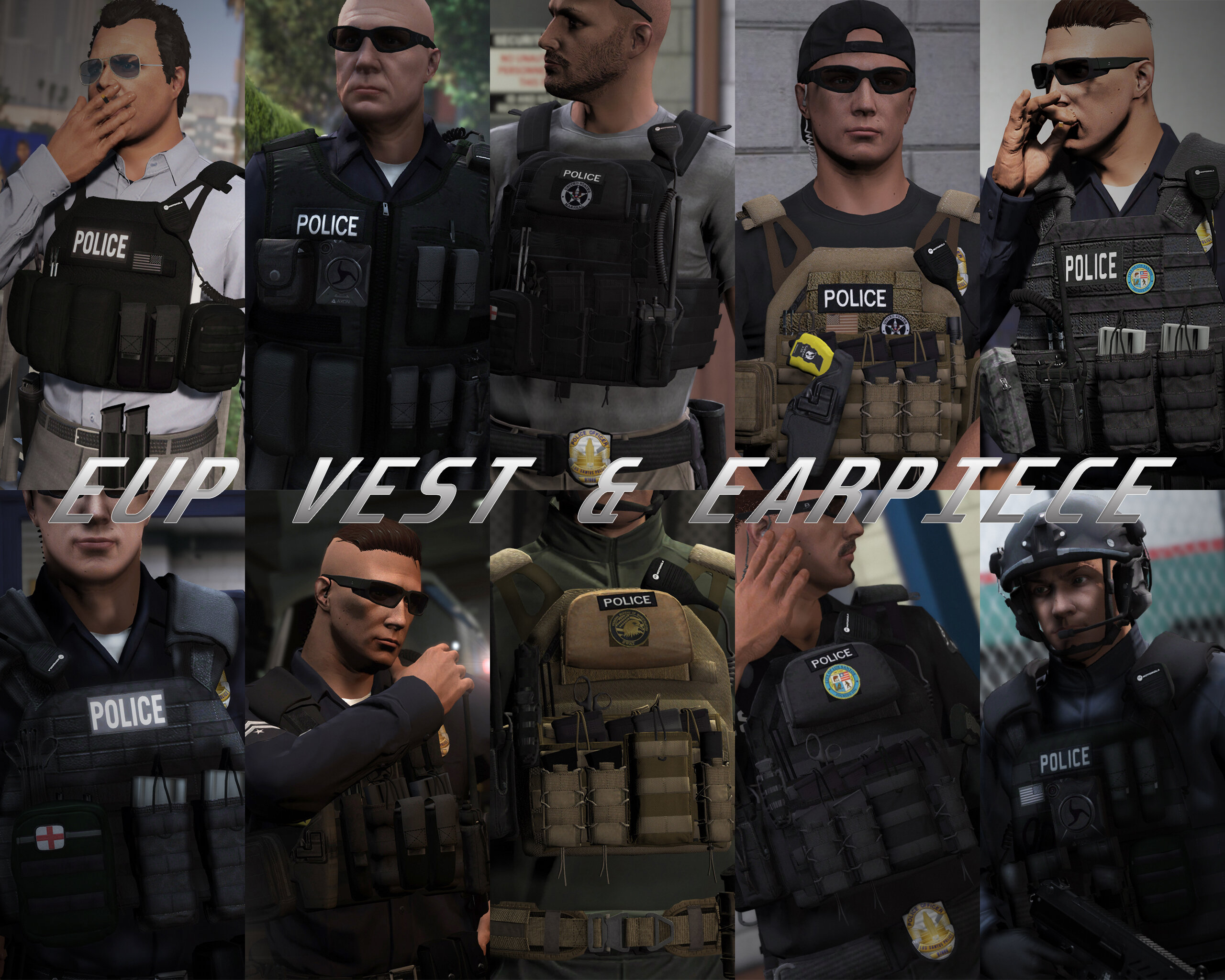
HANAKO got a reaction from Fedeik423 for a file, EUP VEST&EARPIECEAwesome showcase video by Alex Preacher
Thanks to all of you, total downloads have now exceeded 60,000!
I hope you continue to enjoy this mod!
Description
This mod adds police vests, belts, and other equipment to GTA V.
Features
The vests fit properly with various outfits! No awkward gaps or improper sizing!
Realistic gear such as earpieces and realistic vests!
List of included vests
Installation
First, install EUP.
To use the new vests, you must install this mod too.
It is strongly recommended to back up the original files before installation!
Open the File folder.
Using OpenIV, navigate to:
Grand Theft Auto V\mods\update\x64\dlcpacks\eup\dlc.rpf\x64\eup_componentpeds.rpf
Open the corresponding folder (e.g., vest, earpiece, etc.), and place the folder (e.g., mp_m_freemode_01_mp_m_vinewood) that contains the files you want to use.
In-game, change the TASK category.
If your character’s vest (or other item) has changed to the one you installed, the installation was successful.
If installed correctly, the added folders should look like this:
Installation Q&A
Version History
DO NOT ASK
Requests for custom textures Requests to unlock the model Requests for DEV models Questions about installing this mod on FiveM Credits
Rockstar Games
Activision / Infinity Ward
Call of Duty: Modern Warfare (2019) Assets
DICE / Electronic Arts
Battlefield 4 Assets
Ubisoft
Ghost Recon: Wildlands Assets
Rainbow Six: Siege Assets
Battlestate Games
Escape From Tarkov Assets
Contributors
Hanako (me)
Xiphos
Hussky9
CG ARTStudio
Oleg
ericapg
Code4Mods
Alex Ashfold
Beta Testers (crunchycat, Howard)
Special Thanks
crunchycat, Theofficialthrowaway, gabe., Alex Preacher
(for taking many screenshots)
Attention
Do not unlock, edit, or sell models.
Do not attempt to profit from any part included in this mod.
Please follow these rules when releasing textures for this mod:
Always credit all names listed in this mod.
Do not include any files other than texture files (PNG, DDS).
Including any other files violates the guidelines and may result in your mod being deleted and disciplinary action taken.
Do not profit from retextures of my publicly released mods.
Do not release textures on any sites other than LSPDFR and GTA5-Mods.
Looking for the same quality PEDs?👉 Check this out!
Highly Recommended
-
 HANAKO got a reaction from Julian Tillman for a file, EUP Axon Body Cams & Shoulder MicsDescriptions:
Mini pack of shoulder mics and body cams based on equipment actually used in the US Police.
Installation:
1. First, you need to install the EUP.
2. Put the mp_m_freemode_01_mp_m_vinewood, mp_f_freemode_01_mp_f_vinewood to mods\update\x64\dlcpacks\eup\dlc.rpf\x64\eup_componentpeds.rpf
3.Change the Task section in the game
Terms of Use:
Please follow the basic modification rules when using this mod.
1. Do not redistribute, re-edit, unlock, or sell any parts of this mod.
2. If you want to use any of the textures in this mod for other projects, please ask the original author for permission.
3. Do not request the release or provision of any assets.
4. Do not convert this mod to another game or to another format without permission.
5. If you are releasing a texture mod, please upload only the edited texture and include a link to this mod.
Do not ask me:
1.How to install on FiveM
2.How to use these for backup units
3.How to install to another slot
Credits:
EUP
EUP Team
-Alex Ashfold
-PierGud
-Nacho
-Will
-Lucas Ritter
Contributors
- Stan85 for LSPD Badges enhancements
- Dusty Flop
- Jacobmaate
- Sethy1124
- Dilapidated
- Dusty Flop
- Allen
- Bozza
- Alfa1516
- PNWParksFan
- Sam
- SuperStumpje
- Slick
- Fenton
- AlexanderLB
- Jordan Devlin
Axon Body2, Axon Body3
Model, Texture, Conversion by HANAKO
Motorola PMMN4025A Mic
Model, Texture, Conversion by HANAKO
Screenshots
crunchycat
-
HANAKO got a reaction from Prodigy05 for a file, Unmarked LAPD CVPI Mini Pack [ELS | Add-On | LODs]Descriptions:
This mini-pack contains 10 2003-2011 Crown Victoria's based on the LAPD.
More cars will be added in the future.
The base model was newly converted from Forza Horizon3 for this project. The entire model has about 72k polygons and has been optimized lods etc.
The mod uses ELS and carcols to make the lighting as realistic as possible.
I believe I researched much of the LAPD's equipment while working on this vehicle, but there are still some inaccuracies.
If you have any reports or suggestions, please use the comments section or DM me in Discord instead of the review section.
Very cool video by crunchycat!
Features:
Optimized for LSPDFR (L0:75k-L4:250 polys)
Dirt maps
Working dials
Changeable interior colors
Lighting showcase:
EES COPLITE
Federal Signal Cuda TriOptic
Federal Signal Spectralux ILS / CN SignalMaster
Extra Components:
Extra_1=Side Marker Lights
Extra_12=Partition (bcv08)
Terms of Use:
Please follow the basic modification rules when using this mod.
1. Do not redistribute, re-edit, unlock, or sell any parts of this mod.
2. If you want to use any of the textures in this mod for other projects, please ask the original author for permission.
3. Do not request the release or provision of any assets.
4. If you are releasing a texture mod, please upload only the edited texture and include a link to this mod.
Known Bugs:
-If the car is heavily deformed, the emissives may cause clipping.
Currently, there is no known way to fix this.
This is a potential problem for all vehicles that have lighting patterns configured in carcols.
Installation:
ADDON
1. Add "lapdcvpi1" folder(in dlcpacks) to Grand Theft Auto V\mods\update\x64\dlcpacks
2. Add "<Item>dlcpacks:/lapdcvpi1/</Item>" to dlclist.xml
3.Add all vcf files(xml) to Grand Theft Auto V\ELS\pack_default
4. Input the model file name in the game to spawn
List of model names
bcv01 =2003/Coplite/Hubcaps/SAP bcv02 =2003/Coplite/Steelies bcv03 =2005/Cuda TriOptic/Steelies/SAP bcv04 =2005/Cuda TriOptic/Hubcaps/SAP bcv05 =2006/Cuda TriOptic/Hubcaps/SAP bcv06 =2008/Cuda TriOptic/Corner Lights/Steelies bcv07 =2008/Cuda TriOptic/Corner Lights/Spot Lights/Hubcaps bcv08 =2011/Cuda TriOptic/Corner Lights/Hubcaps/SAP bcv09=2011/Spectralux/SignalMaster/Corner Lights/Micro Pulse/Hubcaps/SAP (Fictional) bcv10=2011/Spectralux/SignalMaster/Corner Lights/Micro Pulse/Steelies (Fictional)
REPLACE
The replacement option is no longer supported in this version.
If you want to use it as a replacement, please edit the files and install it yourself.
This mod uses high quality textures, so it may cause some performance issues.
It is recommended to delete XX+hi.ytd if you experience any frame rate drops.
If you have installed a lights corona removal mod ( such as NVE ), the headlight strobe may not function properly. In this case, replace the corona texture in the mods\update.rpf\x64\textures with the vanilla one(This mod has been tested with NVE ( Fixed corona ), VisualV and QuantV.)
The template is here.
Future Plans:
It will be merged with the marked vehicle pack to become one big CVPI pack.
Credits:
BASE MODEL
-2010 Ford Crown Victoria Police Interceptor by Turn10 studios
-Conversion to 2003-2011 CVPI by HANAKO
-03-05 Dial textures by UBISOFT
-Eagle RS-A textures by Cartres and Robert
LIGHTING
-Federal Signal Cuda TriOptic Light by Cj24
-Federal Signal CN SignalMaster by Cj24
-Federal Signal Spectralux ILS by Cj24
-Federal Signal MicroPulse by Cj24
-Federal Signal Corner Light by HANAKO
-EES Coplite by HANAKO
EQUIPMENT
-Federal Signal Smart Siren Controller by Cj24
-Laptop screen by Xiphos
-Antennas by HANAKO
-Center Console by HANAKO
-DELL Laptop by Free3D (lowpoly, textures by HANAKO)
-Federal Signal 6 button Controller by HANAKO
-Federal Signal Unitrol Light & Siren Controller by HANAKO
-Gun Rack by HANAKO
-Motorola XTL5000 and mic by HANAKO
-Setina Partition by HANAKO
-Unity Halogen Spotlight by HANAKO
Special Thanks:
Cartres, Cj24, INSAN1TY, Kanyile2001, Matt、Maple-., Robert, Shmurda, Vast and Xiphos for providing various information about the vehicles and equipment
Desmond98, EVI, KLE0, Lundy, OfficerFive0, Otaku, Schaefft, Scuderio, TWISTEDSCOPES and many other developers who were referenced in the development of this mod
Cj24, Oleg, and the Modding fourm members for the technical support
Cj24 for giving me permission to use some of the siren settings of Spectralux, Signal Master and Micro Pulse!
crunchycat , 丂ιиριє#3802 for the great screenshots!
crunchycat for the showcase video!
Please let me know if I missed any credits
-
HANAKO got a reaction from NoahNRW for a file, EUP Clothes PackDescriptions:
This mod is a pack of a variety of clothes extracted from another games More variety of clothes will be added in the future
Awesome video by Crunhycat
Features:
All clothes are made to fit my latest vests Patches are easy to edit Different color variations
Included Contents:
mp_m_freemode_01_mp_m_gunrunning_01
Jbib_014=Tactical Hoodie Jacket (Rolled up sleeves version) Jbib_015=Tactical Hoodie Jackte (Rolled up Sleeves , Tucked in Version) Jbib_016=Tactical Hoodie Jacket(For vest) Jbib_017=Tactical Hoodie Jacket(For vest, Tucked in Version) Jbib_018=Tactical Hoodie Jacket(Normal)
mp_m_freemode_01_mp_m_vinewood
Jbib_012=Condor Combat Shirt Jbib_013=Condor Short Sleeve Combat Shirt lowr_000_u=Joggers1 mp_m_freemode_01_mp_m_smuggler_01 jbib_008_u=Hoodie1
mp_m_freemode_01_p_mp_m_heist3
p_head_002=Fast Helmet with NVGs (flip down) p_head_003=Fast Helmet with NVGs (flip up)
mp_m_freemode_01_p_mp_m_heist4
p_head_001=The North Face Beanie p_head_002=Under Armour Beanie
mp_m_freemode_01_p_mp_m_vinewood
p_head_000=Fast Helmet p_head_001=Fast Helmet with headset
INSTLLATION:
Please make a backup of eup_componentpeds.rpf before installing this MOD
[Clothes]
1.install the EUP 2.Drag and drop all folders in "Main" to eup_componentpeds.rpf (mods\update\x64\dlcpacks\eup\dlc.rpf\x64) 3.Change Jbib, Torso2, Shirt Overlay, or Lower(in case of pants) using Trainer Mod in game (you can find at the end of the menu)
[Accessories]
1.install the EUP 2.Drag and drop all folders in "Accessories" to eup_componentpeds_p.rpf(mods\update\x64\dlcpacks\eup\dlc.rpf\x64) 3.Change Hat,Helmet or glasses(in the case of sunglasses) using Trainer Mod in game (you can find at the end of the menu)
If your character's appearance is changed, you've succeeded
VERSION HISTORY:
Do not ask me!!
Texture request Request to unlock a model Asset Release Request How to install these to FiveM
FREQUENTLY ASKED QUESTIONS
Credits:
Activision/Infinity Ward
-COD:MW2019 Assets
DICE/Electronic Arts
-Battlefield 4 Assets
Beta-testers:
crunchycat, Syther Screenshots:
crunchycat Alex_Ashfold, EUP team(patch textures)
ATTENTION
Do not unlock, edit, leak or sell the file Editing textures at non-profit is allowed Please do not upload any texture mods to sites other than this site and GTA5 MODS
My other mods
https://www.gta5-mods.com/misc/ai-cover-animations-mod-hanako
Highly Recommended
-
HANAKO got a reaction from archie pounder for a file, EUP Axon Body Cams & Shoulder MicsDescriptions:
Mini pack of shoulder mics and body cams based on equipment actually used in the US Police.
Installation:
1. First, you need to install the EUP.
2. Put the mp_m_freemode_01_mp_m_vinewood, mp_f_freemode_01_mp_f_vinewood to mods\update\x64\dlcpacks\eup\dlc.rpf\x64\eup_componentpeds.rpf
3.Change the Task section in the game
Terms of Use:
Please follow the basic modification rules when using this mod.
1. Do not redistribute, re-edit, unlock, or sell any parts of this mod.
2. If you want to use any of the textures in this mod for other projects, please ask the original author for permission.
3. Do not request the release or provision of any assets.
4. Do not convert this mod to another game or to another format without permission.
5. If you are releasing a texture mod, please upload only the edited texture and include a link to this mod.
Do not ask me:
1.How to install on FiveM
2.How to use these for backup units
3.How to install to another slot
Credits:
EUP
EUP Team
-Alex Ashfold
-PierGud
-Nacho
-Will
-Lucas Ritter
Contributors
- Stan85 for LSPD Badges enhancements
- Dusty Flop
- Jacobmaate
- Sethy1124
- Dilapidated
- Dusty Flop
- Allen
- Bozza
- Alfa1516
- PNWParksFan
- Sam
- SuperStumpje
- Slick
- Fenton
- AlexanderLB
- Jordan Devlin
Axon Body2, Axon Body3
Model, Texture, Conversion by HANAKO
Motorola PMMN4025A Mic
Model, Texture, Conversion by HANAKO
Screenshots
crunchycat
-
HANAKO got a reaction from Benjamin Compton for a file, GENERIC SWAT PEDDescriptions:
This mod replaces the Vanilla SWAT Ped with a more modern and realistic equipped SWAT Ped.
See all images of the GENERIC SWAT PED
FEATURES:
High quality models
The polygons are reduced as much as possible while maintaining the quality of the original models. High quality textures
Many textures have been reworked (removing dirt, changing colors). Realistic Equipment
It includes some realistic equipment such as Crye's JPC 1.0 and G3 Combat Uniform, Atlantic Signal Combat PTT, Taser x26p and Night Vision Goggles (with glowing lenses). Working LODs
Lower the quality of the models depending on the drawing distance to keep the performance of the game. Working Blood, Bullet Holes
Pants and shirts have accurate Blood and Bullet Hole Mapping based on GTA5 specifications. Multiple Organization Textures
In addition to LSPD SWAT, real-life units textures such as LAPD SWAT and the FBI are also included (this mod does not aim for 100% accuracy).
INSTALLATION:
It is recommended to back up the original files before the installation!
Replace all the files in this location
mods\x64e.rpf\models\cdimages\componentpeds_s_m_y.rpf
If the old Ped is loaded, install it in this location.
mods\update\x64\dlcpacks\patchday22ng\dlc.rpf\x64\models\cdimages\peds\patchday22ng.rpf\
mods\x64e.rpf\models\cdimages\pedprops.rpf
The Optional Colors folder contains other color variations that are available.
It's not a problem if the textures don't display in OpenIV!
ATTENTIONS:
Please observe the following rules when editing and releasing the textures of this mod.
1. Please credit all names included in this mod.
2.Please do not upload files except texture files (YTD).
3.Please do not profit from retexturing.
CREDITS:
Rockstar Games
Activision/Infinity Ward
-COD:MW2019 Assets
DICE/Electronic Arts
-Battlefield 4 Assets
UBI SOFT
-Ghost Recon Wildlands, Rainbow Sis Siege Assets
Battlestate
-Escape From Tarkov Assets
Hanako
Special thanks to crunchycat, Theofficialthrowaway, Alex Preacher, gabe. for taking the screenshots!
And thanks to crunchycat and Howard for the beta test!
Please do not unlock files or make any edits without permission.
Also, please do not try to profit from any of the parts included in this mod.
-
HANAKO got a reaction from Charlie S40 for a file, Unmarked LAPD CVPI Mini Pack [ELS | Add-On | LODs]Descriptions:
This mini-pack contains 10 2003-2011 Crown Victoria's based on the LAPD.
More cars will be added in the future.
The base model was newly converted from Forza Horizon3 for this project. The entire model has about 72k polygons and has been optimized lods etc.
The mod uses ELS and carcols to make the lighting as realistic as possible.
I believe I researched much of the LAPD's equipment while working on this vehicle, but there are still some inaccuracies.
If you have any reports or suggestions, please use the comments section or DM me in Discord instead of the review section.
Very cool video by crunchycat!
Features:
Optimized for LSPDFR (L0:75k-L4:250 polys)
Dirt maps
Working dials
Changeable interior colors
Lighting showcase:
EES COPLITE
Federal Signal Cuda TriOptic
Federal Signal Spectralux ILS / CN SignalMaster
Extra Components:
Extra_1=Side Marker Lights
Extra_12=Partition (bcv08)
Terms of Use:
Please follow the basic modification rules when using this mod.
1. Do not redistribute, re-edit, unlock, or sell any parts of this mod.
2. If you want to use any of the textures in this mod for other projects, please ask the original author for permission.
3. Do not request the release or provision of any assets.
4. If you are releasing a texture mod, please upload only the edited texture and include a link to this mod.
Known Bugs:
-If the car is heavily deformed, the emissives may cause clipping.
Currently, there is no known way to fix this.
This is a potential problem for all vehicles that have lighting patterns configured in carcols.
Installation:
ADDON
1. Add "lapdcvpi1" folder(in dlcpacks) to Grand Theft Auto V\mods\update\x64\dlcpacks
2. Add "<Item>dlcpacks:/lapdcvpi1/</Item>" to dlclist.xml
3.Add all vcf files(xml) to Grand Theft Auto V\ELS\pack_default
4. Input the model file name in the game to spawn
List of model names
bcv01 =2003/Coplite/Hubcaps/SAP bcv02 =2003/Coplite/Steelies bcv03 =2005/Cuda TriOptic/Steelies/SAP bcv04 =2005/Cuda TriOptic/Hubcaps/SAP bcv05 =2006/Cuda TriOptic/Hubcaps/SAP bcv06 =2008/Cuda TriOptic/Corner Lights/Steelies bcv07 =2008/Cuda TriOptic/Corner Lights/Spot Lights/Hubcaps bcv08 =2011/Cuda TriOptic/Corner Lights/Hubcaps/SAP bcv09=2011/Spectralux/SignalMaster/Corner Lights/Micro Pulse/Hubcaps/SAP (Fictional) bcv10=2011/Spectralux/SignalMaster/Corner Lights/Micro Pulse/Steelies (Fictional)
REPLACE
The replacement option is no longer supported in this version.
If you want to use it as a replacement, please edit the files and install it yourself.
This mod uses high quality textures, so it may cause some performance issues.
It is recommended to delete XX+hi.ytd if you experience any frame rate drops.
If you have installed a lights corona removal mod ( such as NVE ), the headlight strobe may not function properly. In this case, replace the corona texture in the mods\update.rpf\x64\textures with the vanilla one(This mod has been tested with NVE ( Fixed corona ), VisualV and QuantV.)
The template is here.
Future Plans:
It will be merged with the marked vehicle pack to become one big CVPI pack.
Credits:
BASE MODEL
-2010 Ford Crown Victoria Police Interceptor by Turn10 studios
-Conversion to 2003-2011 CVPI by HANAKO
-03-05 Dial textures by UBISOFT
-Eagle RS-A textures by Cartres and Robert
LIGHTING
-Federal Signal Cuda TriOptic Light by Cj24
-Federal Signal CN SignalMaster by Cj24
-Federal Signal Spectralux ILS by Cj24
-Federal Signal MicroPulse by Cj24
-Federal Signal Corner Light by HANAKO
-EES Coplite by HANAKO
EQUIPMENT
-Federal Signal Smart Siren Controller by Cj24
-Laptop screen by Xiphos
-Antennas by HANAKO
-Center Console by HANAKO
-DELL Laptop by Free3D (lowpoly, textures by HANAKO)
-Federal Signal 6 button Controller by HANAKO
-Federal Signal Unitrol Light & Siren Controller by HANAKO
-Gun Rack by HANAKO
-Motorola XTL5000 and mic by HANAKO
-Setina Partition by HANAKO
-Unity Halogen Spotlight by HANAKO
Special Thanks:
Cartres, Cj24, INSAN1TY, Kanyile2001, Matt、Maple-., Robert, Shmurda, Vast and Xiphos for providing various information about the vehicles and equipment
Desmond98, EVI, KLE0, Lundy, OfficerFive0, Otaku, Schaefft, Scuderio, TWISTEDSCOPES and many other developers who were referenced in the development of this mod
Cj24, Oleg, and the Modding fourm members for the technical support
Cj24 for giving me permission to use some of the siren settings of Spectralux, Signal Master and Micro Pulse!
crunchycat , 丂ιиριє#3802 for the great screenshots!
crunchycat for the showcase video!
Please let me know if I missed any credits
-
HANAKO got a reaction from Julian Tillman for a file, NPC Style Cover AnimationsDiscriptions:
This mod will change some of the cover animations to NPC style.
It also includes other changes to the cover idle animation, intro, outro, and weapon holding animations.
Options include changing the shooting stance and action mode animations for police attribute peds.
This mod is an improved, reworked version of the AI Cover Animations I posted a long time ago.
In addition, with the help of Wolf Fire Modz, several new features have been added.
Also, I've changed all installations to OIV format to improve the complexity of the installation process that was pointed out in previous versions.
I hope you all enjoy it!
Installation:
0. It is recommended to make a backup of update.rpf before installing this mod.
1. install 0.Core.oiv.
Notes:
This mod will replace peds.ymt, pedpersonality.ymt, combattasks.ymt, and weaponanimations.meta. So it is not compatible with other mods that modify these files.
How to make it compatible with AI Cover, Taunts, & Idle Animations by Wolf Fire Modz is described separately.
2. install options if necessary.
The following is a description of the function of the options.
0. New weapon holding animation
This option is included in Core and changes the holding animation of two-handed weapons to a more realistic one.
Some weapons are not implemented due to the position of the hands in the animation.
To remove this, use option 4 oiv.
1. New shooting stance
This option enables the shooting stance in stealth mode at all times.
Affected weapons are
Pistol, Combat Pistol, Pistol MK2, Ceramic Pistol, Stungun
Carbine Rifle, Carbine Rifle MK2.
2. New action mode
This option changes the animation of the sprints during combat (Action Mode).
(Trevor will be affected by this option regardless of whether it is enabled or not, as it modifies a portion of Trevor's action mode animation).
3. New shooting stance + action mode
This option installs both options 1 and 2.
4. Remove new weapon holding animations
This option removes the new weapon retention animation included in Core.
To remove all options, run "Uninstaller of all options.oiv".
Notes:
"1. for police peds only" will only change the animations of police peds such as s_m_y_cop_01, s_f_y_cop_01, etc.
"2. for police peds + mp freemode characters" will change the animations of police peds and EUP characters such as mp_m_freemode_01, mp_f_freemode_01.
If you want to uninstall this mod, please run "NPC Cover Animations Uninstaller.oiv" and then delete NPCCover from dlclist.xml manually!
How to make it compatible with AI Cover, Taunts, & Idle Animations by Wolf Fire Modz:
0.Download his mod from 5mods.
1.mods\upload\x64\dlcpacks\NPCCover\dlc.rpf\x64\anim\ingame\clip_cover@.rpf\.
2. Place all the files of the mods x64c.rp \anim\ingame\clip_cover@.rpf\ included in his mod. You can overwrite the original files(be sure to rewrite combattasks.ymt. Otherwise, the cover strafe will not work correctly).
3. Install all files except peds.ymt and pedpersonality.ymt from his mod.
If you want to run the SWAT strafe with a specific character, change the personality in peds.ymt to "swat".
Done!
If you have any bugs, installation issues, or suggestions, please post them in the comments section.
Credits:
YMT, YCD, meta editing and some screenshots by HANAKO
Icons for OIV and main screenshots by crunchycat
Special thanks to Wolf Fire Modz
-Without his mods, this mod would not have been updated, and he provided various information about editing YCD!
Special thanks to Shadow 0f Raven
-His release of the NPC Cover Animations mod was the basis for my mod!
-
HANAKO got a reaction from Zaylikespatrol for a file, EUP VEST&EARPIECEAwesome showcase video by Alex Preacher
Thanks to all of you, total downloads have now exceeded 60,000!
I hope you continue to enjoy this mod!
Description
This mod adds police vests, belts, and other equipment to GTA V.
Features
The vests fit properly with various outfits! No awkward gaps or improper sizing!
Realistic gear such as earpieces and realistic vests!
List of included vests
Installation
First, install EUP.
To use the new vests, you must install this mod too.
It is strongly recommended to back up the original files before installation!
Open the File folder.
Using OpenIV, navigate to:
Grand Theft Auto V\mods\update\x64\dlcpacks\eup\dlc.rpf\x64\eup_componentpeds.rpf
Open the corresponding folder (e.g., vest, earpiece, etc.), and place the folder (e.g., mp_m_freemode_01_mp_m_vinewood) that contains the files you want to use.
In-game, change the TASK category.
If your character’s vest (or other item) has changed to the one you installed, the installation was successful.
If installed correctly, the added folders should look like this:
Installation Q&A
Version History
DO NOT ASK
Requests for custom textures Requests to unlock the model Requests for DEV models Questions about installing this mod on FiveM Credits
Rockstar Games
Activision / Infinity Ward
Call of Duty: Modern Warfare (2019) Assets
DICE / Electronic Arts
Battlefield 4 Assets
Ubisoft
Ghost Recon: Wildlands Assets
Rainbow Six: Siege Assets
Battlestate Games
Escape From Tarkov Assets
Contributors
Hanako (me)
Xiphos
Hussky9
CG ARTStudio
Oleg
ericapg
Code4Mods
Alex Ashfold
Beta Testers (crunchycat, Howard)
Special Thanks
crunchycat, Theofficialthrowaway, gabe., Alex Preacher
(for taking many screenshots)
Attention
Do not unlock, edit, or sell models.
Do not attempt to profit from any part included in this mod.
Please follow these rules when releasing textures for this mod:
Always credit all names listed in this mod.
Do not include any files other than texture files (PNG, DDS).
Including any other files violates the guidelines and may result in your mod being deleted and disciplinary action taken.
Do not profit from retextures of my publicly released mods.
Do not release textures on any sites other than LSPDFR and GTA5-Mods.
Looking for the same quality PEDs?👉 Check this out!
Highly Recommended
-
HANAKO got a reaction from Gallu04 for a file, Unmarked LAPD CVPI Mini Pack [ELS | Add-On | LODs]Descriptions:
This mini-pack contains 10 2003-2011 Crown Victoria's based on the LAPD.
More cars will be added in the future.
The base model was newly converted from Forza Horizon3 for this project. The entire model has about 72k polygons and has been optimized lods etc.
The mod uses ELS and carcols to make the lighting as realistic as possible.
I believe I researched much of the LAPD's equipment while working on this vehicle, but there are still some inaccuracies.
If you have any reports or suggestions, please use the comments section or DM me in Discord instead of the review section.
Very cool video by crunchycat!
Features:
Optimized for LSPDFR (L0:75k-L4:250 polys)
Dirt maps
Working dials
Changeable interior colors
Lighting showcase:
EES COPLITE
Federal Signal Cuda TriOptic
Federal Signal Spectralux ILS / CN SignalMaster
Extra Components:
Extra_1=Side Marker Lights
Extra_12=Partition (bcv08)
Terms of Use:
Please follow the basic modification rules when using this mod.
1. Do not redistribute, re-edit, unlock, or sell any parts of this mod.
2. If you want to use any of the textures in this mod for other projects, please ask the original author for permission.
3. Do not request the release or provision of any assets.
4. If you are releasing a texture mod, please upload only the edited texture and include a link to this mod.
Known Bugs:
-If the car is heavily deformed, the emissives may cause clipping.
Currently, there is no known way to fix this.
This is a potential problem for all vehicles that have lighting patterns configured in carcols.
Installation:
ADDON
1. Add "lapdcvpi1" folder(in dlcpacks) to Grand Theft Auto V\mods\update\x64\dlcpacks
2. Add "<Item>dlcpacks:/lapdcvpi1/</Item>" to dlclist.xml
3.Add all vcf files(xml) to Grand Theft Auto V\ELS\pack_default
4. Input the model file name in the game to spawn
List of model names
bcv01 =2003/Coplite/Hubcaps/SAP bcv02 =2003/Coplite/Steelies bcv03 =2005/Cuda TriOptic/Steelies/SAP bcv04 =2005/Cuda TriOptic/Hubcaps/SAP bcv05 =2006/Cuda TriOptic/Hubcaps/SAP bcv06 =2008/Cuda TriOptic/Corner Lights/Steelies bcv07 =2008/Cuda TriOptic/Corner Lights/Spot Lights/Hubcaps bcv08 =2011/Cuda TriOptic/Corner Lights/Hubcaps/SAP bcv09=2011/Spectralux/SignalMaster/Corner Lights/Micro Pulse/Hubcaps/SAP (Fictional) bcv10=2011/Spectralux/SignalMaster/Corner Lights/Micro Pulse/Steelies (Fictional)
REPLACE
The replacement option is no longer supported in this version.
If you want to use it as a replacement, please edit the files and install it yourself.
This mod uses high quality textures, so it may cause some performance issues.
It is recommended to delete XX+hi.ytd if you experience any frame rate drops.
If you have installed a lights corona removal mod ( such as NVE ), the headlight strobe may not function properly. In this case, replace the corona texture in the mods\update.rpf\x64\textures with the vanilla one(This mod has been tested with NVE ( Fixed corona ), VisualV and QuantV.)
The template is here.
Future Plans:
It will be merged with the marked vehicle pack to become one big CVPI pack.
Credits:
BASE MODEL
-2010 Ford Crown Victoria Police Interceptor by Turn10 studios
-Conversion to 2003-2011 CVPI by HANAKO
-03-05 Dial textures by UBISOFT
-Eagle RS-A textures by Cartres and Robert
LIGHTING
-Federal Signal Cuda TriOptic Light by Cj24
-Federal Signal CN SignalMaster by Cj24
-Federal Signal Spectralux ILS by Cj24
-Federal Signal MicroPulse by Cj24
-Federal Signal Corner Light by HANAKO
-EES Coplite by HANAKO
EQUIPMENT
-Federal Signal Smart Siren Controller by Cj24
-Laptop screen by Xiphos
-Antennas by HANAKO
-Center Console by HANAKO
-DELL Laptop by Free3D (lowpoly, textures by HANAKO)
-Federal Signal 6 button Controller by HANAKO
-Federal Signal Unitrol Light & Siren Controller by HANAKO
-Gun Rack by HANAKO
-Motorola XTL5000 and mic by HANAKO
-Setina Partition by HANAKO
-Unity Halogen Spotlight by HANAKO
Special Thanks:
Cartres, Cj24, INSAN1TY, Kanyile2001, Matt、Maple-., Robert, Shmurda, Vast and Xiphos for providing various information about the vehicles and equipment
Desmond98, EVI, KLE0, Lundy, OfficerFive0, Otaku, Schaefft, Scuderio, TWISTEDSCOPES and many other developers who were referenced in the development of this mod
Cj24, Oleg, and the Modding fourm members for the technical support
Cj24 for giving me permission to use some of the siren settings of Spectralux, Signal Master and Micro Pulse!
crunchycat , 丂ιиριє#3802 for the great screenshots!
crunchycat for the showcase video!
Please let me know if I missed any credits
-
HANAKO got a reaction from matcin113 for a file, EUP Axon Body Cams & Shoulder MicsDescriptions:
Mini pack of shoulder mics and body cams based on equipment actually used in the US Police.
Installation:
1. First, you need to install the EUP.
2. Put the mp_m_freemode_01_mp_m_vinewood, mp_f_freemode_01_mp_f_vinewood to mods\update\x64\dlcpacks\eup\dlc.rpf\x64\eup_componentpeds.rpf
3.Change the Task section in the game
Terms of Use:
Please follow the basic modification rules when using this mod.
1. Do not redistribute, re-edit, unlock, or sell any parts of this mod.
2. If you want to use any of the textures in this mod for other projects, please ask the original author for permission.
3. Do not request the release or provision of any assets.
4. Do not convert this mod to another game or to another format without permission.
5. If you are releasing a texture mod, please upload only the edited texture and include a link to this mod.
Do not ask me:
1.How to install on FiveM
2.How to use these for backup units
3.How to install to another slot
Credits:
EUP
EUP Team
-Alex Ashfold
-PierGud
-Nacho
-Will
-Lucas Ritter
Contributors
- Stan85 for LSPD Badges enhancements
- Dusty Flop
- Jacobmaate
- Sethy1124
- Dilapidated
- Dusty Flop
- Allen
- Bozza
- Alfa1516
- PNWParksFan
- Sam
- SuperStumpje
- Slick
- Fenton
- AlexanderLB
- Jordan Devlin
Axon Body2, Axon Body3
Model, Texture, Conversion by HANAKO
Motorola PMMN4025A Mic
Model, Texture, Conversion by HANAKO
Screenshots
crunchycat
-
Crouch converted by Faya (OC: BaziForYou)
Discord Server / Installation / Progress Board / BaziForYou
With 'Crouch', you can crouch and move around while still being able to aim and shoot.
Use Left Ctrl on the keyboard or DPad Up on the controller to crouch or stand up.
These keys can be customized in the settings.
Notes:
There are no movement bugs, such as automatically standing up, unlike in FiveM.
Full credit goes to BaziForYou, a well-known FiveM developer who allowed this to be converted into an RPH plugin.
Asking for support in a review is not allowed. Message me here instead.
-
HANAKO got a reaction from Deputy Russ for a file, NPC Style Cover AnimationsDiscriptions:
This mod will change some of the cover animations to NPC style.
It also includes other changes to the cover idle animation, intro, outro, and weapon holding animations.
Options include changing the shooting stance and action mode animations for police attribute peds.
This mod is an improved, reworked version of the AI Cover Animations I posted a long time ago.
In addition, with the help of Wolf Fire Modz, several new features have been added.
Also, I've changed all installations to OIV format to improve the complexity of the installation process that was pointed out in previous versions.
I hope you all enjoy it!
Installation:
0. It is recommended to make a backup of update.rpf before installing this mod.
1. install 0.Core.oiv.
Notes:
This mod will replace peds.ymt, pedpersonality.ymt, combattasks.ymt, and weaponanimations.meta. So it is not compatible with other mods that modify these files.
How to make it compatible with AI Cover, Taunts, & Idle Animations by Wolf Fire Modz is described separately.
2. install options if necessary.
The following is a description of the function of the options.
0. New weapon holding animation
This option is included in Core and changes the holding animation of two-handed weapons to a more realistic one.
Some weapons are not implemented due to the position of the hands in the animation.
To remove this, use option 4 oiv.
1. New shooting stance
This option enables the shooting stance in stealth mode at all times.
Affected weapons are
Pistol, Combat Pistol, Pistol MK2, Ceramic Pistol, Stungun
Carbine Rifle, Carbine Rifle MK2.
2. New action mode
This option changes the animation of the sprints during combat (Action Mode).
(Trevor will be affected by this option regardless of whether it is enabled or not, as it modifies a portion of Trevor's action mode animation).
3. New shooting stance + action mode
This option installs both options 1 and 2.
4. Remove new weapon holding animations
This option removes the new weapon retention animation included in Core.
To remove all options, run "Uninstaller of all options.oiv".
Notes:
"1. for police peds only" will only change the animations of police peds such as s_m_y_cop_01, s_f_y_cop_01, etc.
"2. for police peds + mp freemode characters" will change the animations of police peds and EUP characters such as mp_m_freemode_01, mp_f_freemode_01.
If you want to uninstall this mod, please run "NPC Cover Animations Uninstaller.oiv" and then delete NPCCover from dlclist.xml manually!
How to make it compatible with AI Cover, Taunts, & Idle Animations by Wolf Fire Modz:
0.Download his mod from 5mods.
1.mods\upload\x64\dlcpacks\NPCCover\dlc.rpf\x64\anim\ingame\clip_cover@.rpf\.
2. Place all the files of the mods x64c.rp \anim\ingame\clip_cover@.rpf\ included in his mod. You can overwrite the original files(be sure to rewrite combattasks.ymt. Otherwise, the cover strafe will not work correctly).
3. Install all files except peds.ymt and pedpersonality.ymt from his mod.
If you want to run the SWAT strafe with a specific character, change the personality in peds.ymt to "swat".
Done!
If you have any bugs, installation issues, or suggestions, please post them in the comments section.
Credits:
YMT, YCD, meta editing and some screenshots by HANAKO
Icons for OIV and main screenshots by crunchycat
Special thanks to Wolf Fire Modz
-Without his mods, this mod would not have been updated, and he provided various information about editing YCD!
Special thanks to Shadow 0f Raven
-His release of the NPC Cover Animations mod was the basis for my mod!
-
HANAKO got a reaction from Benjamin Compton for a file, EUP VEST&EARPIECEAwesome showcase video by Alex Preacher
Thanks to all of you, total downloads have now exceeded 60,000!
I hope you continue to enjoy this mod!
Description
This mod adds police vests, belts, and other equipment to GTA V.
Features
The vests fit properly with various outfits! No awkward gaps or improper sizing!
Realistic gear such as earpieces and realistic vests!
List of included vests
Installation
First, install EUP.
To use the new vests, you must install this mod too.
It is strongly recommended to back up the original files before installation!
Open the File folder.
Using OpenIV, navigate to:
Grand Theft Auto V\mods\update\x64\dlcpacks\eup\dlc.rpf\x64\eup_componentpeds.rpf
Open the corresponding folder (e.g., vest, earpiece, etc.), and place the folder (e.g., mp_m_freemode_01_mp_m_vinewood) that contains the files you want to use.
In-game, change the TASK category.
If your character’s vest (or other item) has changed to the one you installed, the installation was successful.
If installed correctly, the added folders should look like this:
Installation Q&A
Version History
DO NOT ASK
Requests for custom textures Requests to unlock the model Requests for DEV models Questions about installing this mod on FiveM Credits
Rockstar Games
Activision / Infinity Ward
Call of Duty: Modern Warfare (2019) Assets
DICE / Electronic Arts
Battlefield 4 Assets
Ubisoft
Ghost Recon: Wildlands Assets
Rainbow Six: Siege Assets
Battlestate Games
Escape From Tarkov Assets
Contributors
Hanako (me)
Xiphos
Hussky9
CG ARTStudio
Oleg
ericapg
Code4Mods
Alex Ashfold
Beta Testers (crunchycat, Howard)
Special Thanks
crunchycat, Theofficialthrowaway, gabe., Alex Preacher
(for taking many screenshots)
Attention
Do not unlock, edit, or sell models.
Do not attempt to profit from any part included in this mod.
Please follow these rules when releasing textures for this mod:
Always credit all names listed in this mod.
Do not include any files other than texture files (PNG, DDS).
Including any other files violates the guidelines and may result in your mod being deleted and disciplinary action taken.
Do not profit from retextures of my publicly released mods.
Do not release textures on any sites other than LSPDFR and GTA5-Mods.
Looking for the same quality PEDs?👉 Check this out!
Highly Recommended
-
HANAKO reacted to Cj24 for a file, 2010 Ford Crown Victoria Police Interceptor - Blaine County Sheriff (BCSO)A fictional, California-inspired BCSO Ford Crown Victoria Police Interceptor with a Code 3 RX2700 lightbar. A non-ELS vehicle featuring optional DLS support for light stages and traffic advisor patterns.
BCSO Caprices:
Vehicle Slot: sheriff (Replace) or bcso (Add-On)
Lighting Equipment: Code 3 RX2700
DLS Support: DLS 1.4 (optional)
Multiple Liveries: Supported
Notes
This mod supports DLS (Dynamic Lighting System) for light stages, traffic advisor patterns, siren controls and more. DLS is optional, only light stage 3 will be usable without DLS.
It is recommended to use a modified visualsettings.dat file to increase emergency light brightness, such as my Improved Emergency Lights modification.
Extra components:
extra 5: Pushbar (always on by default) extra 6: Trunk Ford badge (always off by default) extra 10: Radar
Recommended mods:
Better License Plates SirenSetting Limit Adjuster (minimizes the risk of sirensetting ID conflicts with other mods)
Installation
Includes Add-On and Replace versions. Installation with Lenny's Mod Loader (LML) is recommended. Refer to the included readme.pdf for detailed instructions.
Terms of use
You may replace or edit textures for personal use and create and redistribute liveries of your own using the provided template.
You may not circumvent any protecting measures to edit models, you may not redistribute this archive or its contents without permission. You may not use any included textures for other modifications.
-
HANAKO got a reaction from alphastar003 for a file, EUP Axon Body Cams & Shoulder MicsDescriptions:
Mini pack of shoulder mics and body cams based on equipment actually used in the US Police.
Installation:
1. First, you need to install the EUP.
2. Put the mp_m_freemode_01_mp_m_vinewood, mp_f_freemode_01_mp_f_vinewood to mods\update\x64\dlcpacks\eup\dlc.rpf\x64\eup_componentpeds.rpf
3.Change the Task section in the game
Terms of Use:
Please follow the basic modification rules when using this mod.
1. Do not redistribute, re-edit, unlock, or sell any parts of this mod.
2. If you want to use any of the textures in this mod for other projects, please ask the original author for permission.
3. Do not request the release or provision of any assets.
4. Do not convert this mod to another game or to another format without permission.
5. If you are releasing a texture mod, please upload only the edited texture and include a link to this mod.
Do not ask me:
1.How to install on FiveM
2.How to use these for backup units
3.How to install to another slot
Credits:
EUP
EUP Team
-Alex Ashfold
-PierGud
-Nacho
-Will
-Lucas Ritter
Contributors
- Stan85 for LSPD Badges enhancements
- Dusty Flop
- Jacobmaate
- Sethy1124
- Dilapidated
- Dusty Flop
- Allen
- Bozza
- Alfa1516
- PNWParksFan
- Sam
- SuperStumpje
- Slick
- Fenton
- AlexanderLB
- Jordan Devlin
Axon Body2, Axon Body3
Model, Texture, Conversion by HANAKO
Motorola PMMN4025A Mic
Model, Texture, Conversion by HANAKO
Screenshots
crunchycat
-
HANAKO got a reaction from MiBombo for a file, EUP VEST&EARPIECEAwesome showcase video by Alex Preacher
Thanks to all of you, total downloads have now exceeded 60,000!
I hope you continue to enjoy this mod!
Description
This mod adds police vests, belts, and other equipment to GTA V.
Features
The vests fit properly with various outfits! No awkward gaps or improper sizing!
Realistic gear such as earpieces and realistic vests!
List of included vests
Installation
First, install EUP.
To use the new vests, you must install this mod too.
It is strongly recommended to back up the original files before installation!
Open the File folder.
Using OpenIV, navigate to:
Grand Theft Auto V\mods\update\x64\dlcpacks\eup\dlc.rpf\x64\eup_componentpeds.rpf
Open the corresponding folder (e.g., vest, earpiece, etc.), and place the folder (e.g., mp_m_freemode_01_mp_m_vinewood) that contains the files you want to use.
In-game, change the TASK category.
If your character’s vest (or other item) has changed to the one you installed, the installation was successful.
If installed correctly, the added folders should look like this:
Installation Q&A
Version History
DO NOT ASK
Requests for custom textures Requests to unlock the model Requests for DEV models Questions about installing this mod on FiveM Credits
Rockstar Games
Activision / Infinity Ward
Call of Duty: Modern Warfare (2019) Assets
DICE / Electronic Arts
Battlefield 4 Assets
Ubisoft
Ghost Recon: Wildlands Assets
Rainbow Six: Siege Assets
Battlestate Games
Escape From Tarkov Assets
Contributors
Hanako (me)
Xiphos
Hussky9
CG ARTStudio
Oleg
ericapg
Code4Mods
Alex Ashfold
Beta Testers (crunchycat, Howard)
Special Thanks
crunchycat, Theofficialthrowaway, gabe., Alex Preacher
(for taking many screenshots)
Attention
Do not unlock, edit, or sell models.
Do not attempt to profit from any part included in this mod.
Please follow these rules when releasing textures for this mod:
Always credit all names listed in this mod.
Do not include any files other than texture files (PNG, DDS).
Including any other files violates the guidelines and may result in your mod being deleted and disciplinary action taken.
Do not profit from retextures of my publicly released mods.
Do not release textures on any sites other than LSPDFR and GTA5-Mods.
Looking for the same quality PEDs?👉 Check this out!
Highly Recommended
-
HANAKO got a reaction from connor088 for a file, GENERIC SWAT PEDDescriptions:
This mod replaces the Vanilla SWAT Ped with a more modern and realistic equipped SWAT Ped.
See all images of the GENERIC SWAT PED
FEATURES:
High quality models
The polygons are reduced as much as possible while maintaining the quality of the original models. High quality textures
Many textures have been reworked (removing dirt, changing colors). Realistic Equipment
It includes some realistic equipment such as Crye's JPC 1.0 and G3 Combat Uniform, Atlantic Signal Combat PTT, Taser x26p and Night Vision Goggles (with glowing lenses). Working LODs
Lower the quality of the models depending on the drawing distance to keep the performance of the game. Working Blood, Bullet Holes
Pants and shirts have accurate Blood and Bullet Hole Mapping based on GTA5 specifications. Multiple Organization Textures
In addition to LSPD SWAT, real-life units textures such as LAPD SWAT and the FBI are also included (this mod does not aim for 100% accuracy).
INSTALLATION:
It is recommended to back up the original files before the installation!
Replace all the files in this location
mods\x64e.rpf\models\cdimages\componentpeds_s_m_y.rpf
If the old Ped is loaded, install it in this location.
mods\update\x64\dlcpacks\patchday22ng\dlc.rpf\x64\models\cdimages\peds\patchday22ng.rpf\
mods\x64e.rpf\models\cdimages\pedprops.rpf
The Optional Colors folder contains other color variations that are available.
It's not a problem if the textures don't display in OpenIV!
ATTENTIONS:
Please observe the following rules when editing and releasing the textures of this mod.
1. Please credit all names included in this mod.
2.Please do not upload files except texture files (YTD).
3.Please do not profit from retexturing.
CREDITS:
Rockstar Games
Activision/Infinity Ward
-COD:MW2019 Assets
DICE/Electronic Arts
-Battlefield 4 Assets
UBI SOFT
-Ghost Recon Wildlands, Rainbow Sis Siege Assets
Battlestate
-Escape From Tarkov Assets
Hanako
Special thanks to crunchycat, Theofficialthrowaway, Alex Preacher, gabe. for taking the screenshots!
And thanks to crunchycat and Howard for the beta test!
Please do not unlock files or make any edits without permission.
Also, please do not try to profit from any of the parts included in this mod.
-
HANAKO got a reaction from UpperMidnight for a file, Unmarked LAPD CVPI Mini Pack [ELS | Add-On | LODs]Descriptions:
This mini-pack contains 10 2003-2011 Crown Victoria's based on the LAPD.
More cars will be added in the future.
The base model was newly converted from Forza Horizon3 for this project. The entire model has about 72k polygons and has been optimized lods etc.
The mod uses ELS and carcols to make the lighting as realistic as possible.
I believe I researched much of the LAPD's equipment while working on this vehicle, but there are still some inaccuracies.
If you have any reports or suggestions, please use the comments section or DM me in Discord instead of the review section.
Very cool video by crunchycat!
Features:
Optimized for LSPDFR (L0:75k-L4:250 polys)
Dirt maps
Working dials
Changeable interior colors
Lighting showcase:
EES COPLITE
Federal Signal Cuda TriOptic
Federal Signal Spectralux ILS / CN SignalMaster
Extra Components:
Extra_1=Side Marker Lights
Extra_12=Partition (bcv08)
Terms of Use:
Please follow the basic modification rules when using this mod.
1. Do not redistribute, re-edit, unlock, or sell any parts of this mod.
2. If you want to use any of the textures in this mod for other projects, please ask the original author for permission.
3. Do not request the release or provision of any assets.
4. If you are releasing a texture mod, please upload only the edited texture and include a link to this mod.
Known Bugs:
-If the car is heavily deformed, the emissives may cause clipping.
Currently, there is no known way to fix this.
This is a potential problem for all vehicles that have lighting patterns configured in carcols.
Installation:
ADDON
1. Add "lapdcvpi1" folder(in dlcpacks) to Grand Theft Auto V\mods\update\x64\dlcpacks
2. Add "<Item>dlcpacks:/lapdcvpi1/</Item>" to dlclist.xml
3.Add all vcf files(xml) to Grand Theft Auto V\ELS\pack_default
4. Input the model file name in the game to spawn
List of model names
bcv01 =2003/Coplite/Hubcaps/SAP bcv02 =2003/Coplite/Steelies bcv03 =2005/Cuda TriOptic/Steelies/SAP bcv04 =2005/Cuda TriOptic/Hubcaps/SAP bcv05 =2006/Cuda TriOptic/Hubcaps/SAP bcv06 =2008/Cuda TriOptic/Corner Lights/Steelies bcv07 =2008/Cuda TriOptic/Corner Lights/Spot Lights/Hubcaps bcv08 =2011/Cuda TriOptic/Corner Lights/Hubcaps/SAP bcv09=2011/Spectralux/SignalMaster/Corner Lights/Micro Pulse/Hubcaps/SAP (Fictional) bcv10=2011/Spectralux/SignalMaster/Corner Lights/Micro Pulse/Steelies (Fictional)
REPLACE
The replacement option is no longer supported in this version.
If you want to use it as a replacement, please edit the files and install it yourself.
This mod uses high quality textures, so it may cause some performance issues.
It is recommended to delete XX+hi.ytd if you experience any frame rate drops.
If you have installed a lights corona removal mod ( such as NVE ), the headlight strobe may not function properly. In this case, replace the corona texture in the mods\update.rpf\x64\textures with the vanilla one(This mod has been tested with NVE ( Fixed corona ), VisualV and QuantV.)
The template is here.
Future Plans:
It will be merged with the marked vehicle pack to become one big CVPI pack.
Credits:
BASE MODEL
-2010 Ford Crown Victoria Police Interceptor by Turn10 studios
-Conversion to 2003-2011 CVPI by HANAKO
-03-05 Dial textures by UBISOFT
-Eagle RS-A textures by Cartres and Robert
LIGHTING
-Federal Signal Cuda TriOptic Light by Cj24
-Federal Signal CN SignalMaster by Cj24
-Federal Signal Spectralux ILS by Cj24
-Federal Signal MicroPulse by Cj24
-Federal Signal Corner Light by HANAKO
-EES Coplite by HANAKO
EQUIPMENT
-Federal Signal Smart Siren Controller by Cj24
-Laptop screen by Xiphos
-Antennas by HANAKO
-Center Console by HANAKO
-DELL Laptop by Free3D (lowpoly, textures by HANAKO)
-Federal Signal 6 button Controller by HANAKO
-Federal Signal Unitrol Light & Siren Controller by HANAKO
-Gun Rack by HANAKO
-Motorola XTL5000 and mic by HANAKO
-Setina Partition by HANAKO
-Unity Halogen Spotlight by HANAKO
Special Thanks:
Cartres, Cj24, INSAN1TY, Kanyile2001, Matt、Maple-., Robert, Shmurda, Vast and Xiphos for providing various information about the vehicles and equipment
Desmond98, EVI, KLE0, Lundy, OfficerFive0, Otaku, Schaefft, Scuderio, TWISTEDSCOPES and many other developers who were referenced in the development of this mod
Cj24, Oleg, and the Modding fourm members for the technical support
Cj24 for giving me permission to use some of the siren settings of Spectralux, Signal Master and Micro Pulse!
crunchycat , 丂ιиριє#3802 for the great screenshots!
crunchycat for the showcase video!
Please let me know if I missed any credits
-
HANAKO got a reaction from TheFrenchman40 for a file, [ELS] Unmarked LAPD F-150 (Fictional)Descriptions:
Fictional Unmarked F150 based on a slick top F150 actually owned by the LAPD.
The side lighting is based on several unmarked vehicles.
If you have seen this vehicle in real life, or have photos of it, please provide me with the info!
It will help me to make this mod better.
Included Models:
2018 F-150(Black bumpers, LEER 100RCC Truck Cap)
2018 F-150(Chrome bumpers, LEER 100RCC Truck Cap)
More variations will be added in the future
(Trunk equipment is minimal due to the polygon count.
I will not pursue further the quality of things that can only be seen from a first-person perspective and trunk stuff, so please do not suggest or mention it)
Features:
L0-L4
Realistic emissive textures
Lighting showcase:
https://imgur.com/hjnu0Lr
Terms of Use:
Please follow the basic modification rules when using this mod.
1. Do not redistribute, re-edit, unlock, or sell any parts of this mod.
2. If you want to use any of the textures in this mod for other projects, please ask the original author for permission.
3. Do not request the release or provision of any assets.
4. If you are releasing a texture mod, please upload only the edited texture and include a link to this mod.
Installation:
ADDON
1. Add "lapdf150" folder(in files) to Grand Theft Auto V\mods\update\x64\dlcpacks
2. Add "<Item>dlcpacks:/lapdf150/</Item>" to dlclist.xml
3.Add "f150lapd01.xml","f150lapd02.xml" to Grand Theft Auto V\ELS\pack_default
4. Spawn "f150lapd01","f150lapd02", in the game
For Replace, please read the installation.txt included in this mod.
Known Bugs:
-If the car is heavily deformed, the emissives may cause clipping.
Currently, there is no known way to fix this.
This is a potential problem for all vehicles that have lighting patterns configured in carcols.
-The rear hatch does not open and close smoothly.
I will fix it soon.
Credits:
Base model
-Original 2017 Ford Raptor from FH3, revamped, remodeled, and turned into a 2018 F-150 Police Responder by GeorgieMoon
Purchased by HANAKO
-Fix window normals, remapped by HANAKO
-LEER 100RCC Truck cap by HANAKO
Lighting
-Federal Signal CN SignalMaster, MicroPulse 6, Spectralux ILS by Cj24
-Federal Signal Micro Pulse 12 by HANAKO
Equipment
-Federal Signal Siren Controller by Cj24
-Havis Tablet and Keyboard by KLEO
-Tablet Mount, Motorola xtl5000 and Microphone, Center Console, Trunk stuff, Antennas by HANAKO
Special thanks to PNWParksFan
The Live Lights plugin he developed helped me to easily edit the lighting patterns
Special thanks to Cj24
He gave me permission to use the accurate lighting pattern settings from his 2018 Charger
https://www.modding-forum.com/forums/thread/299-2018-dodge-charger-unmarked-lspd-lapd-metro-division
Special thanks to Kanyile for providing the IRL LAPD F150 photos!
Special thanks to 丂ιиριє and crunchycat for the great screen shots!
Betatesters
丂ιиριє, crunchycat
Thanks to all the other people who supported the development!
Please let me know if I missed any credits
-
HANAKO reacted to Echooo for a file, Improved Pursuit AIThis mod improves the behavior AI backup in pursuits. Tired of seeing AI constantly and randomly go for pits on suspects? Tired of seeing AI drive out in front of a suspect for no reason and cause a major accident? Well I was, the default LSPDFR pursuit menu (keybind is N by default) seemed to be very inconsistent with its ability to stop backup units from utilizing tactics such as pits on AI, so I decided to fix that. With this mod installed, you now have complete control over when backup units go in for a pit on the suspect vehicle (by utilizing the pursuit menu and enabling/disabling tactics, which actually works properly now!). AI is also a bit more tame, when tactics are disabled, AI will just follow the suspect in a proper line. backup AI units will even slow down for you if you attempt to take primary, and they do not fight you for primary position in a pursuit. This mod does not change suspect AI, or any AI that is not labeled as police.
What this mod does:
AI units no longer drive out in front of suspects when joining pursuits to try and "block" the suspect (weirdly enough this was an intentional feature)
AI units are more tame and will follow the suspect in a line (especially when tactics are disabled)
AI units no longer crash into each other constantly during pursuits to fight for a position
AI units do their best to stay behind the suspect vehicle, they do not try and drive out in front of the suspect to block them
The default LSPDFR pursuit menu works properly now, if tactics are disabled, AI units do not try and pit the suspects, they will only move in for pits when tactics are enabled.
AI units slow down for you if you try and pass them to take primary, and if you want the AI to take primary you pull over and let them pass (you need to make a complete stop on your car or else it may look a bit buggy)
NOTE: Tactics in the pursuit menu are usually enabled by default when the pursuit starts, so make sure to disable it if you do not want AI to go for pits.
KNOWN ISSUES: Sometimes, even though you disable tactics in the pursuit menu, the AI will still try and pit the suspect, this can be fixed by simply cycling the tactics between enabled and disabled.
To get the best result from this mod, I recommend you install AI Traffic Fluidity and Discipline (link to the mod below). if you do not install it, you may not get the same results that I did. But it is not required, this mod will work just fine without it.
Wanna see WIPs of future mods and plugins? Join the discord!: https://discord.gg/xerjdGeTA7
-
HANAKO got a reaction from NUV3X for a file, EUP Safariland Holster & Taser Drop Leg HolsterINSTLLATION
First, install the EUP
Put all folders in this location Grand Theft Auto V\mods\update\x64\dlcpacks\eup\dlc.rpf\x64\eup_componentpeds.rpf You can find these in the "Teef" section in game
Do not ask me!!
Request for Textures Request to unlock a model Request for the release of development parts The source of model
FREQUENTLY ASKED QUESTIONS
Q.How do I use multiple textures? A.Rename the YTD and YDD correctly and install them in, for example, January2016, or edit the YMT to enable multi-textures. Q.Will it work with FiveM? A.YDDs with a file size of 26 MB or less can be used with no problem. However, don't ask me how to install it on FiveM. Q.Can I upload a texture? A.Textures only, no problem.
Credits:
HANAKO Hussky9 Alex Ashfold
ATTENTION
Do not unlock, edit, leak or sell the file Editing textures at non-profit is allowed
My other mods
https://www.gta5-mods.com/misc/ai-cover-animations-mod-hanako
Highly Recommended
-
HANAKO got a reaction from Wesakaiconic for a file, EUP Clothes PackDescriptions:
This mod is a pack of a variety of clothes extracted from another games More variety of clothes will be added in the future
Awesome video by Crunhycat
Features:
All clothes are made to fit my latest vests Patches are easy to edit Different color variations
Included Contents:
mp_m_freemode_01_mp_m_gunrunning_01
Jbib_014=Tactical Hoodie Jacket (Rolled up sleeves version) Jbib_015=Tactical Hoodie Jackte (Rolled up Sleeves , Tucked in Version) Jbib_016=Tactical Hoodie Jacket(For vest) Jbib_017=Tactical Hoodie Jacket(For vest, Tucked in Version) Jbib_018=Tactical Hoodie Jacket(Normal)
mp_m_freemode_01_mp_m_vinewood
Jbib_012=Condor Combat Shirt Jbib_013=Condor Short Sleeve Combat Shirt lowr_000_u=Joggers1 mp_m_freemode_01_mp_m_smuggler_01 jbib_008_u=Hoodie1
mp_m_freemode_01_p_mp_m_heist3
p_head_002=Fast Helmet with NVGs (flip down) p_head_003=Fast Helmet with NVGs (flip up)
mp_m_freemode_01_p_mp_m_heist4
p_head_001=The North Face Beanie p_head_002=Under Armour Beanie
mp_m_freemode_01_p_mp_m_vinewood
p_head_000=Fast Helmet p_head_001=Fast Helmet with headset
INSTLLATION:
Please make a backup of eup_componentpeds.rpf before installing this MOD
[Clothes]
1.install the EUP 2.Drag and drop all folders in "Main" to eup_componentpeds.rpf (mods\update\x64\dlcpacks\eup\dlc.rpf\x64) 3.Change Jbib, Torso2, Shirt Overlay, or Lower(in case of pants) using Trainer Mod in game (you can find at the end of the menu)
[Accessories]
1.install the EUP 2.Drag and drop all folders in "Accessories" to eup_componentpeds_p.rpf(mods\update\x64\dlcpacks\eup\dlc.rpf\x64) 3.Change Hat,Helmet or glasses(in the case of sunglasses) using Trainer Mod in game (you can find at the end of the menu)
If your character's appearance is changed, you've succeeded
VERSION HISTORY:
Do not ask me!!
Texture request Request to unlock a model Asset Release Request How to install these to FiveM
FREQUENTLY ASKED QUESTIONS
Credits:
Activision/Infinity Ward
-COD:MW2019 Assets
DICE/Electronic Arts
-Battlefield 4 Assets
Beta-testers:
crunchycat, Syther Screenshots:
crunchycat Alex_Ashfold, EUP team(patch textures)
ATTENTION
Do not unlock, edit, leak or sell the file Editing textures at non-profit is allowed Please do not upload any texture mods to sites other than this site and GTA5 MODS
My other mods
https://www.gta5-mods.com/misc/ai-cover-animations-mod-hanako
Highly Recommended
-
HANAKO got a reaction from TheRealRGTV for a file, EUP VEST&EARPIECEAwesome showcase video by Alex Preacher
Thanks to all of you, total downloads have now exceeded 60,000!
I hope you continue to enjoy this mod!
Description
This mod adds police vests, belts, and other equipment to GTA V.
Features
The vests fit properly with various outfits! No awkward gaps or improper sizing!
Realistic gear such as earpieces and realistic vests!
List of included vests
Installation
First, install EUP.
To use the new vests, you must install this mod too.
It is strongly recommended to back up the original files before installation!
Open the File folder.
Using OpenIV, navigate to:
Grand Theft Auto V\mods\update\x64\dlcpacks\eup\dlc.rpf\x64\eup_componentpeds.rpf
Open the corresponding folder (e.g., vest, earpiece, etc.), and place the folder (e.g., mp_m_freemode_01_mp_m_vinewood) that contains the files you want to use.
In-game, change the TASK category.
If your character’s vest (or other item) has changed to the one you installed, the installation was successful.
If installed correctly, the added folders should look like this:
Installation Q&A
Version History
DO NOT ASK
Requests for custom textures Requests to unlock the model Requests for DEV models Questions about installing this mod on FiveM Credits
Rockstar Games
Activision / Infinity Ward
Call of Duty: Modern Warfare (2019) Assets
DICE / Electronic Arts
Battlefield 4 Assets
Ubisoft
Ghost Recon: Wildlands Assets
Rainbow Six: Siege Assets
Battlestate Games
Escape From Tarkov Assets
Contributors
Hanako (me)
Xiphos
Hussky9
CG ARTStudio
Oleg
ericapg
Code4Mods
Alex Ashfold
Beta Testers (crunchycat, Howard)
Special Thanks
crunchycat, Theofficialthrowaway, gabe., Alex Preacher
(for taking many screenshots)
Attention
Do not unlock, edit, or sell models.
Do not attempt to profit from any part included in this mod.
Please follow these rules when releasing textures for this mod:
Always credit all names listed in this mod.
Do not include any files other than texture files (PNG, DDS).
Including any other files violates the guidelines and may result in your mod being deleted and disciplinary action taken.
Do not profit from retextures of my publicly released mods.
Do not release textures on any sites other than LSPDFR and GTA5-Mods.
Looking for the same quality PEDs?👉 Check this out!
Highly Recommended