
HANAKO
Members
-
Joined
-
Last visited
Reputation Activity
-
 HANAKO got a reaction from Julian Tillman for a file, EUP Axon Body Cams & Shoulder MicsDescriptions:
Mini pack of shoulder mics and body cams based on equipment actually used in the US Police.
Installation:
1. First, you need to install the EUP.
2. Put the mp_m_freemode_01_mp_m_vinewood, mp_f_freemode_01_mp_f_vinewood to mods\update\x64\dlcpacks\eup\dlc.rpf\x64\eup_componentpeds.rpf
3.Change the Task section in the game
Terms of Use:
Please follow the basic modification rules when using this mod.
1. Do not redistribute, re-edit, unlock, or sell any parts of this mod.
2. If you want to use any of the textures in this mod for other projects, please ask the original author for permission.
3. Do not request the release or provision of any assets.
4. Do not convert this mod to another game or to another format without permission.
5. If you are releasing a texture mod, please upload only the edited texture and include a link to this mod.
Do not ask me:
1.How to install on FiveM
2.How to use these for backup units
3.How to install to another slot
Credits:
EUP
EUP Team
-Alex Ashfold
-PierGud
-Nacho
-Will
-Lucas Ritter
Contributors
- Stan85 for LSPD Badges enhancements
- Dusty Flop
- Jacobmaate
- Sethy1124
- Dilapidated
- Dusty Flop
- Allen
- Bozza
- Alfa1516
- PNWParksFan
- Sam
- SuperStumpje
- Slick
- Fenton
- AlexanderLB
- Jordan Devlin
Axon Body2, Axon Body3
Model, Texture, Conversion by HANAKO
Motorola PMMN4025A Mic
Model, Texture, Conversion by HANAKO
Screenshots
crunchycat
-
 HANAKO got a reaction from archie pounder for a file, EUP Axon Body Cams & Shoulder MicsDescriptions:
Mini pack of shoulder mics and body cams based on equipment actually used in the US Police.
Installation:
1. First, you need to install the EUP.
2. Put the mp_m_freemode_01_mp_m_vinewood, mp_f_freemode_01_mp_f_vinewood to mods\update\x64\dlcpacks\eup\dlc.rpf\x64\eup_componentpeds.rpf
3.Change the Task section in the game
Terms of Use:
Please follow the basic modification rules when using this mod.
1. Do not redistribute, re-edit, unlock, or sell any parts of this mod.
2. If you want to use any of the textures in this mod for other projects, please ask the original author for permission.
3. Do not request the release or provision of any assets.
4. Do not convert this mod to another game or to another format without permission.
5. If you are releasing a texture mod, please upload only the edited texture and include a link to this mod.
Do not ask me:
1.How to install on FiveM
2.How to use these for backup units
3.How to install to another slot
Credits:
EUP
EUP Team
-Alex Ashfold
-PierGud
-Nacho
-Will
-Lucas Ritter
Contributors
- Stan85 for LSPD Badges enhancements
- Dusty Flop
- Jacobmaate
- Sethy1124
- Dilapidated
- Dusty Flop
- Allen
- Bozza
- Alfa1516
- PNWParksFan
- Sam
- SuperStumpje
- Slick
- Fenton
- AlexanderLB
- Jordan Devlin
Axon Body2, Axon Body3
Model, Texture, Conversion by HANAKO
Motorola PMMN4025A Mic
Model, Texture, Conversion by HANAKO
Screenshots
crunchycat
-
HANAKO got a reaction from NUV3X for a file, EUP Safariland Holster & Taser Drop Leg HolsterINSTLLATION
First, install the EUP
Put all folders in this location Grand Theft Auto V\mods\update\x64\dlcpacks\eup\dlc.rpf\x64\eup_componentpeds.rpf You can find these in the "Teef" section in game
Do not ask me!!
Request for Textures Request to unlock a model Request for the release of development parts The source of model
FREQUENTLY ASKED QUESTIONS
Q.How do I use multiple textures? A.Rename the YTD and YDD correctly and install them in, for example, January2016, or edit the YMT to enable multi-textures. Q.Will it work with FiveM? A.YDDs with a file size of 26 MB or less can be used with no problem. However, don't ask me how to install it on FiveM. Q.Can I upload a texture? A.Textures only, no problem.
Credits:
HANAKO Hussky9 Alex Ashfold
ATTENTION
Do not unlock, edit, leak or sell the file Editing textures at non-profit is allowed
My other mods
https://www.gta5-mods.com/misc/ai-cover-animations-mod-hanako
Highly Recommended
-
HANAKO got a reaction from Julian Tillman for a file, EUP Safariland Holster & Taser Drop Leg HolsterINSTLLATION
First, install the EUP
Put all folders in this location Grand Theft Auto V\mods\update\x64\dlcpacks\eup\dlc.rpf\x64\eup_componentpeds.rpf You can find these in the "Teef" section in game
Do not ask me!!
Request for Textures Request to unlock a model Request for the release of development parts The source of model
FREQUENTLY ASKED QUESTIONS
Q.How do I use multiple textures? A.Rename the YTD and YDD correctly and install them in, for example, January2016, or edit the YMT to enable multi-textures. Q.Will it work with FiveM? A.YDDs with a file size of 26 MB or less can be used with no problem. However, don't ask me how to install it on FiveM. Q.Can I upload a texture? A.Textures only, no problem.
Credits:
HANAKO Hussky9 Alex Ashfold
ATTENTION
Do not unlock, edit, leak or sell the file Editing textures at non-profit is allowed
My other mods
https://www.gta5-mods.com/misc/ai-cover-animations-mod-hanako
Highly Recommended
-
HANAKO got a reaction from sinusphi for a file, EUP Safariland Holster & Taser Drop Leg HolsterINSTLLATION
First, install the EUP
Put all folders in this location Grand Theft Auto V\mods\update\x64\dlcpacks\eup\dlc.rpf\x64\eup_componentpeds.rpf You can find these in the "Teef" section in game
Do not ask me!!
Request for Textures Request to unlock a model Request for the release of development parts The source of model
FREQUENTLY ASKED QUESTIONS
Q.How do I use multiple textures? A.Rename the YTD and YDD correctly and install them in, for example, January2016, or edit the YMT to enable multi-textures. Q.Will it work with FiveM? A.YDDs with a file size of 26 MB or less can be used with no problem. However, don't ask me how to install it on FiveM. Q.Can I upload a texture? A.Textures only, no problem.
Credits:
HANAKO Hussky9 Alex Ashfold
ATTENTION
Do not unlock, edit, leak or sell the file Editing textures at non-profit is allowed
My other mods
https://www.gta5-mods.com/misc/ai-cover-animations-mod-hanako
Highly Recommended
-
HANAKO got a reaction from UpperMidnight for a file, EUP Safariland Holster & Taser Drop Leg HolsterINSTLLATION
First, install the EUP
Put all folders in this location Grand Theft Auto V\mods\update\x64\dlcpacks\eup\dlc.rpf\x64\eup_componentpeds.rpf You can find these in the "Teef" section in game
Do not ask me!!
Request for Textures Request to unlock a model Request for the release of development parts The source of model
FREQUENTLY ASKED QUESTIONS
Q.How do I use multiple textures? A.Rename the YTD and YDD correctly and install them in, for example, January2016, or edit the YMT to enable multi-textures. Q.Will it work with FiveM? A.YDDs with a file size of 26 MB or less can be used with no problem. However, don't ask me how to install it on FiveM. Q.Can I upload a texture? A.Textures only, no problem.
Credits:
HANAKO Hussky9 Alex Ashfold
ATTENTION
Do not unlock, edit, leak or sell the file Editing textures at non-profit is allowed
My other mods
https://www.gta5-mods.com/misc/ai-cover-animations-mod-hanako
Highly Recommended
-
HANAKO got a reaction from Juan rubio for a file, EUP Safariland Holster & Taser Drop Leg HolsterINSTLLATION
First, install the EUP
Put all folders in this location Grand Theft Auto V\mods\update\x64\dlcpacks\eup\dlc.rpf\x64\eup_componentpeds.rpf You can find these in the "Teef" section in game
Do not ask me!!
Request for Textures Request to unlock a model Request for the release of development parts The source of model
FREQUENTLY ASKED QUESTIONS
Q.How do I use multiple textures? A.Rename the YTD and YDD correctly and install them in, for example, January2016, or edit the YMT to enable multi-textures. Q.Will it work with FiveM? A.YDDs with a file size of 26 MB or less can be used with no problem. However, don't ask me how to install it on FiveM. Q.Can I upload a texture? A.Textures only, no problem.
Credits:
HANAKO Hussky9 Alex Ashfold
ATTENTION
Do not unlock, edit, leak or sell the file Editing textures at non-profit is allowed
My other mods
https://www.gta5-mods.com/misc/ai-cover-animations-mod-hanako
Highly Recommended
-
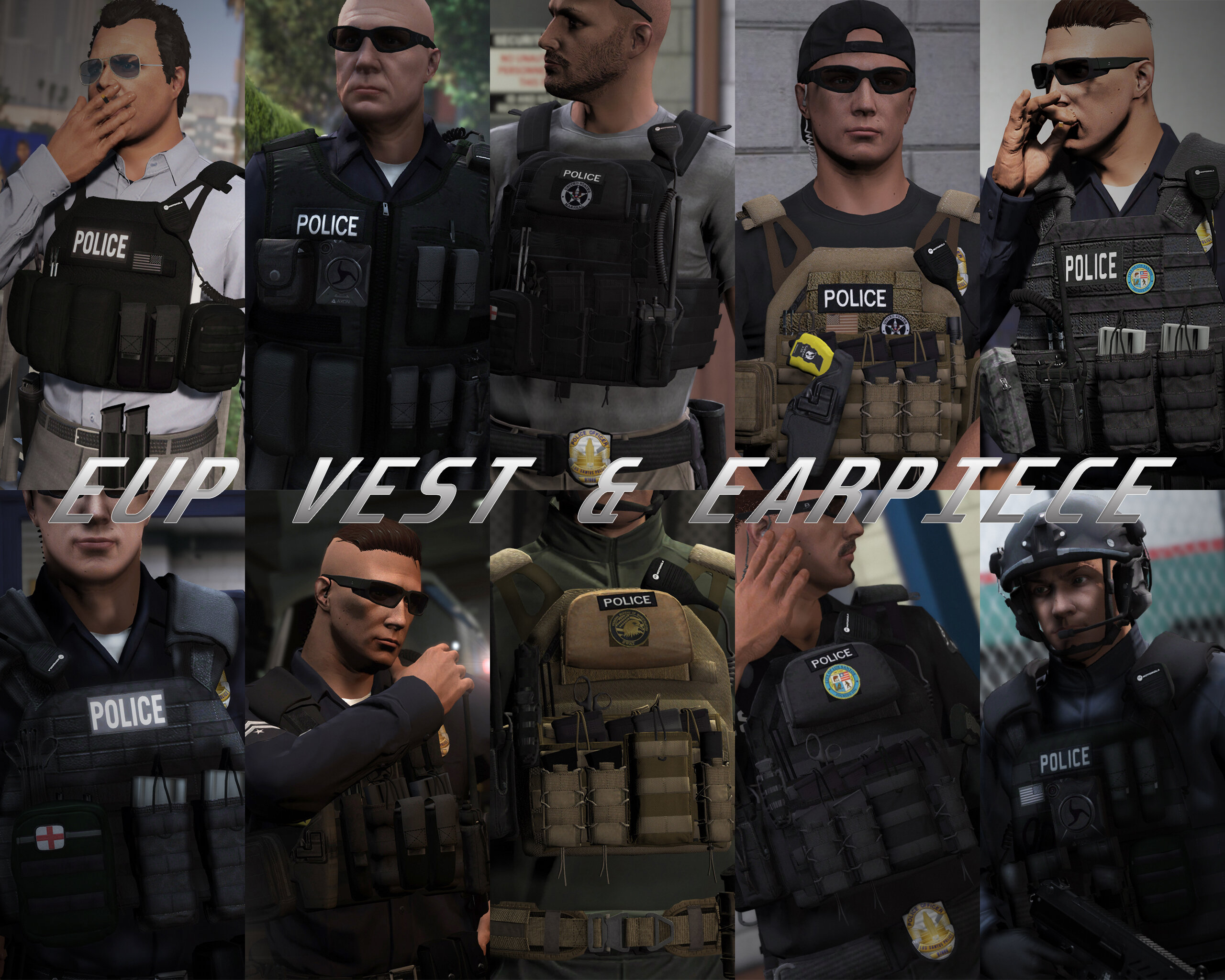
HANAKO got a reaction from Skydrohz for a file, EUP VEST&EARPIECEAwesome showcase video by Alex Preacher
Thanks to all of you, total downloads have now exceeded 60,000!
I hope you continue to enjoy this mod!
Description
This mod adds police vests, belts, and other equipment to GTA V.
Features
The vests fit properly with various outfits! No awkward gaps or improper sizing!
Realistic gear such as earpieces and realistic vests!
List of included vests
Installation
First, install EUP.
To use the new vests, you must install this mod too.
It is strongly recommended to back up the original files before installation!
Open the File folder.
Using OpenIV, navigate to:
Grand Theft Auto V\mods\update\x64\dlcpacks\eup\dlc.rpf\x64\eup_componentpeds.rpf
Open the corresponding folder (e.g., vest, earpiece, etc.), and place the folder (e.g., mp_m_freemode_01_mp_m_vinewood) that contains the files you want to use.
In-game, change the TASK category.
If your character’s vest (or other item) has changed to the one you installed, the installation was successful.
If installed correctly, the added folders should look like this:
Installation Q&A
Version History
DO NOT ASK
Requests for custom textures Requests to unlock the model Requests for DEV models Questions about installing this mod on FiveM Credits
Rockstar Games
Activision / Infinity Ward
Call of Duty: Modern Warfare (2019) Assets
DICE / Electronic Arts
Battlefield 4 Assets
Ubisoft
Ghost Recon: Wildlands Assets
Rainbow Six: Siege Assets
Battlestate Games
Escape From Tarkov Assets
Contributors
Hanako (me)
Xiphos
Hussky9
CG ARTStudio
Oleg
ericapg
Code4Mods
Alex Ashfold
Beta Testers (crunchycat, Howard)
Special Thanks
crunchycat, Theofficialthrowaway, gabe., Alex Preacher
(for taking many screenshots)
Attention
Do not unlock, edit, or sell models.
Do not attempt to profit from any part included in this mod.
Please follow these rules when releasing textures for this mod:
Always credit all names listed in this mod.
Do not include any files other than texture files (PNG, DDS).
Including any other files violates the guidelines and may result in your mod being deleted and disciplinary action taken.
Do not profit from retextures of my publicly released mods.
Do not release textures on any sites other than LSPDFR and GTA5-Mods.
Looking for the same quality PEDs?👉 Check this out!
Highly Recommended
-
HANAKO got a reaction from Fedeik423 for a file, EUP VEST&EARPIECEAwesome showcase video by Alex Preacher
Thanks to all of you, total downloads have now exceeded 60,000!
I hope you continue to enjoy this mod!
Description
This mod adds police vests, belts, and other equipment to GTA V.
Features
The vests fit properly with various outfits! No awkward gaps or improper sizing!
Realistic gear such as earpieces and realistic vests!
List of included vests
Installation
First, install EUP.
To use the new vests, you must install this mod too.
It is strongly recommended to back up the original files before installation!
Open the File folder.
Using OpenIV, navigate to:
Grand Theft Auto V\mods\update\x64\dlcpacks\eup\dlc.rpf\x64\eup_componentpeds.rpf
Open the corresponding folder (e.g., vest, earpiece, etc.), and place the folder (e.g., mp_m_freemode_01_mp_m_vinewood) that contains the files you want to use.
In-game, change the TASK category.
If your character’s vest (or other item) has changed to the one you installed, the installation was successful.
If installed correctly, the added folders should look like this:
Installation Q&A
Version History
DO NOT ASK
Requests for custom textures Requests to unlock the model Requests for DEV models Questions about installing this mod on FiveM Credits
Rockstar Games
Activision / Infinity Ward
Call of Duty: Modern Warfare (2019) Assets
DICE / Electronic Arts
Battlefield 4 Assets
Ubisoft
Ghost Recon: Wildlands Assets
Rainbow Six: Siege Assets
Battlestate Games
Escape From Tarkov Assets
Contributors
Hanako (me)
Xiphos
Hussky9
CG ARTStudio
Oleg
ericapg
Code4Mods
Alex Ashfold
Beta Testers (crunchycat, Howard)
Special Thanks
crunchycat, Theofficialthrowaway, gabe., Alex Preacher
(for taking many screenshots)
Attention
Do not unlock, edit, or sell models.
Do not attempt to profit from any part included in this mod.
Please follow these rules when releasing textures for this mod:
Always credit all names listed in this mod.
Do not include any files other than texture files (PNG, DDS).
Including any other files violates the guidelines and may result in your mod being deleted and disciplinary action taken.
Do not profit from retextures of my publicly released mods.
Do not release textures on any sites other than LSPDFR and GTA5-Mods.
Looking for the same quality PEDs?👉 Check this out!
Highly Recommended
-
HANAKO got a reaction from punisher844 for a file, FEMALE EUP VESTDescription:
This is a mod that adds female EUP Stuff The current version includes four vests and one belt More vests and other stuff will be added in the future
INSTLLATION
First, install the EUP
Please make a backup of eup_componentpeds.rpf before installing this MOD 1.Open the "File" folder. 2.Go to "Grand Theft Auto V\mods\update\x64\dlcpacks\eup\dlc.rpf\x64\eup_componentpeds.rpf" using OpenIV 3.Place the mp_m_freemode_01_mp_m_vinewood folder in eup_componentpeds.rp (add the Vinewood folder as it is not included in the default EUP) 4.Change the "TASK"(Please check the table below for categories.) category in the game. 5.If your character's vest(or other) has been changed to the one you installed, it's a success. Do not ask me!!
Texture request Request to unlock a model Asset Release Request How to install these to FiveM
Credits:
Rockstar Games
Activision/Infinity Ward
-COD:MW2019 Assets
DICE/Electronic Arts
-Battlefield 4 Assets
UBI SOFT
-Ghost Recon Wildlands, Rainbow Sis Siege Assets
Battlestate
-Escape From Tarkov Assets
Hanako
xiphos
Hussky9
CG ARTStudio
Oleg
ericapg
Code4Mods
Alex Ashfold
Beta-testers(crunchycat, Howard)
Screenshots by crunchycat
-
HANAKO got a reaction from Zaylikespatrol for a file, EUP VEST&EARPIECEAwesome showcase video by Alex Preacher
Thanks to all of you, total downloads have now exceeded 60,000!
I hope you continue to enjoy this mod!
Description
This mod adds police vests, belts, and other equipment to GTA V.
Features
The vests fit properly with various outfits! No awkward gaps or improper sizing!
Realistic gear such as earpieces and realistic vests!
List of included vests
Installation
First, install EUP.
To use the new vests, you must install this mod too.
It is strongly recommended to back up the original files before installation!
Open the File folder.
Using OpenIV, navigate to:
Grand Theft Auto V\mods\update\x64\dlcpacks\eup\dlc.rpf\x64\eup_componentpeds.rpf
Open the corresponding folder (e.g., vest, earpiece, etc.), and place the folder (e.g., mp_m_freemode_01_mp_m_vinewood) that contains the files you want to use.
In-game, change the TASK category.
If your character’s vest (or other item) has changed to the one you installed, the installation was successful.
If installed correctly, the added folders should look like this:
Installation Q&A
Version History
DO NOT ASK
Requests for custom textures Requests to unlock the model Requests for DEV models Questions about installing this mod on FiveM Credits
Rockstar Games
Activision / Infinity Ward
Call of Duty: Modern Warfare (2019) Assets
DICE / Electronic Arts
Battlefield 4 Assets
Ubisoft
Ghost Recon: Wildlands Assets
Rainbow Six: Siege Assets
Battlestate Games
Escape From Tarkov Assets
Contributors
Hanako (me)
Xiphos
Hussky9
CG ARTStudio
Oleg
ericapg
Code4Mods
Alex Ashfold
Beta Testers (crunchycat, Howard)
Special Thanks
crunchycat, Theofficialthrowaway, gabe., Alex Preacher
(for taking many screenshots)
Attention
Do not unlock, edit, or sell models.
Do not attempt to profit from any part included in this mod.
Please follow these rules when releasing textures for this mod:
Always credit all names listed in this mod.
Do not include any files other than texture files (PNG, DDS).
Including any other files violates the guidelines and may result in your mod being deleted and disciplinary action taken.
Do not profit from retextures of my publicly released mods.
Do not release textures on any sites other than LSPDFR and GTA5-Mods.
Looking for the same quality PEDs?👉 Check this out!
Highly Recommended
-
HANAKO reacted to Cocaine And Caviar for a file, Gunman brand Police Long Sleeve ShirtsG U N M A N
POLICE long sleeve Dri-Fit shirt
-Moisture wicking technology
-Makes you look hella buff
K-9 unit long sleeve Dri-Fit shirt
-Antibacterial and odor prevention allows you to hug your good boi without worries
-Good boi fur won't stick to the fabric
Gang unit long sleeve Dri-Fit shirt
-Neutral color so gangs don't think you're biased
-Big drip gangs might drown
Narcotics unit long sleeve Dri-Fit shirt
-Smells won't stick if you sample the evidence (to check whether or not it's real product)
-Light color so blow won't be obvious on your shirt
Police Baby Yoda long sleeve Dri-Fit shirt
-Child-friendly
-Under arrest, you are.
Gang unit long sleeve Triple 9 edition
-Someone accidentally bleached your whole team's shirts
-Will probably get you involved with bad cops
File contains installation path and instructions, pictures and the texture file itself. No 3d models.
Credits : NBA Youngboy - Jumpman logo with da gun
Under Armour - The stars
Rockstar Games - 3D model and original texture
Cocaine and Caviar aka ChromieHomie - texture
Texture for CPC
Mechanix gloves in pictures by mk12
Under Armour hat in pictures by dead2self89
PIG FDT Alpha gloves in picture by .Trooper
Crye Cage Plate Carrier in picture by Hanako
-
HANAKO got a reaction from Benjamin Compton for a file, EUP VEST&EARPIECEAwesome showcase video by Alex Preacher
Thanks to all of you, total downloads have now exceeded 60,000!
I hope you continue to enjoy this mod!
Description
This mod adds police vests, belts, and other equipment to GTA V.
Features
The vests fit properly with various outfits! No awkward gaps or improper sizing!
Realistic gear such as earpieces and realistic vests!
List of included vests
Installation
First, install EUP.
To use the new vests, you must install this mod too.
It is strongly recommended to back up the original files before installation!
Open the File folder.
Using OpenIV, navigate to:
Grand Theft Auto V\mods\update\x64\dlcpacks\eup\dlc.rpf\x64\eup_componentpeds.rpf
Open the corresponding folder (e.g., vest, earpiece, etc.), and place the folder (e.g., mp_m_freemode_01_mp_m_vinewood) that contains the files you want to use.
In-game, change the TASK category.
If your character’s vest (or other item) has changed to the one you installed, the installation was successful.
If installed correctly, the added folders should look like this:
Installation Q&A
Version History
DO NOT ASK
Requests for custom textures Requests to unlock the model Requests for DEV models Questions about installing this mod on FiveM Credits
Rockstar Games
Activision / Infinity Ward
Call of Duty: Modern Warfare (2019) Assets
DICE / Electronic Arts
Battlefield 4 Assets
Ubisoft
Ghost Recon: Wildlands Assets
Rainbow Six: Siege Assets
Battlestate Games
Escape From Tarkov Assets
Contributors
Hanako (me)
Xiphos
Hussky9
CG ARTStudio
Oleg
ericapg
Code4Mods
Alex Ashfold
Beta Testers (crunchycat, Howard)
Special Thanks
crunchycat, Theofficialthrowaway, gabe., Alex Preacher
(for taking many screenshots)
Attention
Do not unlock, edit, or sell models.
Do not attempt to profit from any part included in this mod.
Please follow these rules when releasing textures for this mod:
Always credit all names listed in this mod.
Do not include any files other than texture files (PNG, DDS).
Including any other files violates the guidelines and may result in your mod being deleted and disciplinary action taken.
Do not profit from retextures of my publicly released mods.
Do not release textures on any sites other than LSPDFR and GTA5-Mods.
Looking for the same quality PEDs?👉 Check this out!
Highly Recommended
-
-
HANAKO reacted to Foxlabs for a file, [EUP] Daddy I love you vestFeaturing :
5.11 radio pouch Tasmanian Tiger label (inspired by the TT MK) Red line removed from the police back strap Cordura fabric label Daddy i love you draw pinned inside of the vest Gerber knife kydex holster Balistic disclaimer on the back panel PMAG window mags Translucent pistol mags, Glock stamp on it (yeah Glock doesn't make that kind of mag I know) New textures added to pencils Blue live matters patch Nkda o+ patch Blue line USA patch
Requirements :
Tell me in the comment section what do you think about my work please 👋
-
HANAKO reacted to Ellvir for a file, Lapd Eup mini makeMy name is Elvir,im part of new opened United Studios
United Studios : Discord - https://discord.gg/bN5ZggK
What is United Studios?
United studios is a brand new texture studio
Dedicated to helping new devs and providing
them with high quality decals.
What is United Studios goal?
At United Studios we want to see the new devs
flourish and become texture gods.
-What types of work do we do:
EUP Texture Commissions
Premade EUP Packs
EMT/Firefighter Liverys
EMT/Firefighter EUP Textures
Livery Commissions
Weardrobe Settings
[SWAT]
Gender=Male
Hat=118:1
Glasses=3:1
Ear=0:0
Watch=0:0
Mask=1:1
Top=50:1
UpperSkin=97:1
Decal=4:1
UnderCoat=16:1
Pants=32:1
Shoes=26:1
Accessories=7:1
Armor=44:1
Parachute=49:1
[patrol short sleeve]
Gender=Male
Hat=0:0
Glasses=0:0
Ear=0:0
Watch=4:1
Mask=1:1
Top=191:1
UpperSkin=1:1
Decal=1:1
UnderCoat=57:1
Pants=36:1
Shoes=52:1
Accessories=123:1
Armor=14:1
Parachute=73:1
[motor unit LongSleve]
Gender=Male
Hat=18:2
Glasses=0:0
Ear=0:0
Watch=0:0
Mask=1:1
Top=201:1
UpperSkin=21:1
Decal=1:1
UnderCoat=57:1
Pants=33:2
Shoes=14:1
Accessories=9:1
Armor=1:1
Parachute=74:1
[Lapd Jacket]
Gender=Male
Hat=0:0
Glasses=0:0
Ear=0:0
Watch=0:0
Mask=1:1
Top=40:1
UpperSkin=5:1
Decal=1:1
UnderCoat=67:1
Pants=36:1
Shoes=52:1
Accessories=9:1
Armor=3:1
Parachute=49:1
[Lapd Winter]
Gender=Male
Hat=0:0
Glasses=0:0
Ear=0:0
Watch=0:0
Mask=1:1
Top=155:1
UpperSkin=39:1
Decal=1:1
UnderCoat=57:1
Pants=36:1
Shoes=52:1
Accessories=9:1
Armor=29:1
Parachute=1:1
[lapd bicycle unit]
Gender=Male
Hat=50:1
Glasses=0:0
Ear=0:0
Watch=0:0
Mask=1:1
Top=94:1
UpperSkin=20:1
Decal=1:1
UnderCoat=38:1
Pants=13:3
Shoes=3:1
Accessories=9:1
Armor=15:1
Parachute=49:1
[Lapd k9 Short]
Gender=Male
Hat=143:1
Glasses=0:0
Ear=0:0
Watch=0:0
Mask=1:1
Top=103:1
UpperSkin=1:1
Decal=16:1
UnderCoat=38:1
Pants=88:3
Shoes=25:1
Accessories=2:1
Armor=15:1
Parachute=75:1
[Lapd K9 Long Sleeve]
Gender=Male
Hat=143:1
Glasses=0:0
Ear=0:0
Watch=0:0
Mask=1:1
Top=102:1
UpperSkin=2:1
Decal=16:1
UnderCoat=38:1
Pants=88:3
Shoes=25:1
Accessories=2:1
Armor=15:1
Parachute=75:1
[Motor Short Sleeve]
Gender=Male
Hat=18:2
Glasses=0:0
Ear=0:0
Watch=0:0
Mask=1:1
Top=191:1
UpperSkin=20:1
Decal=1:1
UnderCoat=57:1
Pants=33:2
Shoes=14:1
Accessories=9:1
Armor=1:1
Parachute=60:1
[Lapd Gang Unit]
Gender=Male
Hat=3:1
Glasses=4:1
Ear=0:0
Watch=2:1
Mask=122:1
Top=209:3
UpperSkin=31:1
Decal=1:1
UnderCoat=114:1
Pants=1:1
Shoes=52:1
Accessories=2:1
Armor=42:1
Parachute=75:1
What do u you need:
i didnt get to retexture all the vests soo not a full swat/lapd entire
-
HANAKO got a reaction from DanielJrZzSwat for a file, FEMALE EUP VESTDescription:
This is a mod that adds female EUP Stuff The current version includes four vests and one belt More vests and other stuff will be added in the future
INSTLLATION
First, install the EUP
Please make a backup of eup_componentpeds.rpf before installing this MOD 1.Open the "File" folder. 2.Go to "Grand Theft Auto V\mods\update\x64\dlcpacks\eup\dlc.rpf\x64\eup_componentpeds.rpf" using OpenIV 3.Place the mp_m_freemode_01_mp_m_vinewood folder in eup_componentpeds.rp (add the Vinewood folder as it is not included in the default EUP) 4.Change the "TASK"(Please check the table below for categories.) category in the game. 5.If your character's vest(or other) has been changed to the one you installed, it's a success. Do not ask me!!
Texture request Request to unlock a model Asset Release Request How to install these to FiveM
Credits:
Rockstar Games
Activision/Infinity Ward
-COD:MW2019 Assets
DICE/Electronic Arts
-Battlefield 4 Assets
UBI SOFT
-Ghost Recon Wildlands, Rainbow Sis Siege Assets
Battlestate
-Escape From Tarkov Assets
Hanako
xiphos
Hussky9
CG ARTStudio
Oleg
ericapg
Code4Mods
Alex Ashfold
Beta-testers(crunchycat, Howard)
Screenshots by crunchycat
-
HANAKO got a reaction from MiBombo for a file, EUP VEST&EARPIECEAwesome showcase video by Alex Preacher
Thanks to all of you, total downloads have now exceeded 60,000!
I hope you continue to enjoy this mod!
Description
This mod adds police vests, belts, and other equipment to GTA V.
Features
The vests fit properly with various outfits! No awkward gaps or improper sizing!
Realistic gear such as earpieces and realistic vests!
List of included vests
Installation
First, install EUP.
To use the new vests, you must install this mod too.
It is strongly recommended to back up the original files before installation!
Open the File folder.
Using OpenIV, navigate to:
Grand Theft Auto V\mods\update\x64\dlcpacks\eup\dlc.rpf\x64\eup_componentpeds.rpf
Open the corresponding folder (e.g., vest, earpiece, etc.), and place the folder (e.g., mp_m_freemode_01_mp_m_vinewood) that contains the files you want to use.
In-game, change the TASK category.
If your character’s vest (or other item) has changed to the one you installed, the installation was successful.
If installed correctly, the added folders should look like this:
Installation Q&A
Version History
DO NOT ASK
Requests for custom textures Requests to unlock the model Requests for DEV models Questions about installing this mod on FiveM Credits
Rockstar Games
Activision / Infinity Ward
Call of Duty: Modern Warfare (2019) Assets
DICE / Electronic Arts
Battlefield 4 Assets
Ubisoft
Ghost Recon: Wildlands Assets
Rainbow Six: Siege Assets
Battlestate Games
Escape From Tarkov Assets
Contributors
Hanako (me)
Xiphos
Hussky9
CG ARTStudio
Oleg
ericapg
Code4Mods
Alex Ashfold
Beta Testers (crunchycat, Howard)
Special Thanks
crunchycat, Theofficialthrowaway, gabe., Alex Preacher
(for taking many screenshots)
Attention
Do not unlock, edit, or sell models.
Do not attempt to profit from any part included in this mod.
Please follow these rules when releasing textures for this mod:
Always credit all names listed in this mod.
Do not include any files other than texture files (PNG, DDS).
Including any other files violates the guidelines and may result in your mod being deleted and disciplinary action taken.
Do not profit from retextures of my publicly released mods.
Do not release textures on any sites other than LSPDFR and GTA5-Mods.
Looking for the same quality PEDs?👉 Check this out!
Highly Recommended
-
HANAKO reacted to hexdex321 for a file, Enhanced Vehicle Actions 2 (Engine Keybinding and a Bug Fix!)Apologies for the break between the last update, I have been extremely busy with school so I want to thank everyone for their patience!
While I was gone, EVA2 has hit another milestone of 25,000 downloads so I want to thank everyone for their support!
I added a toggle for seatbelt animations and an engine keybinding in this small update.
(7/6/20 Hotfix 2.8.1: Made seatbelt animations toggleable due to continuous issues)
-holexion
DESCRIPTION:
Enhanced Vehicle Actions 2 is aimed to allow you to play more realistically with LSPDFR! With more features always coming on the way, it allows for a more enjoyable LSPDFR experience without being intrusive on your game play due to the focus on the performance-focused nature of this mod. This mod will continue to be regularly updated with new features that are suggested in the comments section down below, so please follow my content if you want to stay up with the latest updates and report any issues that arise!
DEFAULT CONTROLS (Editable with .ini file):
Vehicle Actions Menu: F7
Left Blinker: Press opening bracket ([)
Right Blinker: Press closing bracket (])
Hazard Lights: Press backslash (\)
Engine: Disabled by Default
CONTROLLER CONTROLS (Editable with .ini file):
Vehicle Actions Menu: Press down on right thumb-stick
Left Blinker: Press left shoulder
Right Blinker: Press right shoulder
Hazard Lights: Press both left blinker and right blinker keybindings simultaneously
ADDITIONAL FEATURES (Toggle On/Off in .ini file):
Auto Turn Signal: Automatically shuts off blinker once a turn is made*
Tire Retainment: Keeps tires aligned to left or right when vehicle is stopped
Brake Lights: Brake lights activate when your vehicle is stopped
Full Controller Support: Key bindings are editable in ini file, automatically detects and uses controller keybindings if controller is present*
Toggleable Speedometer: Activate a speedometer that can be turned off/on
Toggleable Seatbelt: Wear a seatbelt to prevent flying out of the windshield
Toggleable Seatbelt Animation: Animated seatbelts (Default off)
Toggleable Radio Station: Set a default radio station that will be used for all vehicles entered
Toggleable Vehicle Lock: Lock and unlock your vehicle to prevent it from being stolen
Toggleable Engine: Set your engine to be on auto, always on, or always off
Toggleable Vehicle Windows: Lower and raise your windows for more realism*
Door System: Long press to shut the door, short press to leave the door open when exiting a vehicle
Felony Stop Animations (Police vehicles only): Press exit vehicle keys (Long press for primary weapon/Long press for secondary) while simultaneously aiming (Right mouse/Left trigger)
*Features marked with asterisk are not toggleable in .ini file
FAQ:
VERSION HISTORY:
REQUIREMENTS:
This mod requires RageNativeUI (located in the install folder) and Rage Plugin Hook to function.
INSTALLATION:
After downloading and installing Rage Plugin Hook and RageNativeUI.dll into your GTA V folder, add EnhancedVehicleActions.dll and EnhancedVehicleActions.ini to your Plugins folder in your GTA V folder. Open up the game and either select Enhanced Vehicle Actions to be launched when game starts through Rage Plugin Hook's launch interface or press F4 and type "LoadPluginEnhancedVehicleActions.dll" and press enter. For general game or plugin support visit the unofficial LSPDFR support server here: https://discord.gg/xsdAXJb
UNINSTALLATION:
Remove EnhancedVehicleActions2.dll and EnhancedVehicleActions2.ini from your Plugins folder in main GTA V root folder. Then remove RageNativeUI.dll in main GTA V root folder.
Thanks for the support! More features are on the way, so be sure to check in, and please leave a review if you enjoyed the mod!
If you enjoyed this script, please leave a positive review! If you are feeling generous, you can also donate through my Paypal link located underneath the download buttons! But leaving suggestions and bug reports helps a lot too!
Thanks to @HANAKO for the help!
-
HANAKO reacted to mbk2008 for a file, British Style VestsBritish style vests ...
I made these to go with other edits I made for my british style game.
These are fictional and not related to any UK police force.
Install instructions in the read me.
Thanks for looking.
Also thanks to
Hanako for the great vests
Other great mods I use for my british game ...
-
HANAKO reacted to RamanAbdullen for a file, LSPD SWAT Replacement Vest for HANAKO's EUP VEST & EARPIECEThis is my first upload, i couldnt find any LSPD SWAT vest compatible with HANAKO's EUP VEST & EARPIECE mod, so i made one myself and with his permission decided to upload it.
-
HANAKO got a reaction from TheRealRGTV for a file, EUP VEST&EARPIECEAwesome showcase video by Alex Preacher
Thanks to all of you, total downloads have now exceeded 60,000!
I hope you continue to enjoy this mod!
Description
This mod adds police vests, belts, and other equipment to GTA V.
Features
The vests fit properly with various outfits! No awkward gaps or improper sizing!
Realistic gear such as earpieces and realistic vests!
List of included vests
Installation
First, install EUP.
To use the new vests, you must install this mod too.
It is strongly recommended to back up the original files before installation!
Open the File folder.
Using OpenIV, navigate to:
Grand Theft Auto V\mods\update\x64\dlcpacks\eup\dlc.rpf\x64\eup_componentpeds.rpf
Open the corresponding folder (e.g., vest, earpiece, etc.), and place the folder (e.g., mp_m_freemode_01_mp_m_vinewood) that contains the files you want to use.
In-game, change the TASK category.
If your character’s vest (or other item) has changed to the one you installed, the installation was successful.
If installed correctly, the added folders should look like this:
Installation Q&A
Version History
DO NOT ASK
Requests for custom textures Requests to unlock the model Requests for DEV models Questions about installing this mod on FiveM Credits
Rockstar Games
Activision / Infinity Ward
Call of Duty: Modern Warfare (2019) Assets
DICE / Electronic Arts
Battlefield 4 Assets
Ubisoft
Ghost Recon: Wildlands Assets
Rainbow Six: Siege Assets
Battlestate Games
Escape From Tarkov Assets
Contributors
Hanako (me)
Xiphos
Hussky9
CG ARTStudio
Oleg
ericapg
Code4Mods
Alex Ashfold
Beta Testers (crunchycat, Howard)
Special Thanks
crunchycat, Theofficialthrowaway, gabe., Alex Preacher
(for taking many screenshots)
Attention
Do not unlock, edit, or sell models.
Do not attempt to profit from any part included in this mod.
Please follow these rules when releasing textures for this mod:
Always credit all names listed in this mod.
Do not include any files other than texture files (PNG, DDS).
Including any other files violates the guidelines and may result in your mod being deleted and disciplinary action taken.
Do not profit from retextures of my publicly released mods.
Do not release textures on any sites other than LSPDFR and GTA5-Mods.
Looking for the same quality PEDs?👉 Check this out!
Highly Recommended
-
HANAKO reacted to Patricktan112 for a file, Cyre-Cage-Plate-CarrierDo not reupload this without permission or claim it to be your
EUP Vest. This vest is uploaded Lock. If you wish to edit the texture on it go ahead, all the texture on the belt can be change and edit.
installation path:
READ the "READ ME" in the .rar files
Feature:
2 Variants in 3 different colours
- Sheriff/LEO Vest
- Fire-EMS Vest
IF THERE IS ANY BUG PLEASE MESSAGE ME STRAIGHT AWAY.
I would recommend that you all go check out HANAKO EUP vest pack:
-
HANAKO got a reaction from DanielJrZzSwat for a file, EUP VEST&EARPIECEAwesome showcase video by Alex Preacher
Thanks to all of you, total downloads have now exceeded 60,000!
I hope you continue to enjoy this mod!
Description
This mod adds police vests, belts, and other equipment to GTA V.
Features
The vests fit properly with various outfits! No awkward gaps or improper sizing!
Realistic gear such as earpieces and realistic vests!
List of included vests
Installation
First, install EUP.
To use the new vests, you must install this mod too.
It is strongly recommended to back up the original files before installation!
Open the File folder.
Using OpenIV, navigate to:
Grand Theft Auto V\mods\update\x64\dlcpacks\eup\dlc.rpf\x64\eup_componentpeds.rpf
Open the corresponding folder (e.g., vest, earpiece, etc.), and place the folder (e.g., mp_m_freemode_01_mp_m_vinewood) that contains the files you want to use.
In-game, change the TASK category.
If your character’s vest (or other item) has changed to the one you installed, the installation was successful.
If installed correctly, the added folders should look like this:
Installation Q&A
Version History
DO NOT ASK
Requests for custom textures Requests to unlock the model Requests for DEV models Questions about installing this mod on FiveM Credits
Rockstar Games
Activision / Infinity Ward
Call of Duty: Modern Warfare (2019) Assets
DICE / Electronic Arts
Battlefield 4 Assets
Ubisoft
Ghost Recon: Wildlands Assets
Rainbow Six: Siege Assets
Battlestate Games
Escape From Tarkov Assets
Contributors
Hanako (me)
Xiphos
Hussky9
CG ARTStudio
Oleg
ericapg
Code4Mods
Alex Ashfold
Beta Testers (crunchycat, Howard)
Special Thanks
crunchycat, Theofficialthrowaway, gabe., Alex Preacher
(for taking many screenshots)
Attention
Do not unlock, edit, or sell models.
Do not attempt to profit from any part included in this mod.
Please follow these rules when releasing textures for this mod:
Always credit all names listed in this mod.
Do not include any files other than texture files (PNG, DDS).
Including any other files violates the guidelines and may result in your mod being deleted and disciplinary action taken.
Do not profit from retextures of my publicly released mods.
Do not release textures on any sites other than LSPDFR and GTA5-Mods.
Looking for the same quality PEDs?👉 Check this out!
Highly Recommended
-
HANAKO got a reaction from nel4127 for a file, EUP VEST&EARPIECEAwesome showcase video by Alex Preacher
Thanks to all of you, total downloads have now exceeded 60,000!
I hope you continue to enjoy this mod!
Description
This mod adds police vests, belts, and other equipment to GTA V.
Features
The vests fit properly with various outfits! No awkward gaps or improper sizing!
Realistic gear such as earpieces and realistic vests!
List of included vests
Installation
First, install EUP.
To use the new vests, you must install this mod too.
It is strongly recommended to back up the original files before installation!
Open the File folder.
Using OpenIV, navigate to:
Grand Theft Auto V\mods\update\x64\dlcpacks\eup\dlc.rpf\x64\eup_componentpeds.rpf
Open the corresponding folder (e.g., vest, earpiece, etc.), and place the folder (e.g., mp_m_freemode_01_mp_m_vinewood) that contains the files you want to use.
In-game, change the TASK category.
If your character’s vest (or other item) has changed to the one you installed, the installation was successful.
If installed correctly, the added folders should look like this:
Installation Q&A
Version History
DO NOT ASK
Requests for custom textures Requests to unlock the model Requests for DEV models Questions about installing this mod on FiveM Credits
Rockstar Games
Activision / Infinity Ward
Call of Duty: Modern Warfare (2019) Assets
DICE / Electronic Arts
Battlefield 4 Assets
Ubisoft
Ghost Recon: Wildlands Assets
Rainbow Six: Siege Assets
Battlestate Games
Escape From Tarkov Assets
Contributors
Hanako (me)
Xiphos
Hussky9
CG ARTStudio
Oleg
ericapg
Code4Mods
Alex Ashfold
Beta Testers (crunchycat, Howard)
Special Thanks
crunchycat, Theofficialthrowaway, gabe., Alex Preacher
(for taking many screenshots)
Attention
Do not unlock, edit, or sell models.
Do not attempt to profit from any part included in this mod.
Please follow these rules when releasing textures for this mod:
Always credit all names listed in this mod.
Do not include any files other than texture files (PNG, DDS).
Including any other files violates the guidelines and may result in your mod being deleted and disciplinary action taken.
Do not profit from retextures of my publicly released mods.
Do not release textures on any sites other than LSPDFR and GTA5-Mods.
Looking for the same quality PEDs?👉 Check this out!
Highly Recommended