Skip to content
View in the app

A better way to browse. Learn more.

LCPDFR.com

A full-screen app on your home screen with push notifications, badges and more.

To install this app on iOS and iPadOS
  1. Tap the Share icon in Safari
  2. Scroll the menu and tap Add to Home Screen.
  3. Tap Add in the top-right corner.
To install this app on Android
  1. Tap the 3-dot menu (⋮) in the top-right corner of the browser.
  2. Tap Add to Home screen or Install app.
  3. Confirm by tapping Install.

Dude2233

Members
  • Joined

  • Last visited

Everything posted by Dude2233

  1. ​Yeah, I've got it now. I didn't try the manual install because I assumed the same thing would happen. Thanks.
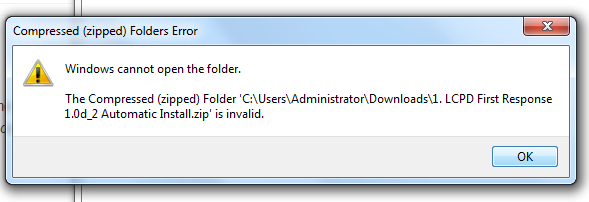
  2. This is my first time downloading this mod so my apologies if this is a question asked a lot. I've tried to look this up but I've found nothing closely related to my problem. I've tried downloading LCPDFR v1.1 several times now but when it gets done loading and I get ready to get into the file something pops up saying that the file is "invalid", as in pic related. Any help that could be given to this little ol' noob would be much appreciated.
Account

Navigation

Search

Search

Configure browser push notifications

Chrome (Android)
  1. Tap the lock icon next to the address bar.
  2. Tap Permissions → Notifications.
  3. Adjust your preference.
Chrome (Desktop)
  1. Click the padlock icon in the address bar.
  2. Select Site settings.
  3. Find Notifications and adjust your preference.