
LightsOut0netime
Members
-
Joined
-
Last visited
Files posted by LightsOut0netime
-
Hello,
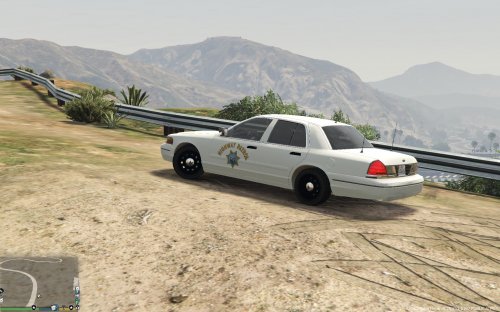
This is San Andreas Highway Patrol Specially Marked Patrol Vehicle model or (Commercial Enforcement Vehicle). I've always wanted to call State Patrol for backup and actually have State Patrol marked vehicles show up.
This file replaces your "police4" slot.
This is only temporary, until someone else more experienced releases a better product.
I hope you will enjoy it as I have!
***NOTES***
When choosing an unmarked police vehicle, NOW you will only have this vehicle available "White SAHP".
This vehicle only comes with markings on the door panel.
SMPV's don't usually have numbering on the roof or "Highway Patrol" written on the back. I'm NOT saying that they don't exist.
All i have done was edit textures and put everything together in one file for you.
ALL CREDIT goes to the following people BELOW:
Model: Driver San Francisco/NFSMW (gamemodels.ru).
- Converted to Grand Theft Auto: V by YCA-RE.
- Template by YCA-RE.
- Model edits by Emergency112.
- White Texture Edits JUMBOxSIZE http://www.lcpdfr.com/files/file/8573-1999-ford-crown-victoria-slicktop-unmarked-unitcruiser-now-includes-white-cruiser/
- Original SAHP Door Panel Texture by MephistoPheles http://www.lcpdfr.com/files/file/8827-2011-ford-crown-victoria-police-interceptor-san-andreas-highway-patrol/
- Texture edit to fit this model by LightsOut0netime
- 934 Downloads
- 9 Comments
Updated