


JoseR
Members
-
Joined
-
Last visited
Everything posted by JoseR
-
Is it because I am using the Driver San Francisco Crown Victoria?
-
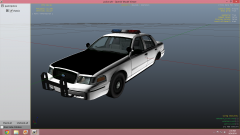 I'm still in the beginning stages of this model, but would anyone want this to be released?
 -
From the album: AST's Album
-
From my perspective I believe the dash light may be broken, at least for me. The red light (right side) works perfectly fine, but the blue light (left side) seems to be broken. Half of the blue light works while the other half of the blue light doesn't flash at all?
-
After I install the light I have a problem. When I turn them on, only the left side of the blue light flashes, while the whole red light flashes?
-
Thank you everybody for your help. I appreciate it.
-
I appreciate it. Thank you. Another quick question. When I try to put the lights within the vehicle they disappear into the vehicle? Edit: Never mind I figured it out.
-
Here's a third question. (Sorry for three questions in a short period of time, but I'm still learning the ropes so I don't know too many things) In the two pictures, does anyone know of the dash light that fits around the brake light that are in the pictures?
-
All right, thanks anyways.
-
Another quick question. When a model says Mod Status: OPEN, does that mean you are allowed to make modifications to that model (adding lightbar(s), rambars(s), etc) and then release that model with your modifications and proper crediting? Or does it simply mean it's unlocked for personal use, and personal use only? Or neither?
-
Alright, thank you.
-
Then I should lock everything to be on the safe side?
-
If this is in the wrong section I apologize. Quick question. If I were to release someone else's model that I added lightbar(s), rambar(s), etc, that I put proper credits in with intent to release, would I leave the model unlocked or should I lock it?
-
I'm almost positive I put this in the right section, but if not I'm sorry. Here's my question: With the Lenco Bearcat model it has railings on the back and the side (for officers to mount on the railing in real life), but I was wondering how you would remove the railings?
-
Go into your main directory and click on the ELS folder then click on SLOTCONTROL. See if the model that you replaced it with has ELS enabled for that model. (Ex: If you replaced "pstockade" with an ELS vehicle check to see if ELS is enabled in SLOTCONTROL with the "pstockade") Also make sure you're pressing "J" two to three times to get the lights to actually flash. But you said the siren worked so you would of had to press "J" three times, so I'm guessing that ELS is disabled for that vehicle in SLOTCONTROL?
-
Alright, thanks anyways. I'll try it, but AI's officers will always be AI officers. I'll go ahead and mark this as resolved.
-
Wouldn't that allow lethal force and not disable it?
-
Here's the problem. The AI officers will be chasing someone down (who has not endangered the officers), and they will simply use lethal force to take them down. But then this creates a problem for me. The civillians all get out of their cars and run away, and I move the vehicles off the roadway and then my game crashes with the SMPA60 error. If it happened once it wouldn't be a problem, but this happens everytime. I don't want to leave the cars in the roadway, but I don't know if there is any way you can fix it? I understand that the AI officers are just not smart in general, but it would be nice if they could just tone the lethal force down a bit. If anyone knows how to fix this it would be a great help, but I'm not sure if it's possible.
-
I've seen ELS versions of this model, but I was wondering if some has or could create this model? If anyone could help me with this that would be great.

