footballmatt
Members
-
Joined
-
Last visited
Files posted by footballmatt
-
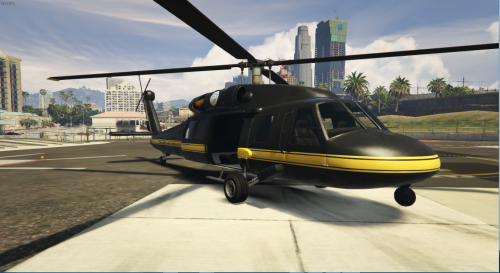
Removes wings and guns from annihilator, making a more Blackhawk style
Feel free to retexture this without my permission, but please give credit :)
Blacked out version:
- 347 Downloads
- 6 Comments
Updated -
***Please note that this is only supporting Police Vehicles at the moment.***
***A secondary file+tutorial will be uploaded soon to support all non-police vehicles***
What is this?
Simple! This is a few .meta files that will add custom cars to the game without having to replace vanilla vehicles
Tutorial on how to add the vehicles
https://www.youtube.com/watch?v=-ziLnWfrbAU&feature=youtu.be
Link to Century's Model
http://www.lcpdfr.com/files/file/8243-gta-v-sahp-buffalo-s/
The picture in the thumbnail is his Model ;)
This is intended for use of police cars, instead of replacing the car this will add the car to the game.
I added the new SAHP Buffalo S by Century, but this can be done with ANY police vehicle made in the future.
- 2,668 Downloads
- 16 Comments
Updated -
FBI Tailgater BETA 1.0
What is this?
Simple! This replaces the fbi buffalo with a tailgater with working police lights!!
Video Showcase
https://www.youtube.com/watch?v=JV-_Lat6UeU&feature=youtu.be
Please keep in mind that this is my first time editing a vehicle model, this needs a lot of work!!!
Current Bugs:
- No inside Textures
- No Light placeholders (lights just float in the car)
- Missing Headlight/Brakelight Textures
- 380 Downloads
- 2 Comments
Updated